
1. Introduction
This instruction manual provides essential information for the safe and effective use, maintenance, and troubleshooting of your MOSER 1884-0053 Li+Pro DIAMOND BLADE Professional Cord/Cordless Hair Clipper. Please read this manual thoroughly before initial use and keep it for future reference.
2. Safety Information
WARNING: Electrical Power Acceptable from 110V to 240V. The unit is supplied with an Asian Plug and an additional EU to US Plug converter.
- Always ensure the appliance is switched off before cleaning or maintenance.
- Do not immerse the appliance in water or other liquids.
- Keep the appliance away from children.
- Do not use the appliance if the blades are damaged or broken, as this may cause injury.
- Use only the original charging adapter provided with the device.
- Avoid using the appliance in damp or wet environments.
3. Package Contents
Your MOSER 1884-0053 Li+Pro Hair Clipper package includes the following items:
- MOSER 1884-0053 Li-Pro Professional Cordless Hair Clipper with Diamond Blade
- 6 slide-on attachment combs (3, 6, 9, 12, 18, 25 mm)
- Charging stand
- Energy-efficient plug-in transformer
- EU to US plug converter
- Cleaning brush
- Clipper oil
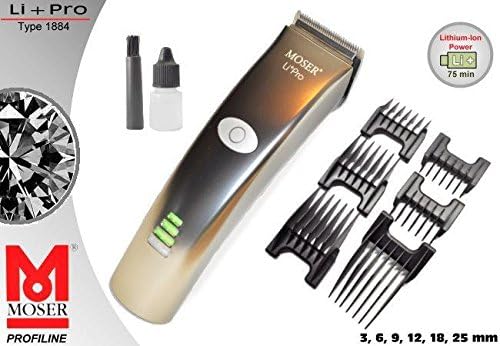
Figure 1: Overview of the MOSER Li+Pro Hair Clipper and its accessories.
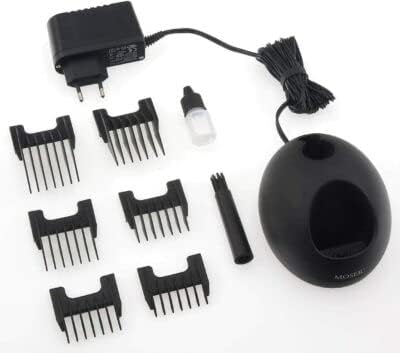
Figure 2: Detailed view of the complete package contents.
4. Product Overview
The MOSER 1884-0053 Li+Pro is a professional cord/cordless hair clipper designed for precision and durability. It features an innovative Diamond Blade with carbon coating for increased service life and wear resistance.
Key Features:
- Diamond Blade: Innovative carbon coating with diamond-like properties for increased service life, high level of hardness, and wear-resistant surface.
- Cord/Cordless Operation: Offers flexibility for use with or without the power cord.
- Quick Charge: 45 minutes super quick charge for efficient use.
- Li-Ion Batteries: Highly efficient and durable Li-Ion batteries without memory effect, providing up to 75 minutes of operating time.
- Intelligent Display: Multi-level battery capacity display and indicator light for blade oiling.
- Constant Speed: Chip-controlled motor ensures constant cutting power regardless of battery charge or hair type.
- Ergonomic Design: Super light (265g) and quiet with a one-piece tube housing for extended comfort.
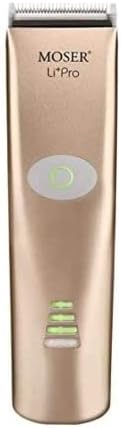
Figure 3: Front view of the MOSER Li+Pro Hair Clipper.

Figure 4: The innovative Diamond Blade for superior cutting performance.
5. Setup
5.1 Initial Charging
- Connect the plug-in transformer to the charging stand.
- Place the clipper onto the charging stand.
- Plug the transformer into a suitable electrical outlet (110-240V). Use the provided EU to US plug converter if necessary.
- The multi-level battery capacity display will indicate charging progress. A full charge takes approximately 45 minutes.
5.2 Attaching Combs
- Ensure the clipper is switched off.
- Select the desired slide-on attachment comb (3, 6, 9, 12, 18, or 25 mm).
- Align the comb with the clipper blade and slide it firmly into place until it clicks.
- To remove, gently push the comb upwards and off the blade.
5.3 Blade Oiling
Before first use, and before every subsequent use, apply a few drops of the provided clipper oil to the blades. This ensures smooth operation and prolongs blade life. The intelligent display includes an indicator light for blade oiling.
6. Operating Instructions
6.1 Powering On/Off
Press the push button with integrated charge control to turn the clipper on or off. The multi-level battery capacity display will activate upon powering on.
6.2 Adjusting Cutting Length
- The clipper features an integrated cutting length adjustment from 0.7 mm to 3 mm. Use the lever on the side of the clipper to adjust this setting.
- For longer cutting lengths, attach one of the 6 slide-on combs as described in Section 5.2.
6.3 Using Turbo Mode
The clipper is equipped with a turbo mode for increased power, useful for thicker hair or faster cutting. Refer to the product's display for the turbo mode indicator.
6.4 Hair Cutting Tips
- Always start with clean, dry hair.
- For an even cut, move the clipper against the direction of hair growth.
- Use the smaller trimmer for detailing, edging, and precise lines around the ears and neckline.
- For fading, gradually change the comb size or the integrated cutting length setting.
7. Maintenance
7.1 Cleaning the Blades
- After each use, switch off the clipper and remove any attached comb.
- Use the provided cleaning brush to remove loose hairs from the blades and the clipper body.
- For thorough cleaning, the quick-detach stainless steel blade set can be removed. Refer to the product's specific instructions for blade removal and reattachment.
7.2 Oiling the Blades
Regular oiling is crucial for maintaining the performance and longevity of your clipper. Apply 2-3 drops of the special clipper oil to the blades before every use. This lubricates the blades, reduces friction, and prevents overheating.
7.3 Storage
Store the clipper and its accessories in a dry, safe place. The charging stand provides a convenient storage solution for the clipper itself, keeping it ready for the next use.
8. Troubleshooting
- Clipper not turning on: Ensure the battery is charged. Connect to the charger and allow for a quick charge (45 minutes).
- Blades pulling hair or cutting poorly: The blades may need oiling. Apply clipper oil as per maintenance instructions. If the issue persists, the blades might be dull or damaged and require replacement.
- Reduced battery life: Ensure the clipper is fully charged before use. Li-Ion batteries are designed for durability without memory effect, but extreme temperatures can affect performance.
- Unusual noise or vibration: Switch off the clipper immediately. Check for any hair or debris caught in the blades. Clean and oil the blades. If the problem continues, contact customer support.
9. Specifications
| Feature | Detail |
|---|---|
| Type | Professional Cord/Cordless Hair Clipper |
| Blade Set | Diamond Blade (Less maintenance required and 40 times more durable compared to standard blade sets) |
| Quick-Change Blade Set | Yes |
| Top Blade Width | 46 mm |
| Cutting Length (Integrated) | 0.7 - 3 mm |
| Type of Operation | Corded/Rechargeable |
| Drive | DC motor with sound proofing, approx. 5200 rpm |
| Operating Voltage | 100-240 V, 50-60 Hz via plug-in transformer |
| Operation Time (Battery) | 75 min. |
| Charging Time | 45 min. quick charge |
| Optical Information System | Multi-level battery capacity display and indicator light for blade oiling |
| Dimensions | 180 x 47 x 42 mm |
| Weight | 265 g |
| Item Model Number | 1884-0053 |
10. Warranty and Support
For warranty information and customer support, please refer to the official documentation included with your product or visit the manufacturer's website. The manufacturer of this product is Moser.


