Download PDFFree PDF. The Save button below keeps a bookmark and private notes in your account.
Pyramid PB2518 3000 Watt MOSFET 2-Channel Car Audio Power Amplifier User Manual
Model: PB2518
1. Introduction and Overview
This manual provides detailed instructions for the installation, operation, and maintenance of your Pyramid PB2518 3000 Watt MOSFET 2-Channel Car Audio Power Amplifier and the accompanying Q Power 4 Gauge 2000 Watt Car Amplifier Complete Installation Kit. Please read this manual thoroughly before attempting installation or operation to ensure proper function and safety.
The Pyramid PB2518 amplifier is designed to deliver powerful and clear audio performance in your vehicle. It features a maximum power handling of 1500 watts at 2 channels or a bridged 3000 watts into 1 channel. Key features include fully adjustable electronic crossovers, a variable gain control, a heavy-duty aluminum alloy heat sink for efficient cooling, and a high-level molex input for versatile connectivity.
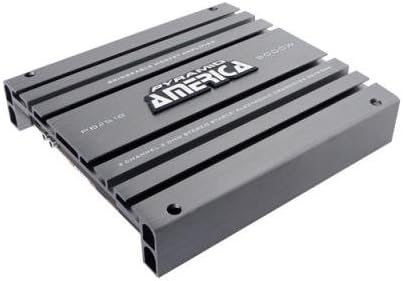
Figure 1: Pyramid PB2518 2-Channel Car Audio Power Amplifier. An overhead view of the Pyramid PB2518 2-channel car audio power amplifier, showcasing its gray metallic heat sink design and the 'Pyramid America' logo.
2. Package Contents
Upon opening the package, please verify that all components listed below are present and undamaged:
1 x Pyramid PB2518 3000 Watt MOSFET 2-Channel Car Audio Power Amplifier
1 x Q Power 4 Gauge 2000 Watt Car Amplifier Complete Wiring Installation Kit, including:
17 ft Red Power Wire
3 ft Black Ground Wire
17 ft 18 Gauge Blue Turn-On Wire
25 ft 16 Gauge Speaker Wire
17 ft RCA Cable
1 x AGU Fuse Holder with a 60 Amp Fuse
Terminals
Wire Ties
Grommets
3. Setup and Installation
Proper installation is crucial for optimal performance and safety. It is recommended that installation be performed by a qualified professional. Disconnect the vehicle's battery before beginning any wiring.
3.1. Mounting the Amplifier
Choose a secure, well-ventilated location for the amplifier, away from direct sunlight, heat sources, and moisture. Ensure adequate airflow around the heat sink. Mount the amplifier firmly to a solid surface using appropriate hardware.
3.2. Wiring Connections
Power Connection: Connect the 17 ft red power wire from the amplifier's +12V terminal to the positive terminal of the vehicle's battery. Install the AGU fuse holder with the 60 amp fuse as close to the battery as possible (within 18 inches) to protect the system.
Ground Connection: Connect the 3 ft black ground wire from the amplifier's GND terminal to a clean, unpainted metal surface on the vehicle's chassis. Ensure a solid, low-resistance connection.
Remote Turn-On Connection: Connect the 17 ft 18 gauge blue turn-on wire from the amplifier's REM terminal to the remote turn-on output of your head unit. This wire signals the amplifier to turn on when the head unit is active.
RCA Input Connection: Connect the 17 ft RCA cable from the RCA outputs of your head unit to the RCA inputs on the amplifier.
Speaker Output Connection: Connect your speakers to the amplifier's speaker output terminals using the 25 ft 16 gauge speaker wire. Ensure correct polarity (+ to + and - to -) for each speaker. The PB2518 supports 2-channel stereo operation or can be bridged for 1-channel mono operation. Refer to the amplifier's terminal markings for specific bridging instructions.
Important: Always double-check all connections before reconnecting the vehicle's battery. Incorrect wiring can cause damage to the amplifier, speakers, or vehicle's electrical system.
4. Operating Instructions
Once the amplifier is correctly installed and wired, you can proceed with initial setup and operation.
4.1. Initial Power-Up
Reconnect the vehicle's battery. Turn on your head unit. The amplifier should power on, indicated by an illuminated power LED (if present).
4.2. Adjusting Controls
Variable Gain Control: This control matches the amplifier's input sensitivity to the output level of your head unit. Start with the gain control at its minimum setting. Play music at a moderate volume on your head unit, then slowly increase the amplifier's gain until you hear distortion, then back off slightly. Avoid setting the gain too high, as this can cause clipping and damage to speakers.
Adjustable Electronic Crossovers: The PB2518 features fully adjustable electronic crossovers (Low Pass Filter - LPF, High Pass Filter - HPF).
LPF (Low Pass Filter): If driving subwoofers, set the LPF to allow only low frequencies to pass through (e.g., 80Hz-120Hz).
HPF (High Pass Filter): If driving full-range speakers or components, set the HPF to block low frequencies that your speakers cannot reproduce effectively (e.g., 60Hz-80Hz).
Adjust these settings to optimize sound quality and protect your speakers.
High-Level Molex Input: If your head unit does not have RCA outputs, you can use the high-level molex input. Connect the speaker outputs from your head unit directly to this input. This feature allows integration with factory head units.
5. Maintenance
Regular maintenance helps ensure the longevity and performance of your amplifier.
Cleaning: Periodically clean the amplifier's exterior with a soft, dry cloth. Do not use harsh chemicals or abrasive cleaners. Ensure the heat sink fins are free of dust and debris to maintain proper cooling.
Connection Checks: Annually, or if you experience audio issues, check all power, ground, remote, RCA, and speaker connections. Ensure they are secure and free from corrosion. Loose connections can lead to poor performance or damage.
Ventilation: Ensure that the amplifier's mounting location remains well-ventilated and free from obstructions. Overheating can cause the amplifier to shut down or sustain damage.
6. Troubleshooting
If you encounter issues with your amplifier, refer to the following common problems and solutions:
Problem
Possible Cause
Solution
Amplifier does not turn on (no power LED)
Blown fuse
Loose power or ground connection
No remote turn-on signal
Check and replace the 60 amp fuse in the AGU fuse holder.
Verify all power and ground connections are secure.
Ensure the remote turn-on wire is connected and receiving 12V from the head unit.
No sound output
RCA cables disconnected or faulty
Speaker wires disconnected or shorted
Gain control set too low
Head unit volume too low or muted
Check RCA cable connections at both the amplifier and head unit.
Inspect speaker wire connections and ensure no bare wires are touching.
Adjust the gain control (refer to Section 4.2).
Increase head unit volume and check mute settings.
Distorted sound
Gain control set too high (clipping)
Improper crossover settings
Speaker impedance mismatch
Reduce the gain control setting.
Adjust LPF/HPF settings (refer to Section 4.2).
Ensure speakers are compatible with the amplifier's impedance ratings.
Amplifier overheats and shuts down
Insufficient ventilation
Speaker impedance too low
Sustained high volume operation
Ensure proper airflow around the amplifier.
Verify speaker impedance is within the amplifier's specifications.
Reduce volume or allow amplifier to cool down.
If the problem persists after attempting these solutions, please contact customer support.
7. Specifications
The following are the technical specifications for the Pyramid PB2518 Amplifier:
Model Number: PB2518
Brand: Pyramid
Number of Channels: 2
Maximum Power Handling: 1500 Watts (2-channel), 3000 Watts (1-channel bridged)
Dimensions (W x H x L): 10.24'' x 2.26'' x 11.02''
Mounting Type: Surface Mount
UPC: 193802147841
8. Warranty Information
The Pyramid PB2518 Amplifier and the Q Power wiring kit both include a 1-year manufacturer warranty from the date of purchase. This warranty covers defects in materials and workmanship under normal use. It does not cover damage resulting from improper installation, accident, misuse, abuse, neglect, unauthorized modification, or normal wear and tear. Please retain your proof of purchase for warranty claims.
9. Customer Support
For technical assistance, warranty claims, or any questions regarding your Pyramid PB2518 amplifier, please contact Pyramid customer support. You can find more information and contact details by visiting the official Pyramid brand store:
Ask about setup, troubleshooting, compatibility, parts, safety, or missing instructions. Manuals+ will review the question and use this page’s manual context to help answer it.