Introduction
This manual provides comprehensive instructions for the installation, operation, and maintenance of the Hunter 99179 Original Ceiling Fan Remote Control and Canopy Kit. This kit is specifically designed to enhance the functionality of Hunter "Original" series ceiling fans by adding remote control capabilities for fan speeds and lighting.
The kit includes a remote control unit and a canopy designed to house the receiver. It integrates with your existing two-wire fan setup, offering convenient control over three fan speeds and the fan's light fixture.
Important Safety Information
- Electrical Safety: Always disconnect power at the circuit breaker or fuse box before attempting any installation, maintenance, or repair. Failure to do so can result in serious injury or death.
- Compatibility: This kit is designed for use ONLY with Hunter "Original" series ceiling fans. It is not compatible with other fan models or brands.
- Downrod Requirement: Installation requires a downrod of 12 inches or longer (sold separately). The receiver unit is designed to fit within the canopy, which necessitates sufficient space provided by a longer downrod.
- Professional Installation: If you are unfamiliar with electrical wiring or ceiling fan installation, it is recommended to consult a qualified electrician.
- Local Codes: Ensure all installation procedures comply with local electrical codes and ordinances.
- Product Integrity: Do not modify the product or use it for purposes other than its intended use.
Package Contents
Verify that all components are present before beginning installation:
- Remote Control Unit
- Remote Receiver
- Canopy (for receiver housing)
- Mounting Hardware (screws, wire nuts, etc. - specific items may vary)
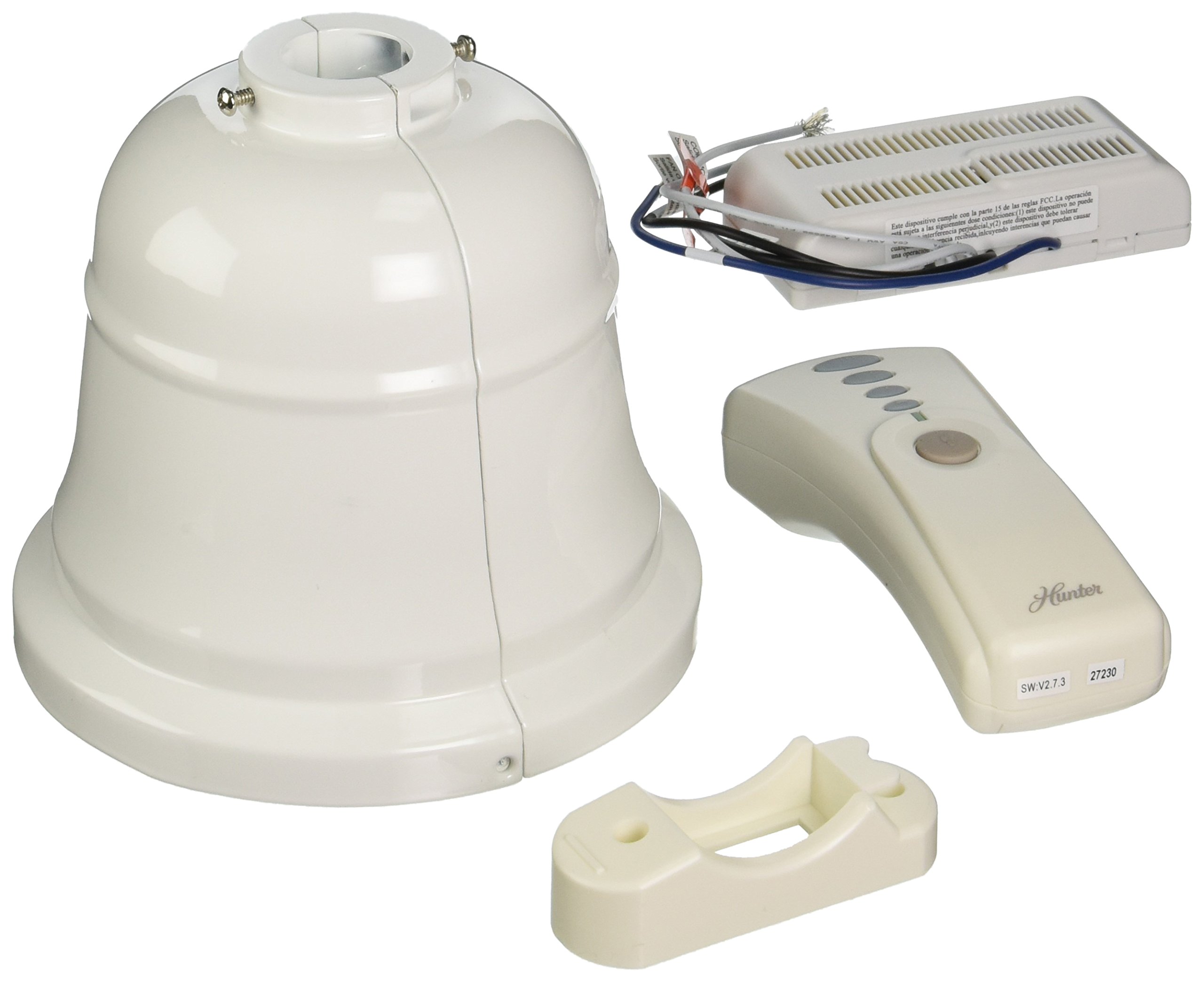
Image: A Hunter ceiling fan, representative of the type of fan compatible with the 99179 remote and canopy kit.
Setup and Installation
Follow these steps carefully to install your Hunter 99179 Remote Control and Canopy Kit:
- Power Disconnection: Before starting, turn off the electrical power to your ceiling fan at the main circuit breaker or fuse box.
- Access Wiring: Carefully lower the existing canopy from your Hunter Original ceiling fan to expose the wiring connections.
- Remove Old Receiver (if applicable): If an old receiver is present, disconnect its wiring and remove it.
- Install New Receiver: Connect the new remote receiver's wires to the corresponding fan and household wires. Ensure all connections are secure using wire nuts. The receiver is designed to fit within the new canopy.
- Position Canopy: Carefully tuck the wired receiver into the new canopy. Ensure no wires are pinched.
- Secure Canopy: Mount the new canopy securely to the fan's mounting bracket. Confirm that the downrod is at least 12 inches long to accommodate the receiver within the canopy.
- Restore Power: Once installation is complete and all connections are secure, restore power to the ceiling fan at the circuit breaker.
- Pair Remote: Follow the instructions provided with the remote control unit to pair it with the newly installed receiver. This typically involves pressing a button on the remote within a short time after restoring power.
Note: The new canopy is designed to accommodate the receiver. Some older Hunter Original fan mounting plates or downrods may not be compatible with the new canopy's dimensions. Verify fit before final installation.
Operating Instructions
Your Hunter 99179 remote control provides convenient operation of your ceiling fan and light:
- Fan Speed Control: Use the designated buttons on the remote to cycle through three fan speeds (Low, Medium, High) or to turn the fan off.
- Light Control: Use the light button to turn the fan light on or off. Some remotes may also support dimming functions if your fan and light kit are compatible.
- Battery Replacement: If the remote control stops responding, replace the batteries. Refer to the remote's specific instructions for battery type and replacement procedure.
Maintenance
To ensure optimal performance and longevity of your Hunter 99179 kit:
- Cleaning: Periodically wipe the remote control and canopy with a soft, dry cloth. Do not use abrasive cleaners or solvents.
- Battery Check: Replace remote control batteries as needed to maintain reliable operation.
- Wiring Inspection: Annually, or if issues arise, ensure all electrical connections within the canopy are secure and free from corrosion. Always disconnect power before inspection.
Troubleshooting
If you encounter issues with your remote control and canopy kit, refer to the following common solutions:
| Problem | Possible Cause | Solution |
|---|---|---|
| Remote not responding / Fan or light not working |
|
|
| Canopy does not fit / Receiver cannot be housed |
|
|
| Interference from other devices |
|
|
Specifications
- Model Number: 99179
- Manufacturer: Hunter Fan Company
- Product Dimensions: Approximately 6 x 6 x 7 inches
- Item Weight: Approximately 2.35 pounds
- Voltage: 120 Volts
- Power Source: Corded-electric
- Material: Metal
- Certification: ETL Listed
- Usage: Ceiling fan remote control and canopy accessory
- Special Feature: Heavy Duty construction
- Compatible Devices: Hunter "Original" series ceiling fans
Warranty Information
No specific warranty description is provided for the Hunter 99179 Remote Control and Canopy Kit in the product details. For warranty inquiries, please contact Hunter Fan Company directly or refer to the documentation included with your original Hunter "Original" ceiling fan.
Customer Support
For further assistance, technical support, or to inquire about parts, please visit the official Hunter Fan Company website or contact their customer service department.
Hunter Fan Company Website: Visit the Hunter Store on Amazon


