
Introduction
This manual provides essential information for the safe and effective use of your Digital Nc BPU90 Ultra High Capacity Lithium-Ion Battery. Designed for compatibility with various Sony PMW and PXW series camcorders, this battery offers extended power for professional video production. Please read this manual thoroughly before using the product.
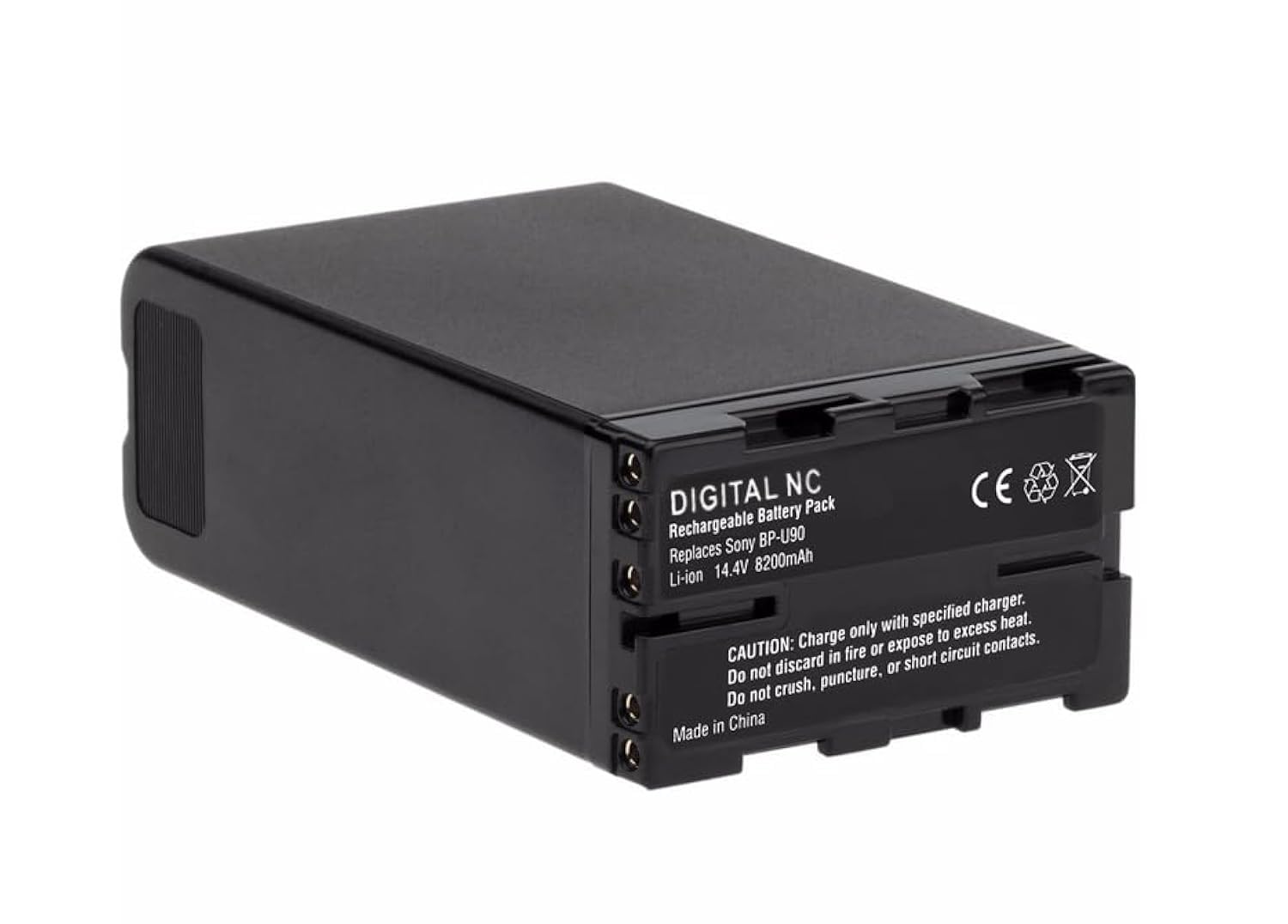
Image: Front view of the Digital Nc BPU90 Lithium-Ion Battery, showing the 'Li-ion' label and LED power indicator.
Safety Information
To ensure safe operation and prolong the life of your battery, observe the following precautions:
- Use only with specified chargers.
- Do not expose to fire or excessive heat.
- Do not crush, puncture, or short circuit contacts.
- Keep out of reach of children.
- Do not disassemble the battery.
- Dispose of batteries according to local regulations.

Image: Rear view of the Digital Nc BPU90 battery, displaying product information and essential safety warnings.
Setup
1. Unpacking
Carefully remove the battery from its packaging. Inspect for any visible damage. If damage is present, do not use the battery and contact customer support.
2. Initial Charge
For optimal performance, fully charge the battery before its first use. Connect the battery to a compatible charger. The integrated microchip prevents overcharging and helps lengthen battery life.
3. Installation
Align the battery with the battery compartment of your compatible Sony PMW or PXW series camcorder. Gently slide the battery into place until it clicks securely. Ensure a firm connection.

Image: Side view of the Digital Nc BPU90 battery, showing its form factor for proper installation.

Image: Alternate side view of the Digital Nc BPU90 battery, highlighting connection points.
Operating Instructions
1. Charging the Battery
Connect the battery to a compatible charger. The charging process will begin automatically. The battery's intelligent microchip communicates with the charger to optimize charging and prevent overcharging.
2. Checking Battery Level
The Digital Nc BPU90 battery features a 4-LED power gauge. Press the 'CHECK' button next to the LEDs to display the current charge level. Each illuminated LED represents approximately 25% of the battery's full capacity.
- 4 LEDs: 75-100% charged
- 3 LEDs: 50-75% charged
- 2 LEDs: 25-50% charged
- 1 LED: 0-25% charged (recharge soon)

Image: Close-up of the Digital Nc BPU90 battery's front panel, showing the 4 LED power gauge and 'CHECK' button.
3. Using with a Camcorder
Once installed and charged, the battery will power your compatible camcorder. Monitor the battery level indicator on the battery itself or through your camcorder's display, if supported, to avoid unexpected power loss during operation.
Maintenance
Proper maintenance ensures the longevity and performance of your Digital Nc BPU90 battery:
- Storage: Store the battery in a cool, dry place away from direct sunlight and extreme temperatures. For long-term storage, it is recommended to store the battery at approximately 50% charge.
- Cleaning: Use a soft, dry cloth to clean the battery's exterior and contacts. Do not use harsh chemicals or abrasive materials.
- Temperature: Avoid operating or storing the battery in environments with extreme heat or cold, as this can degrade performance and battery life.
- Lithium-Ion Technology: This battery utilizes Lithium-Ion chemistry, which means it has no memory effect. You can recharge it at any charge level without reducing its overall capacity.
Troubleshooting
If you encounter issues with your Digital Nc BPU90 battery, refer to the following common solutions:
| Problem | Possible Cause | Solution |
|---|---|---|
| Battery not charging | Charger not connected, faulty charger, or dirty battery contacts. | Ensure charger is properly connected and powered. Try a different compatible charger. Clean battery contacts with a dry cloth. |
| Battery not powering camcorder | Battery not fully inserted, low charge, or incompatible device. | Re-insert battery firmly. Check battery level and recharge if necessary. Verify camcorder compatibility. |
| Short battery life | Battery degradation, extreme operating temperatures, or high power consumption by device. | Ensure battery is fully charged. Avoid extreme temperatures. If battery life significantly decreases over time, it may be nearing the end of its lifespan. Refer to warranty information. |
If the problem persists after attempting these solutions, please contact Digital Nc customer support.
Specifications
Detailed technical specifications for the Digital Nc BPU90 Lithium-Ion Battery:

Image: Digital Nc BPU90 battery displaying key specifications including chemistry, voltage, and capacity.
| Feature | Detail |
|---|---|
| Model Name | BPU90 |
| Model Number | BATVIVBPU90/PMW |
| Battery Cell Composition | Lithium Ion |
| Battery Capacity | 8200 Milliamp Hours (mAh) |
| Voltage | 14.4 Volts |
| Watt Hours | 85 Wh |
| Reusability | Rechargeable |
| Unit Count | 1 Count |
| Battery Weight | 629 Grams |
| Recommended Uses | Camcorder |
| Compatibility | Sony PMW-EX1, PMW-EX1R, PMW-EX3, PMW-F3, PMW-100, PMW-160, PMW-200, PMW-300, XDCAM, PXW-X280, and more. |
Warranty Information
The Digital Nc BPU90 Lithium-Ion Battery comes with a 3 Year Full Replacement Warranty. This warranty covers manufacturing defects and ensures that your battery performs as expected under normal use conditions.
If you experience any issues covered by the warranty, please contact Digital Nc customer support with your proof of purchase. The warranty period begins from the date of purchase.

Image: Graphic indicating a 3 Year Full Replacement Warranty.
Customer Support
For further assistance, technical support, or warranty claims, please contact Digital Nc customer service. Refer to the product packaging or the Digital Nc official website for the most current contact information.
When contacting support, please have your product model (BPU90) and purchase details readily available.