
Introduction
Thank you for choosing the Marea B41099-1 Analog-Digital Quartz Watch. This manual provides detailed instructions for the proper setup, operation, and maintenance of your new timepiece. Please read this manual thoroughly to ensure optimal performance and longevity of your watch.
Safety Information
- Water Resistance: This watch is water-resistant up to 50 meters (5 ATM). It is suitable for short periods of recreational swimming but not for diving or snorkeling. Do not operate buttons underwater.
- Temperature: Avoid exposing the watch to extreme temperatures (hot or cold) for extended periods, as this may affect accuracy and battery life.
- Chemicals: Keep the watch away from solvents, detergents, perfumes, and cosmetics, as they may damage the case, band, or gaskets.
- Impact: Protect the watch from strong impacts and shocks.
- Battery: Do not attempt to open the watch case or replace the battery yourself. Refer to a qualified watch technician for battery replacement.
Watch Components
Familiarize yourself with the main components of your Marea B41099-1 watch:
- Crown: Used for setting the analog time.
- Buttons (A, B, C, D): Used for operating digital functions (mode, adjust, light, start/stop). Specific button functions may vary by mode.
- Analog Display: Traditional hour, minute, and second hands.
- Digital Display: Shows time, date, and other digital functions.
- Case: Stainless steel housing for the watch movement.
- Band: Rubber strap with a buckle clasp.
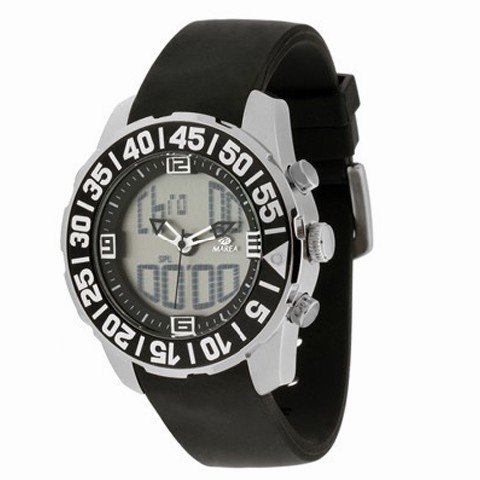
Image 1: Front view of the Marea B41099-1 watch, showing the analog and digital displays, crown, and control buttons.
Initial Setup
Setting Analog Time
- Pull the crown out to the first click position.
- Rotate the crown to set the hour and minute hands to the desired time.
- Push the crown back into its normal position to start the analog timekeeping.
Setting Digital Time and Date
The digital display typically has multiple modes, including Timekeeping, Alarm, Stopwatch, and sometimes a Second Time Zone. Refer to the specific button labels on your watch (e.g., MODE, ADJUST, START/STOP, LIGHT).
- Press the MODE button repeatedly until the digital time display starts flashing (indicating setting mode).
- Use the ADJUST button to cycle through the settings (seconds, hour, minute, year, month, day).
- Use the START/STOP button to increase the flashing value. Hold it down to advance rapidly.
- Once all settings are correct, press the MODE button again to exit the setting mode.
Operating Instructions
Using Digital Modes
Press the MODE button to cycle through the different digital functions:
- Timekeeping Mode: Displays current digital time, day, and date.
- Alarm Mode: Set and activate daily alarms.
- In Alarm Mode, press ADJUST to select hour/minute.
- Use START/STOP to change the value.
- Press MODE to confirm and exit.
- Press START/STOP to toggle alarm ON/OFF.
- Stopwatch Mode: Measure elapsed time.
- In Stopwatch Mode, press START/STOP to start/pause.
- Press ADJUST to reset to zero.
Using the Backlight
Press the LIGHT button (usually located on the top left) to illuminate the digital display for a few seconds in low-light conditions.
Maintenance
Cleaning Your Watch
- Wipe the watch case and band regularly with a soft, dry cloth to remove dust and dirt.
- For rubber bands, you can use a slightly damp cloth with mild soap, then rinse thoroughly and dry completely.
- Avoid using harsh chemicals or abrasive materials, which can damage the watch's finish.
Battery Replacement
The watch is powered by a quartz movement, which requires a battery. When the analog hands stop or the digital display becomes dim, it indicates a low battery. Battery life typically ranges from 1 to 3 years, depending on usage.
- Do not attempt to replace the battery yourself, as this may compromise the watch's water resistance and void the warranty.
- Take your watch to an authorized Marea service center or a reputable watch repair shop for battery replacement.
Troubleshooting
| Problem | Possible Cause | Solution |
|---|---|---|
| Analog hands not moving. | Low battery or crown is pulled out. | Push the crown back in. If still not moving, replace the battery at a service center. |
| Digital display is blank or dim. | Low battery. | Replace the battery at a service center. |
| Incorrect time/date on digital display. | Settings need adjustment. | Follow the "Setting Digital Time and Date" instructions in the Setup section. |
| Watch fogging up internally. | Exposure to extreme temperature changes or compromised water resistance. | Avoid sudden temperature changes. If fogging persists, have the watch inspected by a service center. |
Specifications
- Model Number: B41099-1
- Brand: Marea
- Display Type: Analog-Digital
- Movement Type: Quartz
- Case Material: Stainless Steel
- Band Material: Rubber
- Clasp Type: Buckle
- Water Resistance Depth: 50 Meters (5 ATM)
- Case Shape: Round
- Band Color: Black
- Dial Color: Grey
Warranty and Support
Marea watches are manufactured to high-quality standards. For specific warranty terms and conditions, please refer to the warranty card included with your purchase or visit the official Marea website. Keep your proof of purchase for warranty claims.
For technical support, service, or inquiries regarding your Marea B41099-1 watch, please contact Marea customer service through their official channels. Contact information can typically be found on the Marea website or on the warranty documentation.