
1. Introduction
Thank you for choosing the Pro'sKit SD-T635-0112 Adjustable Torque Screwdriver. This precision tool is designed for applying specific torque values to fasteners, ensuring accurate and consistent tightening. Proper use and maintenance will extend the life of the tool and ensure optimal performance. Please read this manual thoroughly before operation.
2. Safety Information
Always observe the following safety precautions when using this tool:
- Wear appropriate personal protective equipment, such as safety glasses.
- Ensure the workpiece is securely held before applying torque.
- Do not use the torque screwdriver for loosening fasteners unless specifically designed for that purpose. This tool is primarily for tightening.
- Do not exceed the maximum specified torque range of the tool.
- Keep the tool clean and free from oil or grease to maintain a secure grip.
- Store the tool in a dry, secure place away from children.
- If the tool is dropped or damaged, inspect it for proper function before further use.
3. Product Overview
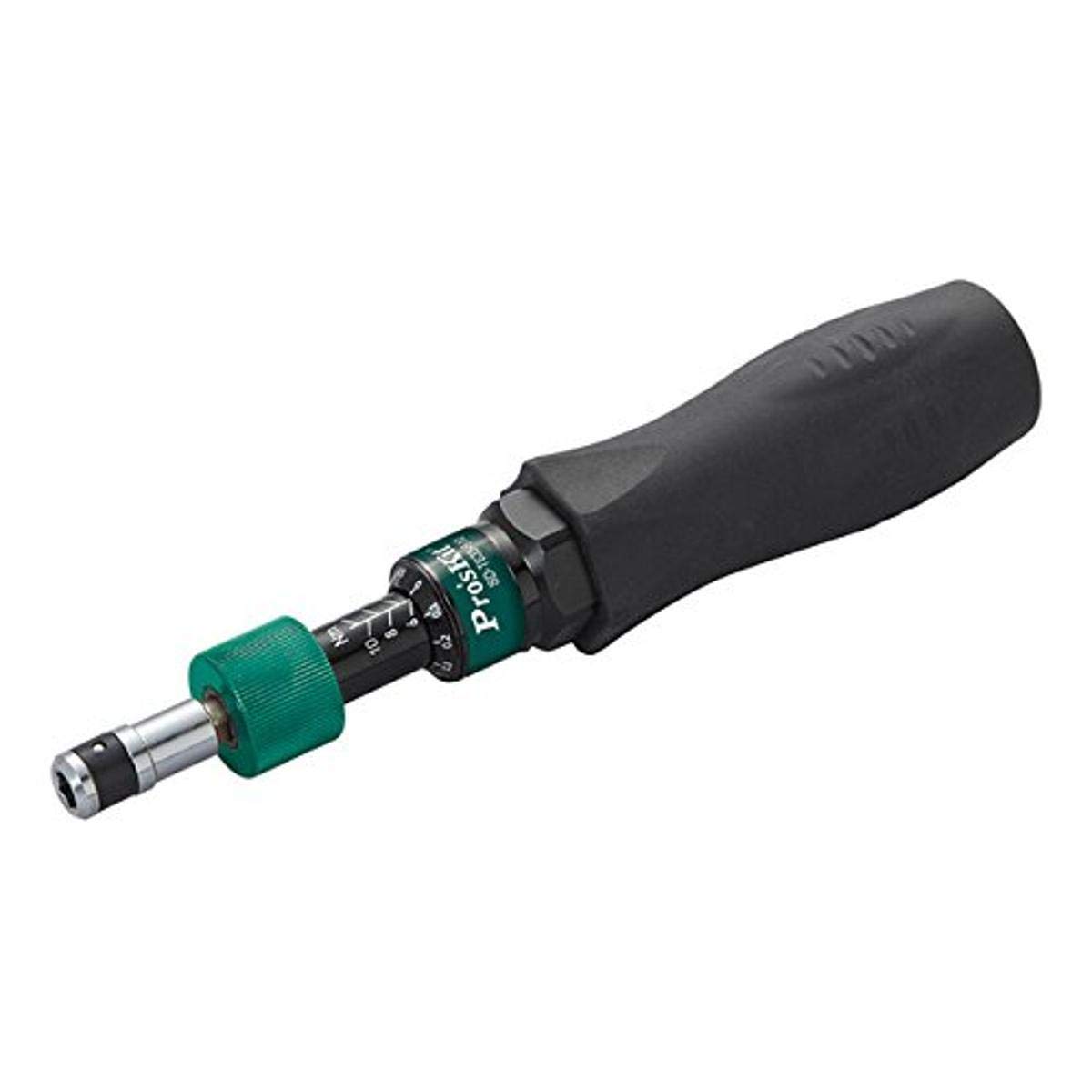
Figure 1: Pro'sKit SD-T635-0112 Adjustable Torque Screwdriver. This image displays the complete torque screwdriver, featuring a black ergonomic handle, a green adjustment collar, and a visible torque scale. The bit holder is at the tip of the tool.
The Pro'sKit SD-T635-0112 is an adjustable torque screwdriver designed for precise fastening applications. Key components include:
- Handle: Ergonomically designed for comfortable grip and control.
- Torque Adjustment Collar: Used to set the desired torque value.
- Torque Scale: Displays the set torque in Newton-meters (N-m) and pound-force inches (lbf.in).
- Bit Holder: Accepts standard hex bits for various fastener types.
4. Setup
- Unpacking: Carefully remove the torque screwdriver from its packaging. Inspect the tool for any signs of damage.
- Bit Insertion: Select the appropriate hex bit for your fastener. Insert the bit firmly into the bit holder at the tip of the screwdriver until it is securely seated.
5. Operating Instructions
5.1 Setting the Torque
- Locate the green torque adjustment collar and the torque scale on the tool body.
- Rotate the adjustment collar until the desired torque value aligns with the indicator mark on the tool body. The scale provides readings in both Newton-meters (N-m) and pound-force inches (lbf.in).
- Ensure the collar is locked in place (if applicable) or that the setting is stable before proceeding.
5.2 Applying Torque
- Place the inserted bit onto the fastener head, ensuring a snug fit to prevent cam-out.
- Grip the handle firmly and apply steady, continuous pressure while rotating the screwdriver clockwise to tighten the fastener.
- Continue turning until the tool produces an audible "click" and a slight tactile impulse. This indicates that the preset torque has been reached.
- Stop applying force immediately after the click. Further tightening will over-torque the fastener.
- Remove the tool from the fastener.
Note: For consistent accuracy, always apply torque smoothly and avoid sudden jerking motions. Do not use the tool as a standard screwdriver for tasks not requiring precise torque.
6. Maintenance
- Cleaning: Wipe the tool with a clean, dry cloth after each use. Do not use harsh chemicals or solvents that could damage the finish or internal mechanisms.
- Storage: Store the torque screwdriver in its protective case (if provided) or a clean, dry environment. It is recommended to set the torque to its lowest setting before storage to relieve spring tension and maintain calibration accuracy over time.
- Calibration: Torque tools require periodic calibration to ensure accuracy. The frequency depends on usage. Consult a professional calibration service if accuracy is critical or if you suspect the tool is out of calibration.
7. Troubleshooting
- Tool does not click:
- Ensure the torque setting is above the minimum range.
- Verify the fastener is not already fully tightened.
- Apply steady, increasing force; a quick jerk might prevent the click mechanism from engaging properly.
- Inconsistent torque readings:
- Check for proper bit seating.
- Ensure the torque setting collar is not accidentally moved during use.
- Consider professional calibration if issues persist.
8. Specifications
| Feature | Detail |
|---|---|
| Model Number | SD-T635-0112 |
| Brand | Pro'sKit |
| Torque Range | 0.1 - 1.2 N-m (Newton-meters) / 1.33 - 10.18 lbf.in (pound-force inches) |
| Overall Length | 7.1 inches (180 mm) |
| Material | Metal |
| Drive System | Hex |
| Item Weight | 8 ounces (approx. 227 grams) |
| Product Dimensions | 7.08 x 1.42 x 0.1 inches (approx. 180 x 36 x 2.5 mm) |
9. Warranty and Support
Pro'sKit products are manufactured to high-quality standards. For specific warranty information or technical support, please refer to the warranty card included with your purchase or visit the official Pro'sKit website. Keep your purchase receipt as proof of purchase for any warranty claims.