
Power Acoustik PDN-626B
Power Acoustik PDN-626B User Manual
Model: PDN-626B | 2-DIN MobileLink X2 Source Unit with GPS/Bluetooth/6.2" LCD
Product Overview
The Power Acoustik PDN-626B is a versatile 2-DIN in-dash multimedia receiver designed for vehicle integration. It features a 6.2-inch LCD touchscreen display, built-in GPS navigation, and Bluetooth connectivity for hands-free calling and audio streaming. This unit supports various media formats including DVD, CD, USB, and SD card, providing a comprehensive entertainment and navigation solution for your vehicle.
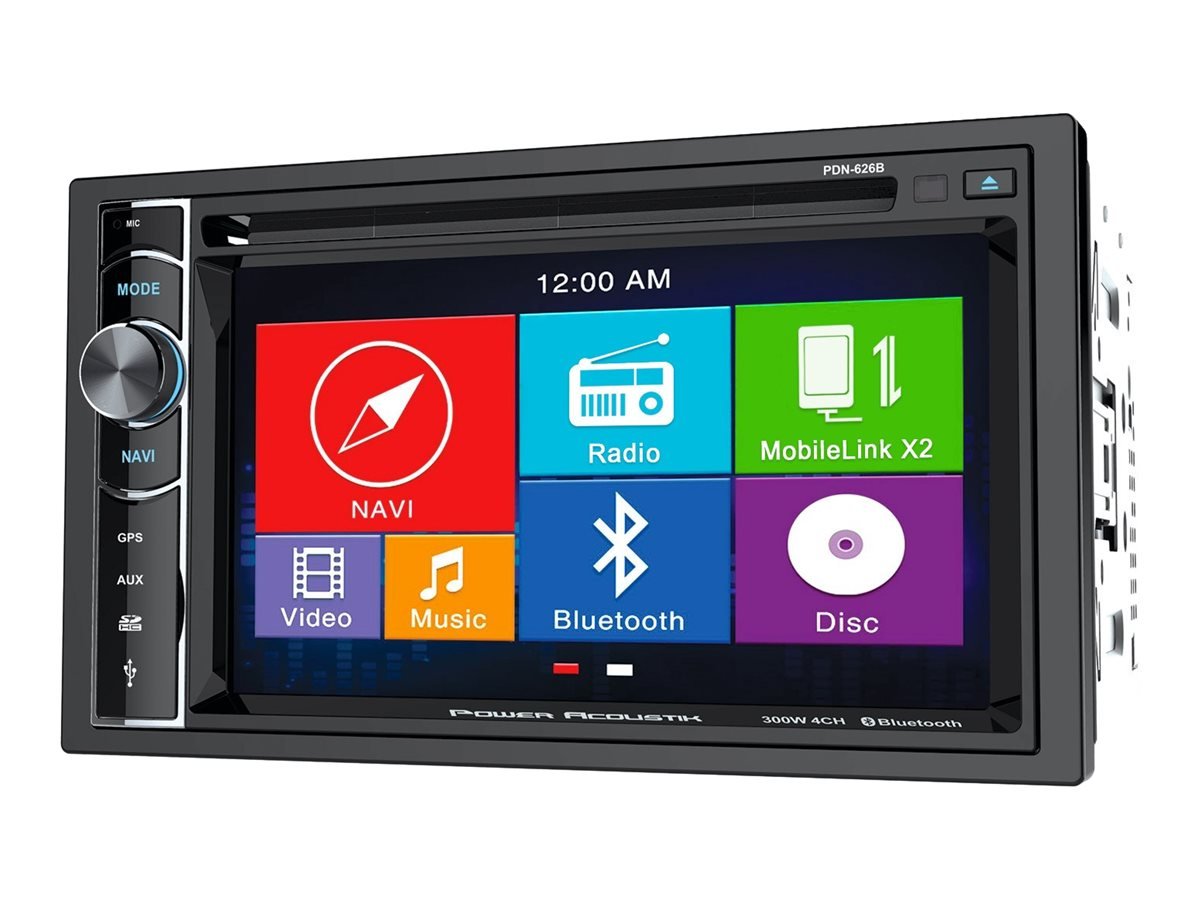
Figure 1: Front view of the Power Acoustik PDN-626B unit, showing the 6.2-inch LCD touchscreen display with various function icons including Navigation, Radio, MobileLink X2, Video, Music, Bluetooth, and Disc. The unit also features physical buttons for Mode, Navi, GPS, Aux, and a volume/control knob on the left side, along with a microphone input and SD card slot.
Setup and Installation
Proper installation is crucial for the optimal performance of your PDN-626B unit. It is recommended that installation be performed by a qualified professional.
Package Contents
- Power Acoustik PDN-626B Head Unit
- Wiring Harness
- GPS Antenna
- External Microphone
- Mounting Hardware
- User Manual (this document)
Wiring Connections
Ensure all connections are secure and correctly matched to your vehicle's wiring diagram. Refer to your vehicle's service manual for specific wiring details.
- Power Wires: Connect the constant 12V (yellow), accessory 12V (red), and ground (black) wires.
- Speaker Wires: Connect all speaker wires (e.g., white/white-black for front left, gray/gray-black for front right, green/green-black for rear left, purple/purple-black for rear right).
- GPS Antenna: Connect the GPS antenna to the dedicated input on the rear of the unit and mount it in a location with a clear view of the sky.
- External Microphone: Plug the external microphone into its input for improved hands-free call quality.
- Rearview Camera Input: Connect your rearview camera to the dedicated video input. Ensure the reverse trigger wire is connected for automatic camera activation.
- Steering Wheel Control: If your vehicle supports steering wheel controls, connect the appropriate interface (sold separately) to the unit.
Initial Power-Up
After installation, turn on your vehicle's ignition. The unit should power on and display the main interface. If not, recheck all power connections.
Operating Instructions
This section details the primary functions and controls of the PDN-626B unit.
Front Panel Controls
- Volume Knob: Rotate to adjust volume. Press to power on/off or mute.
- MODE Button: Press to cycle through available audio/video sources (Radio, Disc, USB, SD, AUX, Bluetooth).
- NAVI/GPS Button: Directly access the GPS navigation application.
- AUX Button: Select the auxiliary input source.
- MIC Input: For connecting the external microphone.
- SD Card Slot: Insert SD cards for media playback.
- USB Port: Connect USB flash drives for media playback.
- Eject Button: Ejects the disc from the DVD/CD slot.
Touchscreen Interface
The 6.2-inch LCD touchscreen provides intuitive control over the unit's functions. Tap icons to select desired modes.
Main Menu Functions:
- NAVI: Activates the built-in GPS navigation system. Provides turn-by-turn directions and access to a comprehensive database of Points of Interest (POIs).
- Radio: Accesses the AM/FM tuner. Allows for station scanning, manual tuning, and saving favorite stations.
- MobileLink X2: Enables connectivity with compatible mobile devices for screen mirroring or app control (refer to MobileLink X2 specific instructions for device compatibility and setup).
- Video: Plays video files from inserted discs (DVD/CD), USB drives, or SD cards. Supports MP4 video files.
- Music: Plays audio files from inserted discs (CD), USB drives, or SD cards. Supports MP3 and WAV audio files.
- Bluetooth: Manages Bluetooth connections for hands-free calling and audio streaming.
- Disc: Selects the DVD/CD player as the active source.
Bluetooth Operation
- Pairing:
- Ensure Bluetooth is enabled on your mobile device.
- On the PDN-626B, select the "Bluetooth" icon from the main menu.
- Search for available devices on your mobile phone. The unit will appear as "Power Acoustik" or "PDN-626B".
- Select the unit and enter the default PIN (usually "0000" or "1234") if prompted.
- Once paired, the unit will indicate a successful connection.
- Hands-Free Calling:
- Make and receive calls directly through the unit's interface.
- Use the external microphone for clear voice transmission.
- Access your phone's contact list and call history on the unit's screen.
- Audio Streaming (A2DP):
- Stream music wirelessly from your paired mobile device to the PDN-626B.
- Control playback (play/pause, skip tracks) from the unit's touchscreen.
Maintenance
Regular maintenance ensures the longevity and optimal performance of your PDN-626B unit.
Cleaning the Unit
- Screen: Use a soft, lint-free cloth to gently wipe the touchscreen. For stubborn smudges, slightly dampen the cloth with water or a screen-cleaning solution designed for electronics. Do not use abrasive cleaners or solvents.
- Front Panel: Wipe the front panel with a dry, soft cloth.
- Disc Slot: Avoid inserting foreign objects into the disc slot. Use a disc cleaner if playback issues arise due to dust.
General Care
- Avoid exposing the unit to extreme temperatures or direct sunlight for prolonged periods.
- Ensure proper ventilation around the unit to prevent overheating.
- Do not attempt to disassemble or modify the unit, as this will void the warranty.
Troubleshooting
If you encounter issues with your PDN-626B, refer to the following common problems and solutions. For more detailed troubleshooting, consult the full user manual PDF linked in the Support section.
| Problem | Possible Cause | Solution |
|---|---|---|
| No Power | Incorrect wiring; Blown fuse; Vehicle ignition off. | Check power and ground connections. Inspect vehicle and unit fuses. Ensure vehicle ignition is on. |
| No Sound | Speaker wires disconnected; Volume too low; Mute activated; Incorrect source selected. | Verify speaker wire connections. Increase volume. Deactivate mute. Select correct audio source. |
| GPS Not Functioning | GPS antenna not connected or obstructed; Software issue. | Ensure GPS antenna is securely connected and has a clear view of the sky. Check for available software updates (if applicable). |
| Bluetooth Connectivity Issues | Device not paired; Bluetooth off on phone/unit; Interference. | Ensure Bluetooth is enabled on both devices. Re-pair the device. Move closer to the unit. |
| Disc Playback Error | Dirty or scratched disc; Incorrect disc format. | Clean the disc. Try a different disc. Ensure the disc format is supported (DVD/CD). |
Specifications
Key technical specifications for the Power Acoustik PDN-626B.
| Feature | Detail |
|---|---|
| Product Dimensions | 12.25 x 9.75 x 7 inches |
| Item Weight | 6 pounds |
| Display Type | 6.2" LCD Touchscreen |
| Display Resolution | 800 x 480 widescreen |
| Backlight | 400 nits LED |
| Audio Output Power | 75 watts x 4 MOSFET |
| Connectivity | Bluetooth, Auxiliary, USB |
| Supported Media | DVD, CD, 64GB SD card/USB flash drive |
| Supported Audio Formats | MP3, WAV |
| Supported Video Formats | MP4 |
| GPS Navigation | Turn-by-turn (USA, Canada, Mexico), 12-million POIs |
| Inputs | Rearview camera input with trigger, External microphone input |
| Outputs | Front and rear preamp audio outputs, Variable subwoofer preamp output, Video output for aux devices |
Warranty and Support
For information regarding product warranty, please refer to the warranty card included with your purchase or visit the official Power Acoustik website. Keep your proof of purchase for warranty claims.
For further assistance, technical support, or detailed troubleshooting not covered in this manual, please contact Power Acoustik customer service or visit their official support page.
A comprehensive user manual in PDF format is available for download:
Related documentsPDN-626B


Ask a question about this manual
Ask about setup, troubleshooting, compatibility, parts, safety, or missing instructions. Manuals+ will review the question and use this page’s manual context to help answer it.