
Introduction
This manual provides essential information for the safe and effective operation, maintenance, and troubleshooting of your DEWALT D26203-QS 900W 8mm Variable Speed Plunge Router. Please read and understand all instructions before using the tool. Keep this manual for future reference.

Figure 1: DEWALT D26203-QS 900W 8mm Variable Speed Plunge Router. This image shows the complete router unit with its yellow and grey housing, black handles, and power cord.
General Safety Instructions
Always follow basic safety precautions to reduce the risk of fire, electric shock, and personal injury when operating power tools.
Work Area Safety
- Keep the work area clean and well-lit. Cluttered or dark areas invite accidents.
- Do not operate power tools in explosive atmospheres, such as in the presence of flammable liquids, gases, or dust. Power tools create sparks which may ignite the dust or fumes.
- Keep children and bystanders away while operating a power tool. Distractions can cause you to lose control.
Electrical Safety
- Power tool plugs must match the outlet. Never modify the plug in any way.
- Avoid body contact with earthed or grounded surfaces such as pipes, radiators, ranges, and refrigerators. There is an increased risk of electric shock if your body is earthed or grounded.
- Do not expose power tools to rain or wet conditions. Water entering a power tool will increase the risk of electric shock.
- Do not abuse the cord. Never use the cord for carrying, pulling, or unplugging the power tool. Keep cord away from heat, oil, sharp edges, or moving parts.
Personal Safety
- Always wear eye protection. Use safety glasses, goggles, or a face shield.
- Wear hearing protection when operating power tools for extended periods.
- Dress properly. Do not wear loose clothing or jewelry. Keep your hair, clothing, and gloves away from moving parts.
- Stay alert, watch what you are doing, and use common sense when operating a power tool.
- Do not overreach. Keep proper footing and balance at all times.
Product Overview
The DEWALT D26203-QS is a 900 Watt variable speed plunge router designed for precision routing tasks in various materials including timber, aluminum, and plastics. Its compact and lightweight design enhances user comfort and control.
Key Features:
- 900W Motor: Provides ample power for various routing applications.
- Variable Speed Control (16,000-27,000 rpm): Allows optimization of the router bit speed for different materials and applications.
- Full Wave Electronic Speed Control: Ensures consistent speed is maintained under load.
- Compact and Lightweight Design: Enhances ease of use and reduces fatigue.
- Aluminum Motor Housing: Durable construction that can be quickly transitioned for increased versatility.
- Plunge Base: For controlled depth routing.

Figure 2: The DEWALT D26203-QS router shown with its plunge base, highlighting the ergonomic handles and depth adjustment mechanism.
Setup
Unpacking
Carefully remove the router and all accessories from the packaging. Inspect the tool for any damage that may have occurred during shipping. Ensure all components listed in the 'Included Components' section are present.
Installing a Router Bit
- Ensure the router is unplugged from the power source.
- Press and hold the spindle lock button to prevent the spindle from rotating.
- Loosen the collet nut using the provided wrench.
- Insert the router bit into the collet, ensuring at least 3/4 of the shank is seated. Do not bottom out the bit.
- Tighten the collet nut firmly with the wrench while holding the spindle lock button.

Figure 3: A close-up view illustrating the router bit securely installed in the collet, ready for operation. This image highlights the precision of the bit and collet assembly.
Adjusting Plunge Depth
- Place the router on a flat surface with the bit installed.
- Loosen the plunge lock lever.
- Lower the router until the bit touches the work surface.
- Adjust the depth stop rod to the desired depth.
- Tighten the plunge lock lever to secure the depth setting.

Figure 4: This image displays the router's depth adjustment mechanism, showing the clear base plate and the router bit positioned for a cut. The depth stop rod is visible on the side.
Operating Instructions
Powering On and Off
- Connect the router to a suitable 240V power supply.
- To turn on, slide the ON/OFF switch to the 'ON' position.
- To turn off, slide the ON/OFF switch to the 'OFF' position.

Figure 5: Close-up of the router's power switch, clearly showing the 'ON' and 'OFF' positions. This switch is located on the top of the motor housing.
Adjusting Variable Speed
The router features a variable speed control dial, allowing you to match the speed to the material and bit type. Refer to the table below for general guidelines.

Figure 6: The variable speed control dial on the router, showing numerical settings for adjusting RPM. This dial is located on the top of the router for easy access.
| Material | Bit Diameter | Speed Setting (Approx. RPM) |
|---|---|---|
| Softwood | Small (up to 12mm) | High (22,000 - 27,000) |
| Softwood | Large (over 12mm) | Medium (18,000 - 22,000) |
| Hardwood | Small (up to 12mm) | Medium-High (20,000 - 25,000) |
| Hardwood | Large (over 12mm) | Medium-Low (16,000 - 20,000) |
| Plastics/Aluminum | All sizes | Low (16,000 - 18,000) |
Note: Always perform a test cut on scrap material to determine the optimal speed and feed rate for your specific application.
Routing Techniques
- Secure your workpiece firmly to prevent movement during routing.
- Always feed the router against the rotation of the bit (climb cutting is generally unsafe and should be avoided).
- Apply steady, even pressure. Do not force the router.
- For deep cuts, make multiple shallow passes instead of one deep pass to reduce strain on the tool and improve cut quality.
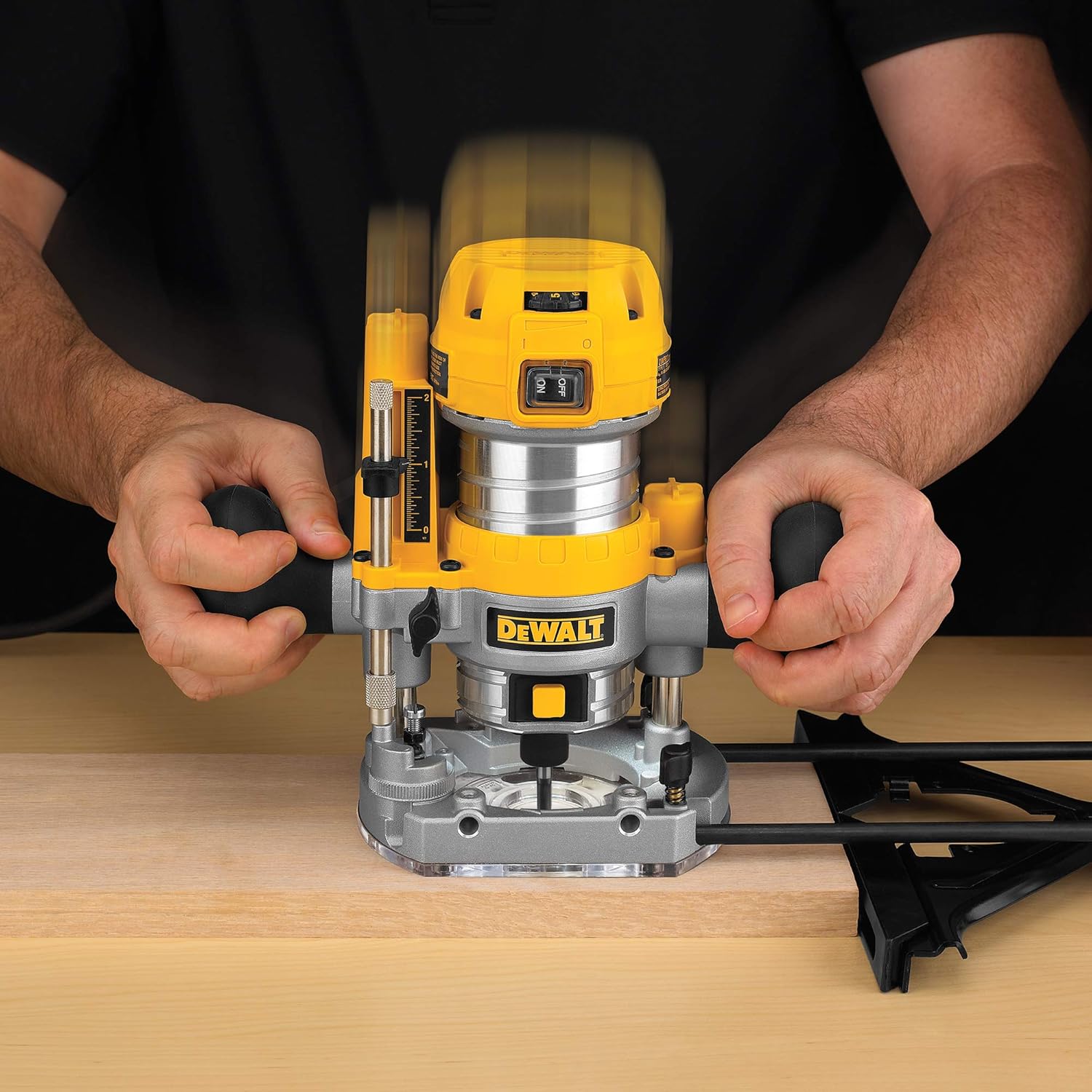
Figure 7: A user demonstrating the operation of the DEWALT plunge router on a piece of wood, showing proper hand placement and control during a routing pass.
Maintenance
Regular maintenance ensures optimal performance and extends the life of your DEWALT router. Always unplug the tool before performing any maintenance.
Cleaning
- After each use, clean the router thoroughly. Remove dust and debris from the motor vents using compressed air.
- Wipe down the exterior with a damp cloth. Do not use harsh chemicals or solvents.
- Clean the collet and collet nut regularly to ensure proper bit gripping.
Inspection
- Periodically inspect the power cord for damage. If damaged, have it replaced by a qualified service technician.
- Check all screws and fasteners for tightness.
- Ensure the plunge mechanism operates smoothly. Apply a small amount of dry lubricant if necessary.
- Inspect router bits for sharpness and damage before each use. Dull or damaged bits can cause kickback and poor cut quality.
Troubleshooting
Before attempting any repairs, ensure the tool is unplugged from the power source.
| Problem | Possible Cause | Solution |
|---|---|---|
| Router does not start | No power supply; Faulty switch; Damaged cord | Check power connection and outlet; Inspect cord for damage; Contact service center if switch or cord is faulty. |
| Excessive vibration | Dull or unbalanced bit; Loose collet nut; Damaged bearings | Replace or sharpen bit; Tighten collet nut; Contact service center for bearing replacement. |
| Poor cut quality (burning, chipping) | Dull bit; Incorrect speed; Too fast feed rate; Wrong bit for material | Replace or sharpen bit; Adjust speed setting; Reduce feed rate; Use appropriate bit for material. |
| Router overheats | Blocked ventilation; Overloading; Prolonged use | Clean ventilation openings; Reduce load; Allow tool to cool down. |
Specifications
| Feature | Specification |
|---|---|
| Model Number | D26203-QS |
| Power Input | 900 Watts |
| Voltage | 240 Volts |
| No Load Speed | 16,000 - 27,000 RPM |
| Collet Size | 8mm |
| Base Type | Plunge |
| Item Weight | 500 Grams |
| Product Dimensions (LxWxH) | 33.7 x 31 x 18.3 cm |
| Material | Metal, Plastic |
| Included Components | 1 Plunge Router |
Warranty
The DEWALT D26203-QS Plunge Router comes with a 2-year warranty provided by the manufacturer from the date of purchase. Please retain your proof of purchase for warranty claims.
For any warranty-related issues or product feedback, please contact DEWALT customer care.
Customer Support
For assistance, technical support, or service inquiries regarding your DEWALT D26203-QS Plunge Router, please contact:
- Manufacturer: DEWALT
- Customer Care Number: 1860-425-1111
- Operating Hours: Monday to Friday, 10 AM to 5 PM (except government holidays)
- Importer: Stanley Black & Decker India Private Ltd #28, Akemps, 3rd Main, 1st Cross, Ashwini Layout Koramangala Bangalore - 560047
You can also visit the official DEWALT website for more information and service center locations.


