
1. Introduction
Thank you for purchasing the Hisonic HS122BT-HL Portable and Rechargeable PA System. This versatile public address system is designed for various voice amplification applications, offering portability, dual UHF wireless microphones, and Bluetooth connectivity. Please read this manual thoroughly to ensure proper operation and to maximize the performance and longevity of your device.
2. Safety Information
To prevent fire, electric shock, and injury, please observe the following safety precautions:
- Do not expose the unit to rain or moisture.
- Do not open the casing. Refer all servicing to qualified personnel.
- Ensure the power source matches the voltage requirements of the unit.
- Keep the unit away from heat sources and direct sunlight.
- Do not block ventilation openings.
- Use only attachments/accessories specified by the manufacturer.
- Disconnect the power cord during lightning storms or when unused for long periods.
3. Product Overview
The Hisonic HS122BT-HL is a compact and powerful PA system featuring a 6.5-inch full-range 40-watt speaker. It includes a dual UHF wireless microphone system for clear, interference-free audio transmission. The system offers multiple power options and integrated Bluetooth for audio streaming.
3.1 Package Contents
- Hisonic HS122BT-HL Portable PA System Unit
- UHF Handheld Wireless Microphone
- UHF Belt-pack Transmitter with Headset Microphone
- AC Power Cord (120V)
- 12V DC Cigarette Lighter Cable
- User Manual (this document)
3.2 Component Identification
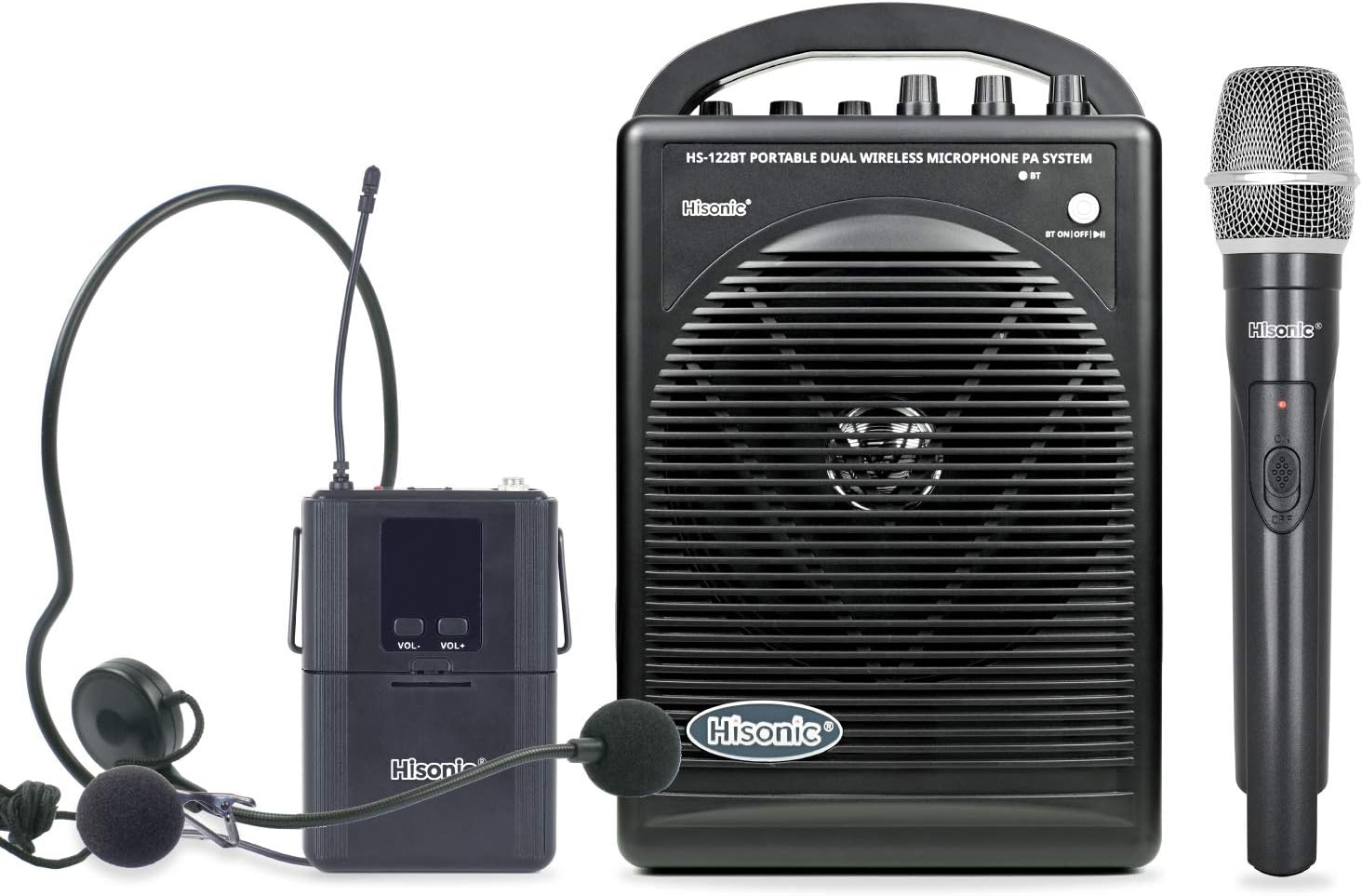
Figure 1: Front view of the Hisonic HS122BT-HL PA system, showing the main unit, a handheld wireless microphone, and a belt-pack transmitter with a headset microphone.

Figure 2: Top panel of the PA system, illustrating the control knobs for Wired Mic 1, Wired Mic 2, Wireless Mic, Tone, Echo, and Audio Volume. Also visible are the Bluetooth pairing button and power indicator.

Figure 3: Side panel of the PA system, detailing the input and output ports including Wired Mic 1, Wired Mic 2, AUX In, AUX Out, Speaker Out, and DC 12V 2A input.
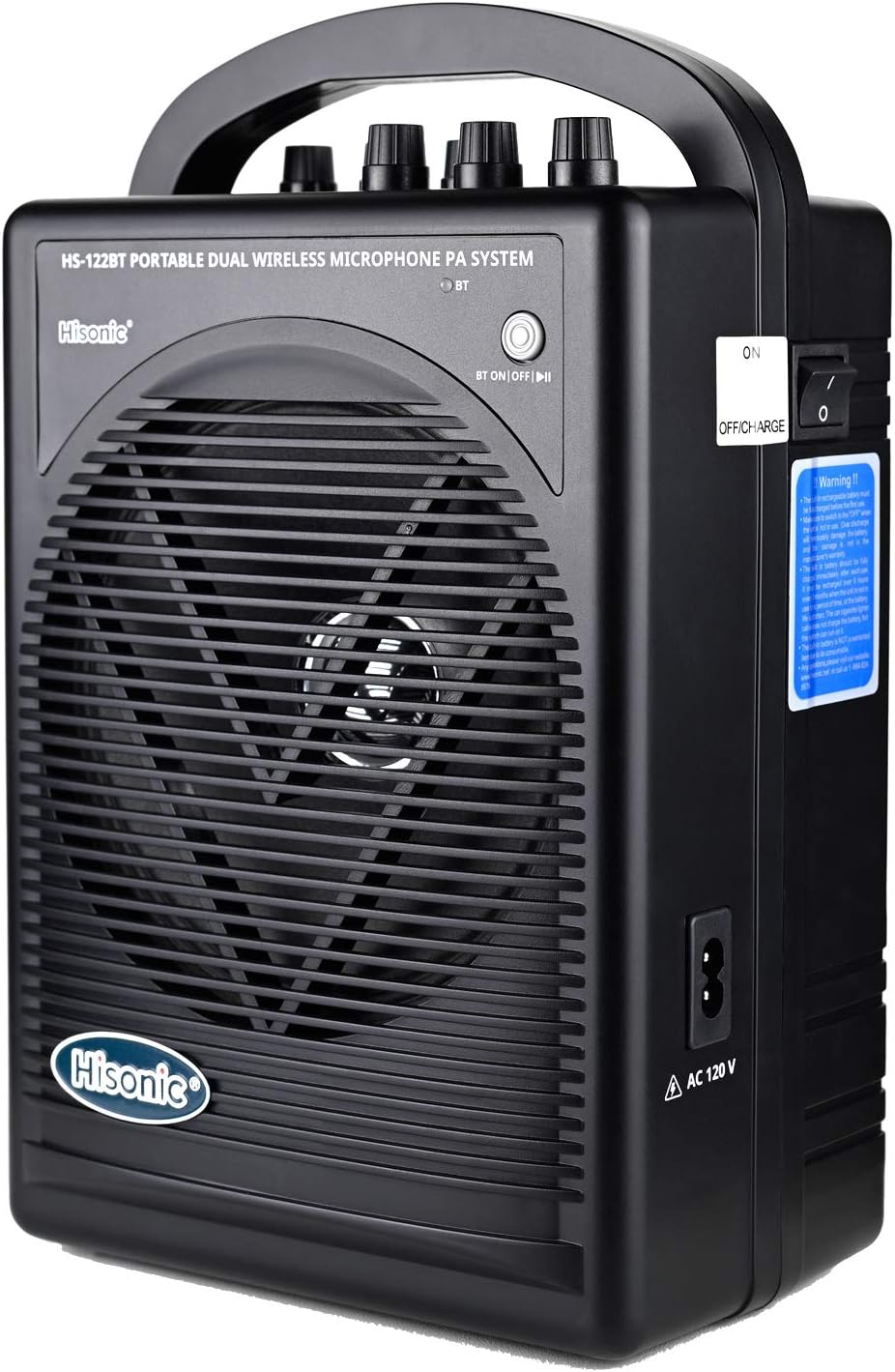
Figure 4: Opposite side panel of the PA system, showing the main power switch (ON/OFF/CHARGE) and the AC 120V power input.

Figure 5: Rear view of the PA system, highlighting the warning label regarding the rechargeable battery and the location of the battery compartment latches.
4. Setup
4.1 Powering the Unit
The HS122BT-HL offers three power options:
- AC Power: Connect the supplied AC power cord to the AC 120V input on the side of the unit (Figure 4) and plug it into a standard wall outlet. The unit will operate and charge the internal battery simultaneously.
- DC Power: Use the supplied 12V DC cigarette lighter cable to power the unit from a vehicle's 12V DC outlet. Connect the cable to the DC 12V 2A input (Figure 3).
- Internal Rechargeable Battery: The unit has a built-in rechargeable lithium-ion battery that provides up to 8 hours of operation on a full charge. Ensure the battery is charged before portable use. To charge, connect the unit to AC power and set the power switch to "CHARGE".
Note: Before first use, or if the unit has been stored for a long time, fully charge the battery. Refer to the warning label on the rear of the unit (Figure 5) for important battery care instructions, including disconnecting the battery if not used for extended periods.
4.2 Microphone Setup
The system supports both wired and wireless microphones.
- Wired Microphones: Connect wired microphones (not included) to the "Wired Mic 1" or "Wired Mic 2" 1/4-inch inputs on the side panel (Figure 3). Adjust their volume using the corresponding knobs on the top panel (Figure 2).
- Wireless Microphones:
- Handheld Microphone: Insert a 9V battery (not included) into the handheld microphone. Turn on the microphone. The PA system will automatically detect and connect to the wireless microphone.
- Belt-pack Transmitter: Insert a 9V battery (not included) into the belt-pack transmitter. Connect the headset microphone to the belt-pack. Turn on the belt-pack. The PA system will automatically detect and connect.
Note: The system uses 900 MHz UHF frequencies with 16 selectable channels for optimal performance. If interference occurs, try changing the channel on the wireless microphone/transmitter.
4.3 Bluetooth Connection
To connect a Bluetooth-enabled device (smartphone, tablet, laptop) to the PA system:
- Ensure the PA system is powered on.
- Press the "BT ON/OFF" button on the top panel (Figure 2) to activate Bluetooth mode. The Bluetooth indicator light will flash, indicating pairing mode.
- On your device, enable Bluetooth and search for available devices.
- Select "Hisonic HS122BT-HL" (or similar name) from the list.
- Once paired, the Bluetooth indicator light on the PA system will become solid. You can now stream audio wirelessly.
Note: You may need to re-pair the device each time the PA system is power cycled.
5. Operating Instructions
5.1 Basic Operation
- Power On/Off: Use the main power switch on the side panel (Figure 4) to turn the unit ON or OFF. Set to "CHARGE" for battery charging.
- Audio Volume: Adjust the overall output volume using the "Audio Volume" knob on the top panel (Figure 2).
- Microphone Volume: Control the individual volume of Wired Mic 1, Wired Mic 2, and Wireless Mic using their respective knobs (Figure 2).
- Tone Control: Use the "Tone" knob (Figure 2) to adjust the treble and bass response of the audio output.
- Echo Effect: Apply an echo effect to the microphone inputs using the "Echo" knob (Figure 2).
5.2 Using External Audio Sources
- AUX Input: Connect external audio devices (e.g., MP3 players, laptops) using a 3.5mm audio cable to the "AUX In" port (Figure 3).
- AUX Output: The "AUX Out" port (Figure 3) allows you to send the mixed audio signal to another PA system or recording device. Note that this requires a MONO 1/8 TS plug.
- Speaker Output: The "Speaker Out" port (Figure 3) can be used to connect an additional passive speaker for wider sound coverage.
6. Maintenance
- Cleaning: Wipe the unit with a soft, dry cloth. Do not use abrasive cleaners or solvents.
- Battery Care:
- For optimal battery life, fully charge the unit before first use and after each use.
- If storing the unit for an extended period (more than 2 months), it is recommended to disconnect the internal battery and recharge it every 2 months to prevent deep discharge and damage. Refer to the warning label on the rear of the unit (Figure 5) for instructions on accessing the battery compartment.
- Replace 9V batteries in wireless microphones and belt-pack transmitters regularly, especially if performance degrades.
- Storage: Store the unit in a cool, dry place away from direct sunlight and extreme temperatures.
7. Troubleshooting
| Problem | Possible Cause | Solution |
|---|---|---|
| No sound from PA system. |
|
|
| Wireless microphone interference/static. |
|
|
| Bluetooth not connecting. |
|
|
| Battery not charging. |
|
|
8. Specifications
| Feature | Detail |
|---|---|
| Model Number | HS120BT-HL |
| Output Wattage | 40 Watts |
| Speaker Size | 6.5 inches (full-range) |
| Microphone System | Dual UHF Wireless (900 MHz, 16 channels selectable) |
| Power Source | 120V AC, 12V DC, Rechargeable Lithium Ion Battery |
| Battery Life | Up to 8 hours (on full charge) |
| Connectivity | Bluetooth, Wired Microphone Inputs (1/4"), AUX In (3.5mm), AUX Out (3.5mm), Speaker Out (1/4") |
| Dimensions (L x W x H) | 11.81 x 4.33 x 7.09 inches |
| Item Weight | 5 pounds |
| Material | Acrylonitrile Butadiene Styrene (ABS) |
| UPC | 857852005345 |
9. Warranty and Support
This Hisonic product comes with a 1-year manufacturer's warranty from the date of purchase. This warranty covers defects in materials and workmanship under normal use.
For technical support, warranty claims, or service inquiries, please contact Hisonic customer support. Free bi-lingual (English/Spanish) technical support is available.
Please retain your proof of purchase for warranty validation.

