
Pentax AP 8x30 WP
Pentax AP 8x30 WP Binoculars User Manual
Model: AP 8x30 WP
1. Introduction
Thank you for choosing the Pentax AP 8x30 WP Binoculars. These binoculars are designed to provide clear, bright, and detailed views, suitable for various outdoor activities. Featuring a compact, durable, and waterproof design, they are built for reliable performance in diverse conditions. Please read this manual thoroughly before using your binoculars to ensure proper operation and maintenance.
2. Parts Identification
Familiarize yourself with the different components of your Pentax AP 8x30 WP Binoculars:
- Objective Lenses: The large lenses at the front of the binoculars that gather light.
- Eyecups: Adjustable cups around the eyepieces for comfortable viewing, especially for eyeglass wearers.
- Eyepieces: The lenses you look through.
- Center Focus Wheel: Used to adjust the focus for both barrels simultaneously.
- Diopter Adjustment Ring: Located on the right eyepiece, used to compensate for differences in vision between your left and right eyes.
- Strap Lugs: Attachment points for the neck strap.
- Hinge: Allows adjustment of the interpupillary distance.

Figure 1: Angled view of the Pentax AP 8x30 WP Binoculars, showing the objective lenses, eyepieces, and focus wheel.

Figure 2: Front view of the Pentax AP 8x30 WP Binoculars, highlighting the objective lenses.
3. Setup and Initial Adjustment
3.1 Attaching the Neck Strap
Thread the provided neck strap through the strap lugs on each side of the binoculars. Ensure the strap is securely fastened before use to prevent accidental drops.
3.2 Adjusting Interpupillary Distance
The interpupillary distance (the distance between your pupils) varies from person to person. To adjust:
- Hold the binoculars up to your eyes.
- Move the two barrels closer together or further apart until you see a single, clear circular field of view.
3.3 Adjusting Eyecups
The eyecups can be twisted up or down to provide the optimal eye relief for comfortable viewing.
- For non-eyeglass wearers: Twist the eyecups up to their fully extended position.
- For eyeglass wearers: Twist the eyecups down to their fully retracted position to allow your eyes to be closer to the eyepieces, providing a full field of view.
4. Operating the Binoculars
4.1 Focusing Procedure
To achieve a sharp image, follow these steps:
- Close your right eye or cover the right objective lens.
- Look through the left eyepiece with your left eye and rotate the center focus wheel until the image is sharp.
- Close your left eye or cover the left objective lens.
- Look through the right eyepiece with your right eye and rotate the diopter adjustment ring (on the right eyepiece) until the image is sharp. Do not use the center focus wheel for this step.
- Once both eyes are individually focused, the diopter setting is correct for your vision. From now on, you will only need to use the center focus wheel to adjust focus for different distances.
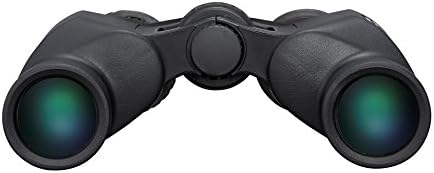
Figure 3: Rear view of the Pentax AP 8x30 WP Binoculars, illustrating the eyepieces and the diopter adjustment ring on the right eyepiece.
5. Care and Maintenance
- Cleaning Lenses: Use a soft, lint-free cloth specifically designed for optical lenses. Gently wipe away dust or smudges. For stubborn dirt, use a small amount of lens cleaning fluid applied to the cloth, not directly to the lens.
- Cleaning Body: Wipe the body with a soft, damp cloth. Avoid harsh chemicals or abrasive materials.
- Storage: Store your binoculars in a cool, dry place, away from direct sunlight and extreme temperatures. Use the provided case for protection.
- Waterproof Feature: While these binoculars are waterproof (JIS Class 6, submersible to 1m), avoid prolonged submersion. If they get wet, wipe them dry with a soft cloth. Do not attempt to open the binoculars, as this will compromise their waterproof seal.
6. Troubleshooting
| Problem | Possible Cause | Solution |
|---|---|---|
| Image is blurry or out of focus. | Incorrect focus adjustment. | Re-adjust focus using the center focus wheel and diopter adjustment ring as described in Section 4.1. |
| Double image or two overlapping circles. | Interpupillary distance is incorrect. | Adjust the barrels until a single circular field of view is achieved (Section 3.2). |
| Dark edges or vignetting in the view. | Eyecups are not set correctly for your eyes/eyewear. | Adjust the eyecups (twist up or down) to optimize eye relief (Section 3.3). |
| Image appears dim. | Low light conditions; dirty objective lenses. | Ensure lenses are clean. Binoculars perform best in adequate light. |
7. Specifications
| Feature | Detail |
|---|---|
| Model | Pentax AP 8x30 WP |
| Magnification | 8x |
| Objective Lens Diameter | 30 mm |
| Waterproof Rating | JIS Class 6 (submersible to 1m) |
| Fogproof | Nitrogen-filled |
| Dimensions (L x W x H) | 2.2 x 4.7 x 6.2 inches (approx.) |
| Weight | 1 pound (approx.) |
| Special Features | Lightweight, Portable, Waterproof, Premium Multi-layer Coatings |
8. Warranty and Support
For warranty information and customer support, please refer to the official Pentax website or contact your local Pentax dealer. Keep your purchase receipt as proof of purchase for warranty claims.
Online Resources: For additional information, FAQs, and product registration, visit the official Pentax support page: Ricoh Imaging Support
Related documentsAP 8x30 WP


Ask a question about this manual
Ask about setup, troubleshooting, compatibility, parts, safety, or missing instructions. Manuals+ will review the question and use this page’s manual context to help answer it.