
Introduction
Welcome to the BLACK+DECKER 12-Cup Programmable Coffee Maker. This manual provides essential information for the safe and efficient operation, maintenance, and care of your new appliance. Please read all instructions carefully before first use and retain for future reference.
Important Safety Information
- Always unplug the coffee maker from the outlet when not in use and before cleaning.
- Do not immerse cord, plugs, or appliance in water or other liquid.
- Close supervision is necessary when any appliance is used by or near children.
- Do not operate any appliance with a damaged cord or plug, or after the appliance malfunctions or has been damaged in any manner.
- Use only attachments recommended by the manufacturer.
- Do not place on or near a hot gas or electric burner, or in a heated oven.
- Do not use appliance for other than intended use.
- Do not clean carafe with cleansers, steel wool pads, or other abrasive materials.
- Always ensure the carafe lid is securely in place before pouring.
Product Overview
The BLACK+DECKER 12-Cup Programmable Coffee Maker (Model CM1300SC) is designed for convenience and consistent brewing. It features a programmable timer, a strong brew option, and a durable glass carafe.

Figure 1: Front view of the BLACK+DECKER 12-Cup Programmable Coffee Maker. The coffee maker is black and silver, with a digital display and control buttons on the front. A clear glass carafe sits on the warming plate below the brew basket.
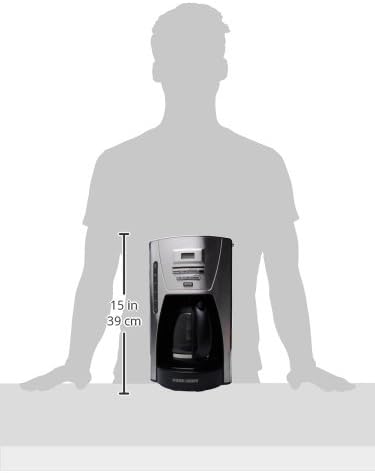
Figure 2: Side view illustrating the dimensions of the BLACK+DECKER 12-Cup Programmable Coffee Maker, showing a height of approximately 15 inches (39 cm).
Setup and First Use
- Unpack: Remove all packaging materials, labels, and stickers from the coffee maker.
- Clean: Wash the carafe, carafe lid, and removable filter basket in warm, soapy water. Rinse thoroughly and dry.
- First Brew Cycle (Cleaning): Fill the water reservoir to the 12-cup mark with clean water. Place an empty paper filter (or the reusable filter) in the filter basket. Place the empty carafe on the warming plate. Plug in the coffee maker and press the ON/OFF button to run a full brew cycle with only water. Discard the water and repeat if desired. This cleans the internal components.
Operating Instructions
Brewing Coffee
- Fill Water Reservoir: Open the top lid and fill the water reservoir with fresh, cold water to your desired level (up to 12 cups). The water level indicator is visible on the side.
- Add Coffee Grounds: Place a basket-style paper filter or the reusable filter into the filter basket. Add your desired amount of ground coffee. A general guideline is one scoop (approximately 1 tablespoon) per cup.
- Close Lid: Close the top lid securely.
- Place Carafe: Ensure the empty carafe with its lid is properly seated on the warming plate.
- Start Brewing: Press the ON/OFF button. The indicator light will illuminate, and brewing will begin.
Using the Programmable Feature (Brew Later)
- Follow steps 1-4 from "Brewing Coffee".
- Set Time: Use the HOUR and MIN buttons to set the current time on the digital display.
- Set Auto Brew Time: Press the PROG button. Use the HOUR and MIN buttons to set the desired time for the coffee maker to start brewing.
- Activate Auto Brew: Press the AUTO button. The indicator light will illuminate, confirming the auto-brew is set. The coffee maker will start brewing at the programmed time.
Strong Brew Option
For a bolder coffee flavor, press the STRONG button after pressing ON/OFF or AUTO. This slows down the brewing process, allowing for greater extraction from the coffee grounds.
Video 1: This video demonstrates the features of a 12-cup coffee maker carafe, including its removable lid for easy cleaning, heat-resistant glass construction, and dripless spout for mess-free pouring. It shows the carafe being placed into a compatible coffee maker and coffee being poured into a glass.
Maintenance and Cleaning
- Daily Cleaning: After each use, wash the carafe, carafe lid, and filter basket in warm, soapy water. These parts are also top-rack dishwasher safe.
- Exterior Cleaning: Wipe the exterior of the coffee maker with a soft, damp cloth. Do not use abrasive cleaners or scouring pads.
- Descaling (Monthly or as needed): To remove mineral deposits, fill the water reservoir with a mixture of 1 part white vinegar and 2 parts water. Place a paper filter in the basket. Run a full brew cycle. After the cycle, let the coffee maker cool for 30 minutes, then run another cycle with the vinegar solution. Discard the solution and run 2-3 cycles with clean water to rinse thoroughly.
Troubleshooting
| Problem | Possible Cause | Solution |
|---|---|---|
| Coffee not brewing. | Not plugged in; ON/OFF button not pressed; water reservoir empty. | Ensure unit is plugged in; press ON/OFF; fill water reservoir. |
| Coffee tastes weak. | Not enough coffee grounds; coarse grind; machine needs descaling. | Add more coffee; use finer grind; perform descaling cycle. |
| Coffee overflows filter basket. | Too many coffee grounds; filter not seated correctly; clogged brew basket. | Reduce coffee grounds; ensure filter is flat; clean brew basket. |
Specifications
- Brand: BLACK+DECKER
- Model Number: CM1300SC
- Capacity: 12 Cups
- Power/Wattage: 800 watts
- Material: Glass (Carafe)
- Special Features: Programmable, Strong Brew Option
- Product Dimensions: 37 x 27 x 37 cm (approx. 14.5 x 10.6 x 14.5 inches)
- Item Weight: 2.22 kg (approx. 4.9 lbs)
Warranty and Support
For warranty information and customer support, please refer to the warranty card included with your product or visit the official BLACK+DECKER website. Keep your purchase receipt as proof of purchase.


