
1. Introduction
This manual provides essential information for the proper installation, operation, and maintenance of your Focal Dome Flax DOME10FB satellite speaker. The Dome Flax speaker is a compact, high-fidelity 2-way sealed speaker designed to deliver exceptional audio performance in various home audio configurations. It incorporates Focal's patented Flax technology for enhanced sound definition and linearity.
Please read this manual thoroughly before using your speaker to ensure optimal performance and longevity.

Image 1.1: Front-angled view of the Focal Dome Flax DOME10FB Satellite Speaker, showcasing its compact design and Flax cone.
2. Key Features
- High-Fidelity Speaker: Engineered for accurate sound reproduction.
- Patented Flax Technology: Utilizes natural linen fiber cones for improved definition and frequency response linearity.
- Focal Sound with Advanced Technologies: Delivers the signature Focal audio experience.
- Integrated Speaker: Versatile mounting options for in-wall, in-ceiling, on-furniture, or standing installations.
- High-Gloss Lacquered Aluminium Body: Durable and aesthetically pleasing enclosure.
3. Package Contents
Upon unpacking, please ensure all the following items are present:
- 1 x Focal Dome Flax DOME10FB Satellite Speaker
- Mounting accessories (brackets, screws) - Specific components may vary; refer to packaging for exact details.
- User Manual (this document)
4. Safety Instructions
To prevent damage to your speaker or potential injury, please observe the following safety precautions:
- Power: Ensure your amplifier or receiver is turned off before making any connections.
- Ventilation: Do not block any ventilation openings. Install in accordance with the manufacturer's instructions.
- Heat: Do not install near any heat sources such as radiators, heat registers, stoves, or other apparatus (including amplifiers) that produce heat.
- Moisture: Do not expose the speaker to rain or moisture. Do not use near water.
- Cleaning: Clean only with a dry cloth.
- Mounting: Use only attachments/accessories specified by the manufacturer. Ensure mounting surfaces are structurally sound to support the speaker's weight.
- Servicing: Refer all servicing to qualified service personnel. Servicing is required when the apparatus has been damaged in any way, such as power-supply cord or plug is damaged, liquid has been spilled or objects have fallen into the apparatus, the apparatus has been exposed to rain or moisture, does not operate normally, or has been dropped.
5. Setup and Installation
5.1 Placement Options
The Focal Dome Flax DOME10FB speaker offers flexible placement options to integrate seamlessly into your living space:
- On Furniture: Place the speaker on a stable surface such as a shelf, cabinet, or desk.
- Wall-Mounted: Utilize the included mounting brackets to secure the speaker to a wall.
- Ceiling-Mounted: The speaker can also be mounted to the ceiling for overhead sound delivery.
- Standing: Optional floor stands (sold separately) may be available for a freestanding setup.

Image 5.1: The Focal Dome Flax DOME10FB speaker positioned on a shelf, demonstrating a typical on-furniture placement.
5.2 Mounting (Wall/Ceiling)
For wall or ceiling mounting, use the provided brackets and hardware. Ensure the mounting surface is capable of supporting the speaker's weight (approximately 3 pounds). Follow these general steps:
- Identify the desired mounting location, ensuring it is free of electrical wires or plumbing.
- Mark the drill points for the mounting bracket using a pencil.
- Drill pilot holes appropriate for the provided screws and wall anchors (if necessary).
- Secure the mounting bracket to the wall or ceiling.
- Attach the speaker to the mounted bracket, ensuring it is firmly locked in place.

Image 5.2: Side view of the Focal Dome Flax DOME10FB speaker, illustrating its curved profile and potential mounting points.
5.3 Wiring Connections
The DOME10FB is a wired speaker. Proper connection to your amplifier or receiver is crucial for optimal sound quality.
- Turn off your amplifier/receiver before making any connections.
- Use high-quality speaker wire.
- Connect the positive (+) terminal (usually red) on the speaker to the positive (+) terminal on your amplifier.
- Connect the negative (-) terminal (usually black) on the speaker to the negative (-) terminal on your amplifier.
- Ensure all connections are secure and free from stray wire strands that could cause a short circuit.
Incorrect polarity will result in poor sound quality and reduced bass response.
6. Operating Instructions
6.1 Initial Power-Up
Once all connections are made and verified:
- Turn on your amplifier/receiver.
- Select the appropriate audio input source.
- Start playing audio at a low volume level.
- Gradually increase the volume to your desired listening level.
6.2 Break-in Period
Your Focal Dome Flax DOME10FB speaker requires a break-in period to achieve its full acoustic potential. This typically involves 10 to 20 hours of normal use. During this time, the speaker drivers will loosen up, resulting in improved bass response and overall sound clarity.
7. Maintenance
To keep your Focal Dome Flax DOME10FB speaker in optimal condition, follow these simple maintenance guidelines:
- Cleaning: Use a soft, dry, lint-free cloth to wipe the speaker's surface. For the grille, a soft brush or vacuum cleaner with a brush attachment can be used gently to remove dust.
- Avoid Chemicals: Do not use abrasive cleaners, solvents, or harsh chemicals, as these can damage the finish and components.
- Environment: Avoid exposing the speaker to extreme temperatures, direct sunlight for prolonged periods, or high humidity.
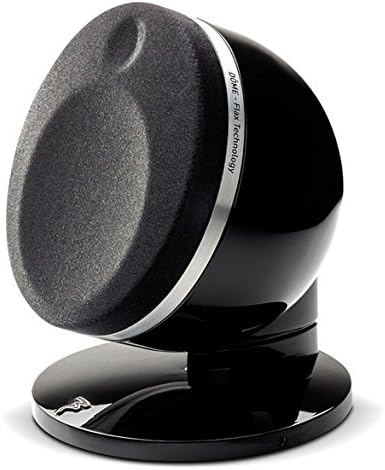
Image 7.1: Front view of the Focal Dome Flax DOME10FB speaker with its protective grille in place, relevant for cleaning instructions.
8. Troubleshooting
If you encounter issues with your speaker, consult the following table for common problems and solutions:
| Problem | Possible Cause | Solution |
|---|---|---|
| No sound from speaker |
|
|
| Distorted or unclear sound |
|
|
| Unbalanced sound (one speaker louder/softer) |
|
|
If the problem persists after trying these solutions, please contact Focal customer support or a qualified technician.
9. Specifications
Detailed technical specifications for the Focal Dome Flax DOME10FB Satellite Speaker:
| Feature | Detail |
|---|---|
| Model Name | DOME10FB |
| Speaker Type | In Ceiling, In Wall, Satellite |
| Mounting Type | Ceiling Mount, Wall Mount |
| Material | Natural Linen (Flax cone) |
| Color | Black |
| Product Dimensions (D x W x H) | 17"D x 15.25"W x 9.75"H |
| Item Weight | 3 Pounds |
| Speaker Maximum Output Power | 100 Watts |
| Frequency Response | 72 Hz (Lower limit, actual range depends on system) |
| Connectivity Technology | Wired |
| Audio Output Mode | Stereo (when used in a stereo pair) |
| Surround Sound Channel Configuration | 2.0 (as a single speaker) |
| Woofer Diameter | 17.2 Centimeters (approx. 6.77 inches) |
| Tweeter Diameter | 0.5 Inches |
| Signal-to-Noise Ratio | 65 dB |
| Recommended Uses For Product | For Music Players, Surround Sound Systems, TVs, Video Game Consoles |
| Indoor/Outdoor Usage | Indoor |
10. Warranty Information
The Focal Dome Flax DOME10FB Satellite Speaker comes with a Limited Warranty. The specific terms and duration of the warranty may vary by region and retailer. Please retain your proof of purchase for warranty claims.
For detailed warranty information, please refer to the warranty card included with your product or visit the official Focal website.
11. Customer Support
If you require further assistance, have questions not covered in this manual, or need technical support, please contact Focal customer service:
- Website: Visit the official Focal website for support resources, FAQs, and contact information.
- Authorized Dealer: Contact the authorized Focal dealer from whom you purchased the product.
When contacting support, please have your product model (DOME10FB) and serial number (if applicable) ready.


