
Holy Stone F181C
Holy Stone F181C RC Quadcopter Drone User Manual
Model: F181C
1. Setup and Assembly
Before your first flight, carefully unpack all components and assemble the drone according to these instructions.
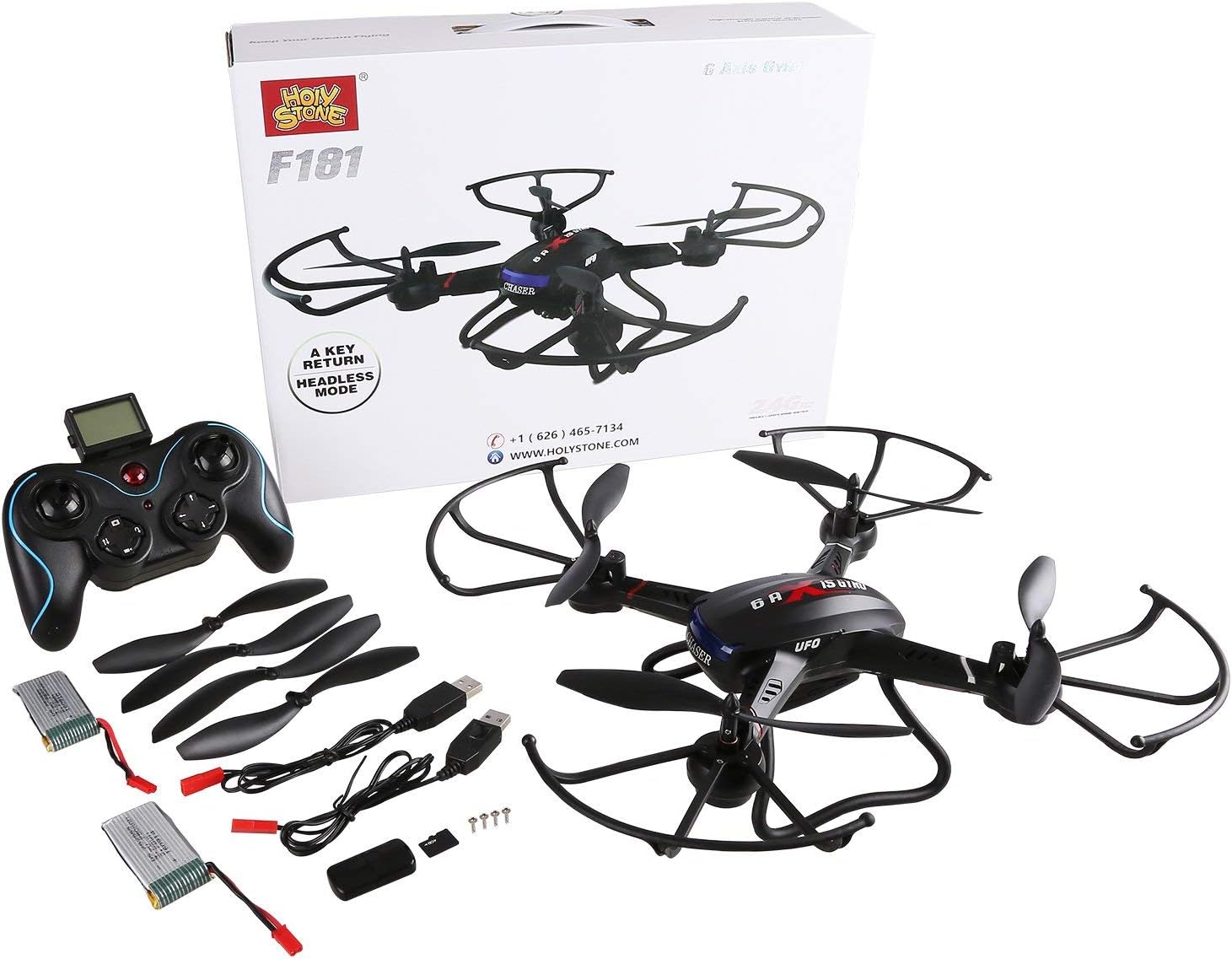
1.1 Package Contents
Verify that all items are present in your package:
- Holy Stone F181C RC Quadcopter Drone
- Remote Controller
- Two Batteries (one bonus battery included)
- USB Charging Cables
- Spare Blades
- Safety Guards
- Landing Gear
- Screwdriver (for assembly)
1.2 Charging the Battery
Fully charge the drone's battery before first use. Connect the battery to the USB charging cable and plug it into a USB power source. The charging time is approximately 80 minutes. Ensure the battery is fully charged for optimal flight duration.
1.3 Installing Propellers and Landing Gear
Attach the safety guards and landing gear to the drone using the provided screwdriver. Ensure all screws are tightened securely but do not overtighten to prevent damage. The propellers are pre-installed but ensure they are firmly attached.
1.4 Remote Controller Setup
Install 4 AA batteries (not included) into the remote controller. Familiarize yourself with the controller's layout:

- Throttle Joystick: Controls altitude (up/down) and rotation (left/right).
- Direction Joystick: Controls forward/backward and left/right movement.
- Speed Control: Adjusts flight speed.
- 3D Flip Button: Initiates 360-degree flips.
- Camera/Video Buttons: Activates photo or video recording.
- Headless Mode/One-Key Return: Special flight functions.
- Trim Buttons: Fine-tunes drone stability to correct drifting.
2. Operating Instructions
Follow these steps for a safe and enjoyable flight experience.
2.1 Pre-Flight Checklist
- Ensure drone battery is fully charged.
- Ensure remote controller batteries are installed.
- Power on the drone, then the remote controller.
- Calibrate the drone by pushing the left joystick up then down.
- Perform a gyroscope calibration by placing the drone on a flat surface and moving both joysticks to the bottom-right corner simultaneously until the drone's lights flash.
- Choose an open, clear area free from obstacles, people, and strong winds.
2.2 Taking Off and Basic Controls
After calibration, slowly push the throttle joystick up to take off. The Altitude Hold Function allows the drone to maintain its current height when the throttle stick is released, making it easier to control and capture stable footage.

2.3 Advanced Flight Features
- Headless Mode: Press the Headless Mode button. In this mode, the drone's orientation is relative to the pilot, regardless of the drone's actual front. This simplifies control, especially for beginners.
- One Key Return: Press the One Key Return button. The drone will automatically fly back towards the remote controller's position.
- 360° Flips: Press the 3D Flip button, then move the direction joystick in the desired flip direction (left, right, forward, or backward). The drone will perform a continuous roll. Ensure sufficient altitude (at least 20 feet) before attempting flips to avoid crashing.


2.4 Camera Operation
The Holy Stone F181C is equipped with a 720p HD camera for capturing aerial photos and videos. Insert a micro SD card (not included) into the drone's camera slot before use. Use the dedicated camera and video buttons on the remote controller to start/stop recording or take photos.

2.5 Landing
To land, slowly lower the throttle joystick until the drone descends gently. Once on the ground, pull the throttle joystick all the way down and hold for a few seconds until the propellers stop spinning. Always power off the drone first, then the remote controller.
3. Maintenance
Proper maintenance ensures the longevity and performance of your drone.
3.1 Battery Care
- Do not overcharge or over-discharge batteries.
- Store batteries in a cool, dry place away from direct sunlight.
- If the drone will not be used for an extended period, charge the battery to about 50% before storage.
3.2 Propeller Replacement
In case of damage, replace propellers with genuine Holy Stone F181C spare parts. Ensure the correct propeller (A or B) is installed on the corresponding motor as indicated in the drone's manual or markings.
3.3 Cleaning
Use a soft, dry cloth to clean the drone. Avoid using water or harsh chemicals that could damage electronic components.
4. Troubleshooting
This section addresses common issues you might encounter.
| Problem | Possible Cause | Solution |
|---|---|---|
| Drone does not respond to controller. | Not paired; low battery; interference. | Ensure drone and controller are powered on and paired. Recharge batteries. Fly in an open area away from other 2.4GHz devices. |
| Drone drifts during flight. | Improper calibration; wind interference. | Perform gyroscope calibration. Use trim buttons to adjust stability. Fly in calm conditions. |
| Short flight time. | Battery not fully charged; aging battery. | Ensure battery is fully charged (approx. 80 minutes). Consider purchasing new batteries if performance degrades significantly. |
| Camera not recording or poor quality. | No SD card; full SD card; low light. | Insert a formatted SD card. Clear memory card before use. Ensure adequate lighting for recording. |
| Drone motors stop unexpectedly. | Propeller obstruction; motor overheating. | Check for obstructions around propellers. Allow drone to cool down between flights, especially after intense use. |
5. Specifications
Key technical specifications for the Holy Stone F181C drone:
- Brand: Holy Stone
- Model Name: F181C
- Product Dimensions: 12.2"L x 12.2"W x 3.5"H
- Item Weight: 14.1 ounces (400 Grams)
- Battery Capacity: 750 Milliamp Hours (Lithium Polymer)
- Battery Flight Time: Approximately 7-9 Minutes
- Charging Time: Approximately 80 Minutes
- Maximum Range: 50-100 Meters
- Video Capture Resolution: 480p (720p HD camera)
- Control Type: Remote Control (2.4GHz, 4 Channel)
- Special Features: Altitude Hold Function, Headless Mode, One Key Return, 360° Flips, 6-Axis Gyro
- Skill Level: Beginner
- Recommended Age: 14 - 17 years and Adult
6. Warranty and Support
Holy Stone is committed to providing excellent customer service and support for its products.
For any issues, replacement parts, or further assistance, please contact Holy Stone customer support. Many users have reported positive experiences with their responsive and helpful support team.
You can also refer to the official user manual PDF for additional details and diagrams: Holy Stone F181C User Manual (PDF)
Related documentsF181C


Ask a question about this manual
Ask about setup, troubleshooting, compatibility, parts, safety, or missing instructions. Manuals+ will review the question and use this page’s manual context to help answer it.