
1. Introduction
This manual provides essential instructions for the proper setup, operation, and maintenance of your Icom VS-3 Bluetooth (Ver. 3.0) Pendant Headset. The VS-3 is designed to provide wireless audio communication for compatible Icom mobile and handheld radios, enhancing convenience and operational flexibility. Please read this manual thoroughly before using the product to ensure safe and efficient operation.
2. Product Overview
The Icom VS-3 is a compact Bluetooth pendant headset featuring Bluetooth Version 3.0 connectivity and a Micro USB connector for charging. It is designed to be lightweight and offers an in-ear form factor for comfortable use. Key components include volume controls, a Push-To-Talk (PTT) switch, and programmable buttons.
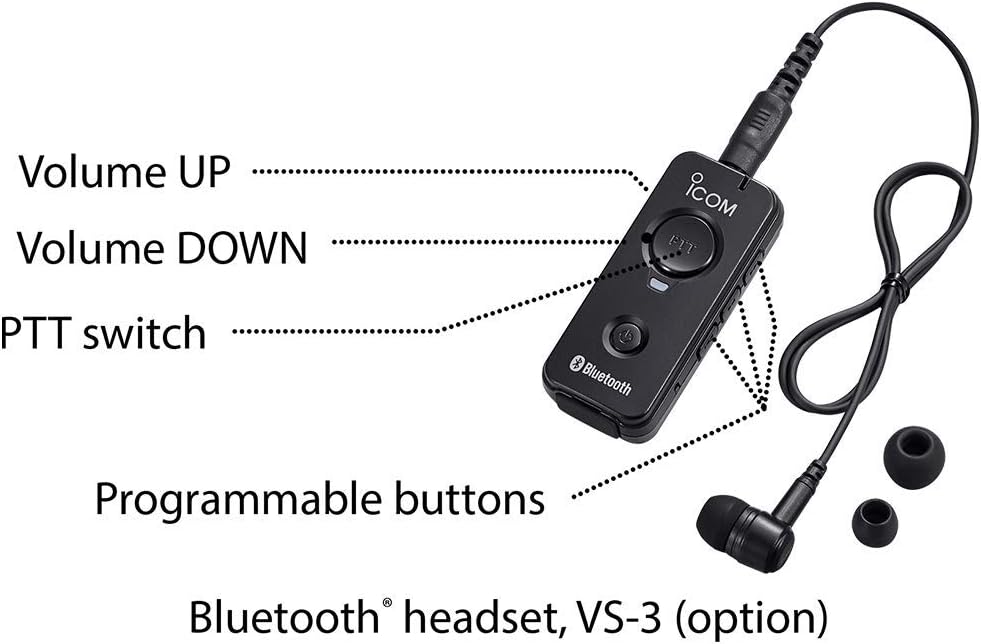
Image 2.1: Icom VS-3 Bluetooth Pendant Headset with labeled controls. The image shows the compact black pendant with an Icom logo, a PTT button, a Bluetooth logo, and an earbud connected via a cable. Labels point to 'Volume UP', 'Volume DOWN', 'PTT switch', and 'Programmable buttons'.

Image 2.2: Icom VS-3 Bluetooth Pendant Headset worn on a mannequin head. The image illustrates how the headset is worn, with the pendant clipped to clothing and the earbud placed in the ear.
3. Setup
3.1 Charging the Headset
- Locate the Micro USB port on the VS-3 pendant.
- Connect the provided Micro USB cable to the VS-3 and the other end to a compatible USB power source (e.g., computer USB port, USB wall adapter).
- The charging indicator light will illuminate. Allow sufficient time for a full charge before first use.
- Once fully charged, disconnect the cable.
3.2 Pairing with a Radio
The VS-3 is compatible with specific Icom radios, including IC-2730A, IC-705, ID-52A, ID-5100A, and ID-4100A. Refer to your radio's instruction manual for detailed Bluetooth pairing procedures.
- Ensure the VS-3 is sufficiently charged and powered off.
- Put the VS-3 into pairing mode. This typically involves pressing and holding the power button or a dedicated pairing button until an indicator light flashes rapidly (refer to the VS-3's quick start guide if available for exact button sequence).
- On your compatible Icom radio, navigate to the Bluetooth settings menu.
- Initiate a device search on the radio.
- Select 'VS-3' or a similar identifier from the list of found devices on your radio's display.
- Confirm the pairing on both devices if prompted. A successful connection will usually be indicated by a steady light on the VS-3.
4. Operating Instructions
4.1 Power On/Off
- To Power On: Press and hold the power button (usually the button with the Bluetooth logo) until the indicator light illuminates.
- To Power Off: Press and hold the power button until the indicator light turns off.
4.2 Volume Control
Use the 'Volume UP' and 'Volume DOWN' buttons on the VS-3 pendant to adjust the audio output level from your radio.
4.3 Push-To-Talk (PTT) Function
Press and hold the 'PTT' button on the VS-3 pendant to transmit. Release the button to receive. Ensure your radio is configured to accept external PTT commands via Bluetooth.
4.4 Programmable Buttons
The VS-3 features programmable buttons. The specific functions assigned to these buttons are typically configured within your compatible Icom radio's settings. Refer to your radio's instruction manual for details on how to customize these functions.
4.5 General Usage
Once paired and powered on, the VS-3 will wirelessly transmit audio from your radio to the earbud and allow for hands-free transmission via the PTT button. Ensure the pendant is positioned for clear microphone pickup if it includes an integrated microphone.
5. Maintenance
5.1 Cleaning
- Wipe the VS-3 pendant and earbud with a soft, dry cloth.
- Do not use harsh chemicals, solvents, or abrasive cleaners.
- Avoid getting moisture into the Micro USB port or speaker/microphone openings.
5.2 Storage
- Store the VS-3 in a cool, dry place away from direct sunlight and extreme temperatures.
- Avoid storing in dusty or humid environments.
5.3 Battery Care
- Recharge the battery regularly, even if the device is not in frequent use, to maintain battery health.
- Avoid fully discharging the battery for extended periods.
6. Troubleshooting
- Headset does not power on: Ensure the battery is charged. Connect to a power source using the Micro USB cable.
- Cannot pair with radio:
- Ensure the VS-3 is in pairing mode (indicator light flashing).
- Verify your radio's Bluetooth function is enabled and in discovery mode.
- Check if the VS-3 is already paired with another device. Disconnect from other devices if necessary.
- Confirm your radio model is listed as compatible (IC-2730A, IC-705, ID-52A, ID-5100A, ID-4100A).
- Restart both the VS-3 and the radio, then attempt pairing again.
- No audio from headset:
- Ensure the VS-3 is successfully paired and connected to the radio.
- Check the volume level on both the VS-3 and the radio.
- Verify the earbud is properly connected to the pendant and seated correctly in your ear.
- PTT function not working:
- Ensure the VS-3 is connected to the radio.
- Check your radio's settings to confirm that external PTT via Bluetooth is enabled.
7. Specifications
| Feature | Specification |
|---|---|
| Model Name | VS-3 |
| Brand | ICOM |
| Connectivity Technology | Wireless |
| Wireless Communication Technology | Bluetooth |
| Bluetooth Version | 3.0 |
| Input Device Interface | Bluetooth |
| Connector Information | Micro USB |
| Compatible Devices | IC-2730A, IC-705, ID-52A, ID-5100A, ID-4100A |
| Ear Placement | In Ear |
| Form Factor | In Ear |
| Color | Black |
| Special Feature | Lightweight |
| Item Weight | 4.2 ounces |
| Package Dimensions | 6.26 x 2.44 x 2.4 inches |
| UPC | 701630969544 |
8. Warranty Information
Specific warranty details for the Icom VS-3 Bluetooth Pendant Headset are not provided within this manual. For comprehensive warranty terms and conditions, please refer to the official Icom website, the product packaging, or contact your authorized Icom dealer.
9. Support Information
For technical assistance, product inquiries, or further support regarding your Icom VS-3 Bluetooth Pendant Headset, please visit the official Icom website or contact Icom customer service through the channels provided on their website. Contact information for authorized service centers may also be available on the Icom website.


