
Introduction
This user manual provides comprehensive instructions for the safe and efficient operation of your Hitachi RAR-2P2 remote control. This remote is designed to control compatible Hitachi air conditioning units, offering convenient access to various functions. Please read this manual thoroughly before use and retain it for future reference.
Product Overview
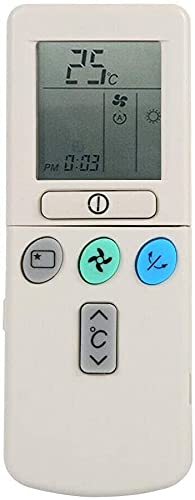
Figure 1: Front view of the Hitachi RAR-2P2 Remote Control. It features an LCD screen at the top displaying temperature, mode, and time. Below the screen are a power button, followed by buttons for mode selection (star icon), fan speed (three-bladed fan icon), and swing function (two arrows). At the bottom, there are temperature adjustment buttons (up and down arrows with a degree Celsius symbol).
Setup
1. Battery Installation
- Locate the battery compartment cover on the back of the remote control.
- Slide the cover downwards or press the latch to open it.
- Insert two AAA batteries (included) according to the polarity indicators (+ and -) inside the compartment. Ensure correct orientation.
- Replace the battery compartment cover, ensuring it clicks securely into place.
Important: Always use new batteries of the same type. Do not mix old and new batteries, or different types of batteries. Remove batteries if the remote will not be used for an extended period.
Operating Instructions
Point the remote control directly at the indoor unit of your air conditioner when operating.
Button Functions:
- Power Button (①): Press to turn the air conditioner ON or OFF.
- Mode Button (★): Press to cycle through operating modes such as Auto, Cool, Dry, Fan, and Heat (if applicable to your AC unit). The current mode is displayed on the LCD.
- Fan Speed Button (☸): Adjusts the fan speed. Options typically include Auto, Low, Medium, and High.
- Swing Button (⇆): Activates or deactivates the automatic swing function of the air conditioner's louvers, directing airflow.
- Temperature Adjustment Buttons (↑°C↓): Use the up arrow to increase the set temperature and the down arrow to decrease it.
LCD Display Indicators:
- Temperature: Displays the set temperature in Celsius.
- Operating Mode Icons: Icons representing Auto, Cool, Dry, Fan, and Heat modes.
- Fan Speed Indicator: Shows the selected fan speed.
- Time Display: Shows the current time (PM 0:03 in the image, indicating 12:03 AM).
Maintenance
Cleaning the Remote Control
- Wipe the remote control with a soft, dry cloth.
- Do not use liquid cleaners, abrasive cleaners, or chemical sprays, as these can damage the remote's surface or internal components.
Battery Replacement
- Replace batteries when the remote's operating range decreases or the display becomes dim.
- Follow the battery installation steps outlined in the "Setup" section.
- Dispose of used batteries responsibly according to local regulations.
Troubleshooting
| Problem | Possible Cause | Solution |
|---|---|---|
| Remote not responding | Dead or incorrectly installed batteries. Obstruction between remote and AC unit. Remote out of range. | Replace batteries, ensuring correct polarity. Remove any obstructions. Ensure remote is within 10 meters of the AC unit. |
| Display is dim or blank | Low battery power. | Replace batteries. |
| AC unit not responding to specific commands | Incorrect mode selected. Remote malfunction. | Verify the correct operating mode is selected. If issues persist after battery replacement, the remote may require service. |
Specifications
- Brand: Hitachi
- Model Name: RAR-2P2
- Connectivity Technology: Wireless
- Controller Type: Remote Control
- Compatible Devices: Hitachi RAR-2P2 (air conditioning units)
- Color: Gray
- Maximum Range: 10 Meters
- Number of Batteries: 2 AAA (included)
- Manufacturer: Hitachi
- Country of Origin: China
Warranty and Support
For information regarding warranty coverage or technical support, please refer to the documentation provided with your Hitachi air conditioning unit or contact Hitachi customer service directly. Keep your purchase receipt as proof of purchase.


