
Introduction
The Fujifilm FinePix XP80 is an all-purpose camera designed for everyday needs, both indoors and outdoors. It integrates four rugged protection features: waterproof up to 50 ft (15m), freeze-proof to temperatures as low as 14°F (-10°C), shockproof to withstand drops from 5.8 ft (1.75m), and dustproof to protect the body from sand and dust.
Key Features
- 4-Way Proof: Waterproof 50 ft / 15m, Freeze-proof 14°F / -10°C, Shockproof 5.8 ft / 1.75m, and Dustproof.
- 16.2 megapixel backlit CMOS sensor delivers high-quality images in low light.
- Continuous shooting mode capable of capturing up to 10.0fps (maximum recording of 10 images at full resolution).
- Full HD Movies with one-touch movie button.
- Connect to your smartphone or tablet for Remote Shooting and Wireless Image Transfer.
Package Contents
The Fujifilm FinePix XP80 package typically includes the following items:
- Fujifilm FinePix XP80 Digital Camera (Graphite Black)
- Rechargeable Li-ion Battery
- USB Cable
- AC Power Adapter
- Hand Strap
- Owner's Manual
Initial Setup
1. Inserting Battery and Memory Card
Open the battery/memory card compartment cover located on the side of the camera. Insert the supplied rechargeable battery, ensuring correct orientation as indicated inside the compartment. Insert a compatible SD/SDHC/SDXC memory card (sold separately) into the memory card slot. Close the compartment cover securely until it clicks into place. For waterproof integrity, ensure the cover is fully sealed.
2. Charging the Battery
Connect the camera to the supplied AC power adapter using the USB cable. Plug the AC power adapter into a wall outlet. The charging indicator will illuminate. Charging is complete when the indicator turns off. Ensure the battery is fully charged before first use.
3. Powering On and Initial Settings
Press and hold the power button to turn on the camera. Follow the on-screen prompts to set the language, date, and time. These settings are crucial for proper image management.
Basic Operation
1. Taking Photos
To take a photo, press the shutter button halfway down to focus, then press it completely to capture the image. The camera features a 16.2 megapixel sensor for high-quality stills.
2. Recording Videos
Press the dedicated one-touch movie button to start recording Full HD videos. Press it again to stop recording. The camera supports 1080p video resolution.
3. Using Shooting Modes
The FinePix XP80 offers various shooting modes, including:
- Underwater Mode: Optimizes color balance and sharpness for underwater photography.
- Continuous Shooting: Capture fast-moving subjects at up to 10 frames per second.
- Panorama: Stitch multiple shots together to create wide panoramic images.
- Other modes include Automatic, Landscape, Macro, Night Portrait, and Portrait.
4. Wireless Image Transfer
Utilize the camera's built-in Wi-Fi to connect to your smartphone or tablet. Download the Fujifilm Camera Remote app to transfer images wirelessly or use your smart device for remote shooting control.
Care and Maintenance
- Cleaning: Wipe the camera body with a soft, dry cloth. For the lens and LCD screen, use a lens cleaning cloth and specialized cleaning solution.
- Water Seal Inspection: Before each underwater use, inspect the battery/memory card compartment seal for any dirt, sand, or damage. Clean and ensure it is free of debris to maintain waterproof integrity.
- Storage: Store the camera in a cool, dry place away from direct sunlight and extreme temperatures. Remove the battery if the camera will not be used for an extended period.
- Battery Care: Fully charge the battery before each use. Avoid completely draining the battery frequently to prolong its lifespan.
Troubleshooting Common Issues
- Camera Won't Turn On: Ensure the battery is fully charged and correctly inserted.
- Poor Image Quality: Check lighting conditions, adjust shooting mode, and ensure the lens is clean.
- Water Leakage: Immediately remove the battery and memory card. Allow the camera to dry completely. Always ensure the battery/memory card compartment is securely closed and free of debris before water exposure.
- Wi-Fi Connection Issues: Ensure the Fujifilm Camera Remote app is updated and the camera's Wi-Fi is enabled. Try restarting both devices.
Technical Specifications
| Feature | Specification |
|---|---|
| Sensor Type | 16.2 MP Backlit CMOS |
| Waterproof Depth | Up to 50 ft (15m) |
| Freeze-proof | Up to 14°F (-10°C) |
| Shockproof Height | Up to 5.8 ft (1.75m) |
| Display | 2.7 Inches LCD |
| Optical Zoom | 5x |
| Video Resolution | Full HD 1080p |
| Connectivity | Wi-Fi, USB |
| Storage Media | SD/SDHC/SDXC Card |
| Item Weight | 179 Grams |
Warranty Information
Legal Disclaimer: Must be 18 years or older. No refunds, returns, or exchanges.
Product Visuals and Demonstrations
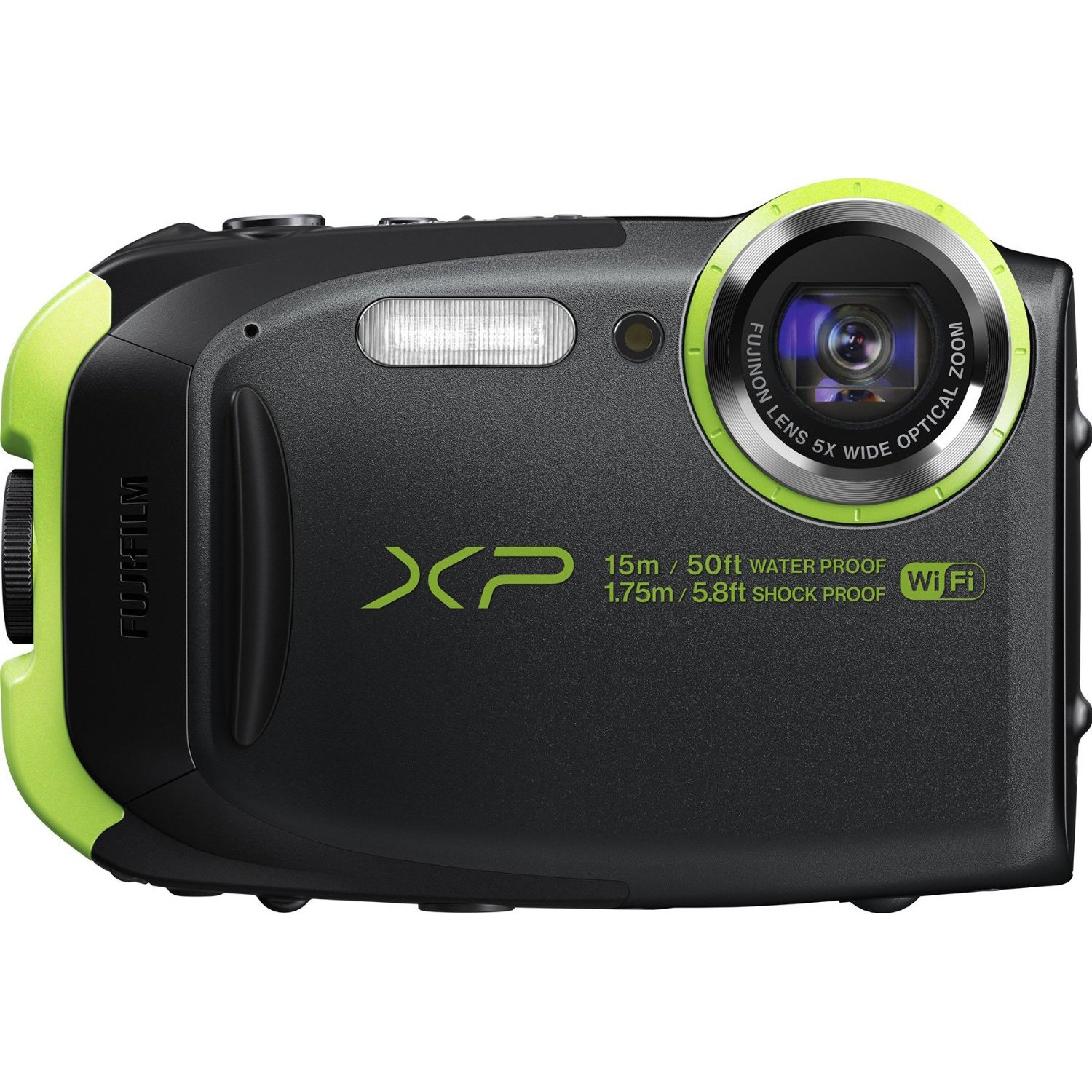
Image: Fujifilm FinePix XP80 Waterproof Digital Camera in Graphite Black, showcasing its compact and rugged design.
Video: A demonstration of a waterproof digital camera, highlighting its features and durability in aquatic environments. This video is provided by a seller.


