
Introduction
Thank you for choosing the Lumitec Lighting NevisLT Light. This manual provides essential information for the safe installation, operation, and maintenance of your new light. Please read these instructions thoroughly before installation and keep them for future reference.
The NevisLT is designed to provide bright, even illumination with a 180-degree spread, ideal for hard-to-light areas. It is certified as ignition protected and compatible with most PWM LED dimmers.
Important Safety Information
WARNING: Failure to follow these safety instructions could result in fire, electric shock, serious injury, or property damage.
- Always disconnect power before installing or servicing the light.
- Installation should be performed by a qualified technician in accordance with all local and national electrical codes.
- Ensure the power source voltage matches the light's requirements (12 Volts).
- Do not modify the light in any way. Unauthorized modifications will void the warranty and may create safety hazards.
- This product is designed for marine and industrial use. Ensure proper sealing and mounting for the intended environment.
- Avoid direct eye exposure to the light when it is operating, as it is very bright (1000 Lumens).
What's in the Box
Upon opening the package, please verify that all components are present and undamaged:
- Lumitec Lighting 101296 NevisLT Light, White
- Mounting Hardware (e.g., screws, gaskets)
- Installation Template (if applicable)
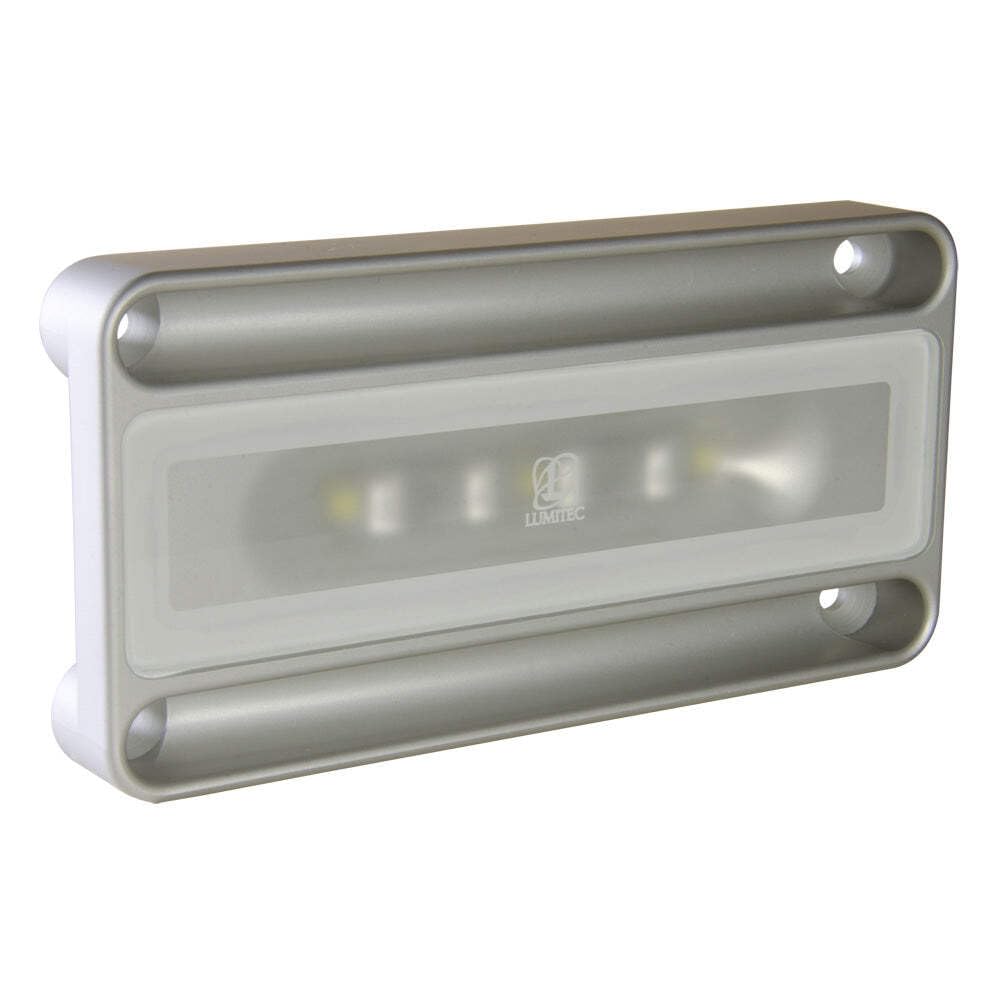
Image: The Lumitec Lighting 101296 NevisLT Light, White. This image shows the compact design of the light fixture, typically used in marine or industrial settings.
Installation Instructions
- Prepare the Mounting Surface: Choose a flat, stable surface for mounting. Ensure there is sufficient space for the light and its wiring.
- Mark Mounting Holes: Use the provided template (if included) or the light fixture itself to mark the locations for drilling mounting holes.
- Drill Holes: Carefully drill pilot holes for the mounting screws. Ensure not to drill too deep to avoid damaging underlying structures.
- Wiring:
- Disconnect all power to the circuit before beginning wiring.
- Connect the positive (+) wire from the power source to the positive wire of the light.
- Connect the negative (-) wire from the power source to the negative wire of the light.
- Ensure all connections are secure and properly insulated to prevent short circuits and corrosion, especially in marine environments.
- If using a PWM LED dimmer, connect it according to the dimmer's instructions.
- Mount the Light: Secure the light fixture to the mounting surface using the provided screws. Do not overtighten.
- Test Functionality: Restore power to the circuit and test the light's operation.
For detailed wiring diagrams or specific marine electrical standards, consult a professional marine electrician.
Operating Instructions
The Lumitec NevisLT Light is designed for straightforward operation.
- Power On/Off: The light is controlled by an external switch connected to its power supply. Toggle the switch to turn the light on or off.
- Dimming (if applicable): If connected to a compatible PWM LED dimmer, adjust the dimmer control to vary the light intensity.
- Color Selection (if applicable for multi-color models): This specific model (101296) is a white light. For multi-color Nevis models, cycling the power switch typically changes the color output.
The NevisLT provides a wide 180-degree spread of bright, even light, making it suitable for illuminating large areas.
Maintenance
The Lumitec NevisLT Light is designed for durability and requires minimal maintenance.
- Cleaning: Periodically clean the lens and housing with a soft cloth and mild soap and water. Avoid abrasive cleaners or solvents that could damage the finish or lens.
- Inspection: Regularly inspect the wiring and connections for any signs of corrosion, wear, or damage, especially in harsh marine environments. Address any issues promptly.
- Seals: Ensure that all seals and gaskets remain intact to maintain the light's water resistance.
No user-serviceable parts are inside the sealed unit. Do not attempt to open the light fixture.
Troubleshooting
| Problem | Possible Cause | Solution |
|---|---|---|
| Light does not turn on. | No power to the light. Faulty wiring connection. Blown fuse or tripped breaker. | Check power supply and switch. Inspect all wiring connections for looseness or corrosion. Check and replace fuse or reset breaker. |
| Light flickers or is dim. | Low voltage. Poor connection. Incompatible dimmer. | Verify correct voltage at the light. Tighten all electrical connections. Ensure dimmer is compatible with LED lights. |
| Light turns on but then turns off. | Overheating (unlikely for LED, but possible in extreme conditions). Intermittent power supply. | Ensure adequate ventilation around the light. Check power source stability. |
If troubleshooting steps do not resolve the issue, contact Lumitec customer support or a qualified technician.
Specifications
| Feature | Detail |
|---|---|
| Model Number | 101296 |
| Brand | Lumitec |
| Light Output | 1000 Lumens |
| Color | White |
| Voltage | 12 Volts |
| Wattage | 12 watts |
| Product Dimensions | 7 x 4 x 4 inches |
| Item Weight | 12.7 ounces |
| Special Features | Ignition Protected |
| Specific Uses | Industrial, Marine |
| GTIN (UPC) | 089300012968 |
Warranty Information
Lumitec offers an extended 5-Year Warranty across its complete line of extreme environment LED products, including the NevisLT Light. This warranty covers defects in materials and workmanship under normal use.
For warranty claims or detailed terms and conditions, please visit the official Lumitec website or contact customer support.
Customer Support
If you have any questions, require technical assistance, or need to report an issue, please contact Lumitec customer support:
- Website: www.lumiteclighting.com
- Phone: Refer to the Lumitec website for current contact numbers.
- Email: Refer to the Lumitec website for current contact email addresses.
Please have your product model number (101296) and purchase date available when contacting support.


