
1. Product Overview
The Red Lion PAXLPT is a versatile process time indicator designed for industrial applications. It provides precise measurement and display of process times, making it suitable for monitoring various manufacturing and control processes. This device features an LED display for clear visibility and is housed in a durable enclosure for reliable performance in demanding environments.
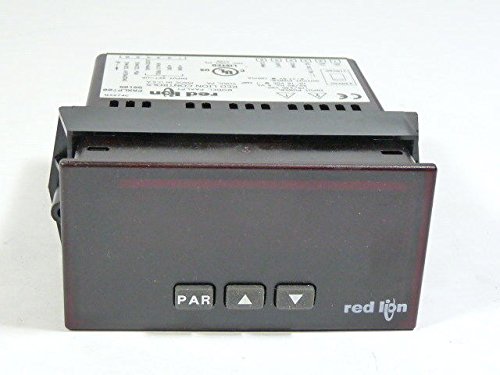
Figure 1: Front and side view of the Red Lion PAXLPT Process Time Indicator, showing its compact design and mounting bracket.
2. Safety Information
WARNING: Disconnect all power before opening or servicing this device. Failure to do so may result in electric shock or damage to the equipment.
- Ensure installation is performed by qualified personnel only.
- Adhere to all local and national electrical codes.
- Do not operate the device in environments exceeding its specified operating conditions.
- Protect the device from moisture and extreme temperatures.
- Use only specified power sources.
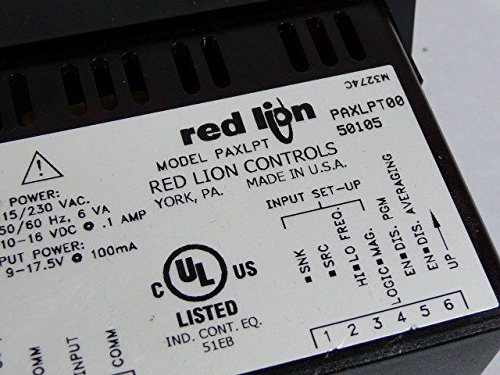
Figure 2: Detailed view of the product label on the Red Lion PAXLPT, highlighting electrical specifications and safety warnings, including "CAUTION: DISCONNECT ALL POWER BEFORE OPENING".
3. Setup and Installation
3.1 Mounting
The PAXLPT is designed for panel mounting. Ensure adequate clearance for ventilation and wiring connections. Secure the device using the provided mounting hardware. Refer to the product dimensions for proper panel cutout requirements.
3.2 Wiring Connections
All wiring should be performed with power disconnected. The terminal block on the rear of the unit provides connections for power input, signal inputs, and outputs. Refer to the wiring diagram on the product label (Figure 2) for specific terminal assignments.
- Input Power: Connect the main power supply (115/230 VAC, 50/60 Hz) to the designated terminals.
- Signal Inputs: Connect process signals according to your application requirements. The label indicates inputs for SNK (Sink), SRC (Source), HI LO FREQ, EN DIS PGM, EN DIS AVG.
- Output Power: The device provides an output power of 9-17.5 V @ 0.1 A.
Ensure all connections are secure and properly insulated to prevent short circuits or electrical hazards.
4. Operation
4.1 Powering On
Once all wiring is complete and verified, apply power to the unit. The LED display will illuminate, indicating the device is operational.
4.2 Display Interpretation
The LED display shows the measured process time. The specific units and scaling depend on the device's configuration, which is typically set during initial setup or through programming interfaces (not detailed in this general manual).
4.3 Input Set-Up
The device supports various input configurations as indicated on the label (Figure 2). These settings determine how the process time is measured and calculated. Consult the full product manual for detailed programming instructions for specific input types (e.g., Sink, Source, High/Low Frequency, Enable/Disable Program, Enable/Disable Averaging).
5. Maintenance
5.1 Cleaning
Keep the device clean and free from dust and debris. Use a soft, dry cloth for cleaning the display and enclosure. Do not use abrasive cleaners or solvents, as these may damage the unit.
5.2 Inspection
Periodically inspect the wiring connections for tightness and signs of wear or damage. Ensure the mounting is secure. If any damage is observed, disconnect power and arrange for repair or replacement.
5.3 Calibration
While the PAXLPT is designed for stable operation, periodic calibration may be required depending on the application's precision requirements. Refer to the comprehensive Red Lion PAXLPT technical manual for calibration procedures, if applicable.
6. Troubleshooting
This section provides basic troubleshooting steps for common issues. For more complex problems, contact Red Lion technical support.
| Problem | Possible Cause | Solution |
|---|---|---|
| No display/No power | No power supply, incorrect wiring, blown fuse (internal/external) | Check power connections. Verify input voltage. Inspect wiring for faults. |
| Incorrect readings | Incorrect input signal, improper configuration, sensor fault | Verify input signal integrity. Check device configuration settings. Test connected sensors. |
| Display flickering | Unstable power supply, electrical interference | Ensure stable power. Check for sources of electrical noise. |
7. Specifications
- Model: PAXLPT
- Manufacturer: Red Lion Controls
- Input Power: 115/230 VAC, 50/60 Hz, 6 VA
- Output Power: 9-17.5 V @ 0.1 A (100mA)
- Product Dimensions: 23 x 16 x 18 cm (approximately)
- Item Weight: 2 kg (approximately)
- Certifications: UL US LISTED (IND. CONT. EQ. 51EB)
- Display: LED
8. Warranty & Support
8.1 Warranty Information
Red Lion Controls products are typically covered by a manufacturer's warranty against defects in materials and workmanship. The specific terms and duration of the warranty may vary. Please refer to the official Red Lion Controls website or your purchase documentation for detailed warranty information.
8.2 Technical Support
For technical assistance, troubleshooting beyond this manual, or inquiries regarding parts and service, please contact Red Lion Controls customer support. You can find contact information and additional resources on their official website: