
1. Introduction
The Monster SuperStar BackFloat is a high-definition, waterproof, and floating Bluetooth speaker designed for use in various wet environments. It delivers powerful and precise Pure Monster Sound, making it ideal for pools, showers, jacuzzis, beaches, and camping. Its rugged design ensures durability against splashes and shocks.

2. Setup
2.1. Package Contents
Before you begin, ensure all items are present in the package:
- Monster SuperStar BackFloat Speaker
- USB Charging Cable
- Acoustically Transparent Protective Carry Pouch
- User Manual (this document)
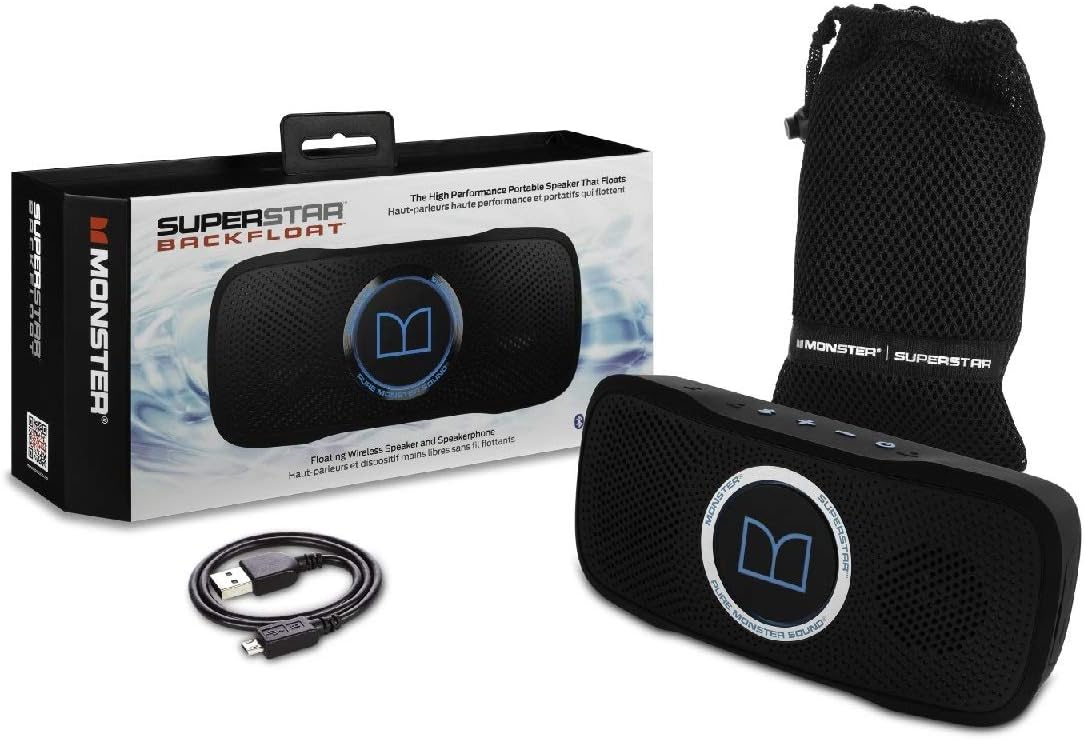
2.2. Charging the Speaker
The SuperStar BackFloat is powered by a rechargeable Lithium Ion battery. For optimal performance, fully charge the speaker before first use.
- Connect the supplied USB cable to the speaker's charging port.
- Connect the other end of the USB cable to a USB power adapter (not included) or a computer's USB port.
- The charging indicator light will illuminate. Once fully charged, the light may change color or turn off (refer to specific LED indicators in the Operating section).
A full charge provides approximately 7 hours of playback time.
2.3. Powering On/Off
To power on the speaker, press and hold the Power button ( ) located on the top panel until the indicator light illuminates. To power off, press and hold the Power button again until the light turns off.
3. Operating the Speaker
3.1. Bluetooth Pairing
The SuperStar BackFloat connects wirelessly to any Bluetooth-enabled device (e.g., smartphone, tablet) within a range of up to 33 feet (10 meters).
- Ensure the speaker is powered on.
- Press and hold the Bluetooth button () until the Bluetooth indicator light begins to flash, indicating it's in pairing mode.
- On your device, enable Bluetooth and search for new devices.
- Select "SuperStar BackFloat" from the list of available devices.
- Once paired, the Bluetooth indicator light on the speaker will become solid.
3.2. Auxiliary Input
For devices without Bluetooth, you can connect using a 3.5mm Aux line (cable not included).
- Connect one end of a 3.5mm audio cable to the AUX input port on the speaker.
- Connect the other end to the headphone jack or audio output of your device.
- The speaker will automatically switch to AUX mode.
3.3. Volume Control
Adjust the volume using the Volume Up () and Volume Down () buttons on the top panel of the speaker, or directly from your connected device.
3.4. Speakerphone Functionality
The built-in microphone allows for hands-free calls when connected via Bluetooth.
- To answer an incoming call, press the Bluetooth button once.
- To end a call, press the Bluetooth button once.
- To reject an incoming call, press and hold the Bluetooth button.
3.5. Waterproof and Floating Use
The SuperStar BackFloat is designed to be waterproof and float on water. It is suitable for use in pools, showers, jacuzzis, and other wet environments. Ensure all port covers are securely closed before exposing the speaker to water.

Video: Shaquille O'Neal demonstrating the Monster SuperStar BackFloat's waterproof capabilities at CES 2015. He discusses its portability and sound quality.
Video: Andru Edwards interviews Shaquille O'Neal about the Monster SuperStar BackFloat, highlighting its waterproof design and powerful sound in a compact form factor.
4. Maintenance
4.1. Cleaning
After use, especially in water, it is recommended to gently wipe down the speaker with a soft, dry cloth to remove any water, dirt, or debris. Ensure the charging port and AUX input are dry before opening or charging.
4.2. Storage
Store the speaker in a cool, dry place away from direct sunlight and extreme temperatures. Use the provided acoustically transparent protective carry pouch for transport and storage to prevent scratches and minor impacts.
5. Troubleshooting
| Problem | Possible Cause | Solution |
|---|---|---|
| Speaker does not power on. | Low battery. | Charge the speaker using the USB cable. |
| Cannot pair via Bluetooth. | Speaker not in pairing mode; device Bluetooth off; too far from device. | Ensure speaker is in pairing mode (flashing Bluetooth light). Turn Bluetooth on your device. Move speaker closer to device (within 33 feet/10 meters). Try restarting both devices. |
| No sound or distorted sound. | Volume too low; speaker wet; poor Bluetooth connection. | Increase volume on speaker and device. If wet, gently shake off excess water and allow to dry. Re-establish Bluetooth connection. |
| Poor Bluetooth range/disconnections. | Obstructions; interference; distance. | Reduce distance between speaker and device. Remove any large obstructions. Avoid areas with strong Wi-Fi or other wireless interference. |
6. Specifications
- Model Name: SuperStar BackFloat
- Model Number: MSP SPSTR BKF BT BK N-BL WW
- Brand: Monster
- Speaker Type: Outdoor, Portable Bluetooth Speaker
- Special Feature: Waterproof, Floating
- Recommended Uses: Music, Pool, Beach
- Compatible Devices: Smartphone (and other Bluetooth-enabled devices)
- Color: Black
- Product Dimensions: 1.57"D x 7.25"W x 3.25"H
- Item Weight: 0.5 Kilograms (1.1 pounds)
- Water Resistance Level: Waterproof
- Control Method: Touch buttons
- Power Source: Battery Powered (Rechargeable Lithium Ion battery)
- Number of Batteries: 1 Lithium Ion battery required
- Speaker Maximum Output Power: 25 Watts
- Connectivity Technology: Auxiliary, Bluetooth, USB
- Audio Output Mode: Stereo
- Wireless Range: 33 feet (10 meters)
- Playback Time: Approximately 7 hours
- UPC: 050644734991
7. Warranty Information
This product comes with a limited warranty. For detailed terms and conditions, please refer to the warranty card included in your product packaging or visit the official Monster Products website.
8. Customer Support
For further assistance, technical support, or product inquiries, please visit the official Monster Products website or contact their customer service department. Contact information can typically be found on the manufacturer's website or in the product packaging.


