
Introduction
This manual provides essential instructions for the proper use and care of your Digital Nc accessory package, designed for the Olympus Stylus VG-170 Digital Camera. The package includes a high-capacity replacement battery, a deluxe hard shell padded case, and an adjustable neck strap. Please read this manual thoroughly before using the products to ensure optimal performance and longevity.
Package Contents
Verify that all items listed below are present in your package:
- 1x Li-50B High Capacity Replacement Battery (3.7V, 1000mAh)
- 1x Deluxe Hard Shell Padded Case (approximately 4 3/4" x 2 3/4" x 1 3/4")
- 1x Adjustable Neck Strap (Lanyard Style) with Quick-Release
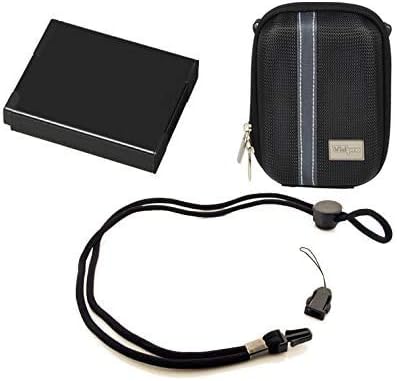
Figure 1: Contents of the Digital Nc accessory package, including the replacement battery (represented by the black box), the padded camera case, and the adjustable neck strap.
Battery Installation and Charging
1. Initial Charge
Before first use, fully charge the Li-50B replacement battery. Use the original Olympus charger or a compatible charger designed for Li-50B batteries. Refer to your camera's original instruction manual for specific charging procedures.
2. Battery Installation
- Ensure your Olympus Stylus VG-170 camera is powered off.
- Locate and open the battery compartment cover on your camera.
- Insert the Li-50B battery into the compartment, ensuring the contacts align correctly with the camera's terminals.
- Close the battery compartment cover securely until it clicks into place.
3. Charging Guidelines
- Always use a charger compatible with Li-50B batteries.
- Avoid overcharging the battery; disconnect it once fully charged.
- Do not expose the battery to extreme temperatures or direct sunlight.
Camera Case Usage
The deluxe hard shell padded case is designed to protect your Olympus Stylus VG-170 camera from minor impacts, scratches, and dust.
- Open the zipper of the camera case.
- Carefully place your Olympus Stylus VG-170 camera inside the padded interior.
- Ensure the camera fits snugly without excessive force.
- Close the zipper completely to secure the camera within the case.
The case may also have a small internal pocket for a spare memory card or an extra battery.

Figure 2: Example of a camera case and a camera with a neck strap. Note: The camera shown is for illustrative purposes and may not be an Olympus Stylus VG-170.
Neck Strap Attachment and Usage
The adjustable neck strap provides a secure and convenient way to carry your camera, reducing the risk of accidental drops.
1. Attaching the Strap
- Locate the strap eyelet or attachment point on your Olympus Stylus VG-170 camera. This is typically a small loop on the side of the camera body.
- Thread the thin loop end of the neck strap through the camera's eyelet.
- Pass the main body of the neck strap through the threaded loop, pulling it tight to secure it to the camera.
- Ensure the connection is firm and cannot easily detach.
2. Adjusting the Strap
The strap features an adjustable slider. Slide it to lengthen or shorten the strap to your desired comfort level for wearing around your neck or wrist.
3. Quick-Release Function
The quick-release buckle allows for rapid detachment of the camera from the main strap. Press the release buttons on the side of the buckle to separate the camera portion from the neck portion.

Figure 3: A person demonstrating the use of a neck strap with a digital camera. Note: The camera shown is for illustrative purposes and may not be an Olympus Stylus VG-170.
Maintenance
Battery Care:
- Store batteries in a cool, dry place when not in use.
- Avoid fully discharging the battery for extended periods.
- If storing for a long time, charge the battery to about 50% capacity every 6 months.
- Do not disassemble, puncture, or expose the battery to fire or water.
Case and Strap Care:
- Clean the case and strap with a soft, damp cloth. Do not use harsh chemicals.
- Inspect the strap and its attachment points regularly for signs of wear or damage. Replace if necessary.
- Keep the case and strap dry to prevent mold or material degradation.
Troubleshooting
Battery Related Issues:
- Battery not charging: Ensure the battery is correctly inserted into the charger and the charger is connected to a power source. Verify the charger is compatible with Li-50B batteries.
- Short battery life: Ensure the battery has been fully charged. Battery performance can degrade over time; consider replacing if significantly reduced.
- Camera not powering on with new battery: Check that the battery is inserted correctly and fully charged. Ensure the camera's battery contacts are clean.
Strap/Case Related Issues:
- Strap not attaching securely: Ensure the strap is threaded correctly through the camera's eyelet and pulled tight.
- Case zipper sticking: Apply a small amount of zipper lubricant or graphite to the zipper teeth.
Specifications
| Component | Detail |
|---|---|
| Battery Type | Li-50B High Capacity Lithium-Ion |
| Battery Voltage | 3.7V |
| Battery Capacity | 1000 mAh |
| Case Dimensions (Approx.) | 4 3/4" x 2 3/4" x 1 3/4" |
| Strap Style | Lanyard with Quick-Release |
| Compatibility | Olympus Stylus VG-170 Digital Camera |
| Manufacturer | Digital Nc |
| Model Number | OVG170BA1 |
Warranty and Support
For warranty information and customer support regarding your Digital Nc accessory package, please refer to the documentation provided with your purchase or contact the retailer directly. You may also visit the Digital Nc Store on Amazon for further assistance.