
Havells GHCICAXK190
Havells Induction Cooktop Et-X GHCICAXK190 User Manual
Model: GHCICAXK190
1. Introduction
This manual provides essential information for the safe and efficient operation of your Havells Induction Cooktop Et-X GHCICAXK190. Please read all instructions carefully before using the appliance and retain this manual for future reference.
The Havells Induction Cooktop Et-X is a 1900W appliance featuring digital touch controls, a ceramic plate, 8 pre-set cooking modes including Indian options, auto shutoff, overheat protection, and a 6KV surge protector. It is designed for modern kitchen use, offering quick and efficient cooking.
2. Safety Instructions
WARNING: Failure to follow these safety instructions may result in electric shock, fire, or serious injury.
- Ensure the appliance is connected to a properly grounded electrical outlet with the correct voltage (220-240V AC, 50Hz).
- Do not immerse the cooktop, power cord, or plug in water or any other liquid.
- Keep the appliance away from heat sources, direct sunlight, and moisture.
- Do not operate the cooktop if the power cord or plug is damaged, or if the appliance malfunctions or has been damaged in any way. Contact authorized service personnel.
- Use only induction-compatible cookware. Non-induction cookware will not heat.
- Do not place metallic objects such as knives, forks, spoons, lids, keys, or coins on the ceramic plate, as they may become hot.
- Allow the ceramic plate to cool down completely after use. The "Residual Heat" indicator will show when the surface is hot. Do not touch the hot surface.
- Ensure proper ventilation around the cooktop. Do not block the air vents.
- This appliance is not intended for use by persons (including children) with reduced physical, sensory, or mental capabilities, or lack of experience and knowledge, unless they have been given supervision or instruction concerning use of the appliance by a person responsible for their safety.
- Unplug the cooktop from the power outlet when not in use and before cleaning.
- Do not perform dry-braising (heating an empty pan) as this can damage the cooktop.
3. Product Overview
The Havells Induction Cooktop Et-X features a sleek design with a durable ceramic plate and an intuitive digital touch control panel.
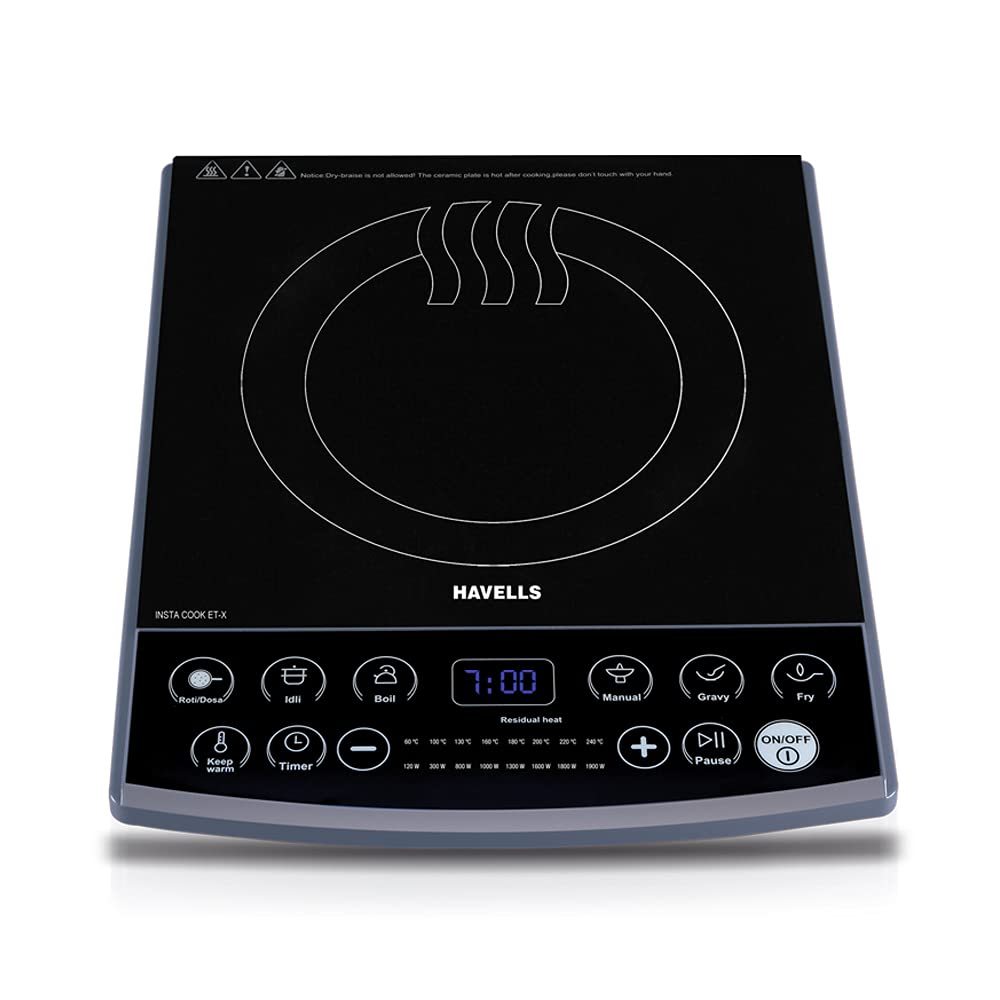
Figure 3.1: Havells Induction Cooktop Et-X, showing the ceramic plate and control panel.
3.1. Key Components
- Ceramic Plate: The cooking surface where induction-compatible cookware is placed. It heats quickly and efficiently.
- Digital Touch Control Panel: For selecting cooking modes, adjusting temperature/power, and setting the timer.
- LED Display: Shows time, temperature, or power settings.
- Air Vents: Located on the sides and bottom for cooling the internal components. Ensure they are not obstructed.
3.2. Control Panel Features

Figure 3.2: Detailed view of the sensitive touch panel for easy operation.
- ON/OFF Button: Powers the cooktop on or off.
- Pre-set Cooking Modes: Dedicated buttons for various dishes (e.g., Roti/Dosa, Idli, Boil, Fry, Gravy, Keep Warm, and other Indian options).
- Manual Mode: Allows for custom temperature or power settings.
- Temperature/Power Adjustment Buttons (+/-): To increase or decrease heat levels.
- Timer Button: Activates and adjusts the cooking timer.
- Pause Button: Temporarily stops cooking without turning off the unit.
- LED Display: Shows current settings and remaining time.
- Residual Heat Indicator: Illuminates when the ceramic plate is hot after cooking.

Figure 3.3: The LED display showing time and temperature settings.
4. Setup
- Unpacking: Carefully remove the cooktop from its packaging. Retain packaging materials for future transport or storage.
- Placement: Place the cooktop on a flat, stable, heat-resistant surface. Ensure there is at least 10-15 cm of clear space around all sides for proper ventilation. Do not place it near water sources or flammable materials.
- Power Connection: Plug the power cord into a suitable grounded electrical outlet. The cooktop will emit a beep, and the display may briefly illuminate.
- Initial Cleaning: Before first use, wipe the ceramic plate with a soft, damp cloth. Ensure it is completely dry before plugging in.
5. Operating Instructions
5.1. Compatible Cookware
Only use cookware made of ferromagnetic materials (iron, cast iron, magnetic stainless steel) with a flat bottom. Cookware diameter should be between 12 cm and 26 cm. A simple test: if a magnet sticks to the bottom of your pot, it is induction compatible.
5.2. Basic Operation
- Place induction-compatible cookware with food on the center of the ceramic plate.
- Press the ON/OFF button to power on the cooktop. The display will light up.
- Select a desired cooking mode:
- Pre-set Modes: Press one of the 8 pre-set buttons (e.g., Roti/Dosa, Idli, Boil, Fry, Gravy, Keep Warm). The cooktop will automatically adjust to optimal temperature and power for that function.
- Manual Mode: Press the Manual button. Use the +/- buttons to adjust the power level (Watts) or temperature (Celsius) as desired. The display will show the current setting.
- To stop cooking, press the ON/OFF button. The cooktop will turn off, and the "Residual Heat" indicator may remain lit if the surface is hot.
5.3. Timer Function

Figure 5.1: Control panel with options for variable temperature and timer settings.
The cooktop features a 3-hour pre-set timer.
- While cooking, press the Timer button.
- Use the +/- buttons to set the desired cooking time (up to 3 hours).
- The timer will start counting down. Once the set time expires, the cooktop will automatically turn off.
5.4. Pause Function
Press the Pause button to temporarily stop the cooking process. The cooktop will pause, and the display will flash. Press Pause again to resume cooking with the previous settings.
5.5. Safety Features
- Auto Pan Detection: The cooktop will only generate heat when an induction-compatible pan is placed on the ceramic plate. If no pan is detected or an incompatible pan is used, an error code may appear, and the cooktop will not heat.
- Auto Shutoff: If no operation is performed for a certain period (e.g., 2 hours, depending on the mode), or if the timer expires, the cooktop will automatically shut off to save energy and enhance safety.
- Overheat Protection: If the internal temperature of the cooktop becomes too high, it will automatically reduce power or shut down to prevent damage. An error code may be displayed.
- 6KV Surge Protector: Built-in protection against voltage fluctuations, safeguarding the appliance from electrical surges.
- Residual Heat Indicator: After cooking, the display may show "H" or a similar indicator to warn that the ceramic plate is still hot. Do not touch the surface until the indicator turns off.
6. Maintenance and Cleaning
Regular cleaning and maintenance will ensure the longevity and optimal performance of your Havells Induction Cooktop.

Figure 6.1: The ceramic plate is easy to clean with a soft cloth.
- Before Cleaning: Always unplug the cooktop from the power outlet and ensure the ceramic plate has cooled down completely (the "Residual Heat" indicator is off).
- Ceramic Plate: Wipe the ceramic plate with a soft, damp cloth and a mild detergent. For stubborn stains, use a specialized ceramic cooktop cleaner. Avoid abrasive cleaners, scouring pads, or harsh chemicals that can scratch the surface.
- Control Panel: Wipe the control panel with a soft, damp cloth. Ensure no water enters the gaps around the buttons.
- Exterior: Clean the exterior housing with a soft, damp cloth.
- Air Vents: Periodically check and clean the air vents to ensure they are free from dust and debris. Use a soft brush or a vacuum cleaner with a brush attachment.
- Storage: If storing the cooktop for an extended period, ensure it is clean and dry. Store it in its original packaging in a cool, dry place.
7. Troubleshooting
Refer to the table below for common issues and their potential solutions. If the problem persists, contact customer support.
| Problem | Possible Cause | Solution |
|---|---|---|
| Cooktop does not turn on. | No power supply; power cord not plugged in; faulty outlet. | Check power cord connection; test outlet with another appliance; check circuit breaker. |
| Cooktop turns on but does not heat. | Incompatible cookware; no cookware detected; pan not centered. | Use induction-compatible cookware; ensure pan is centered on the cooking zone; check pan size. |
| Error code displayed (e.g., E0, E1, E2). | Overheat protection activated; voltage fluctuation; internal malfunction. | Turn off and unplug the cooktop, let it cool down; check power supply; if error persists, contact service. |
| Fan continues to run after turning off. | Normal operation to cool internal components. | This is normal. The fan will stop automatically once the internal temperature has sufficiently cooled. |
| Cooktop makes a humming or buzzing noise. | Normal sound during induction cooking, especially with certain types of cookware. | This is generally normal. Ensure cookware is flat-bottomed and induction-compatible. |
8. Specifications
| Feature | Detail |
|---|---|
| Brand | Havells |
| Model Number | GHCICAXK190 |
| Power Consumption | 1900W |
| Control Type | Digital Touch Control |
| Cooking Surface | Ceramic Plate |
| Pre-set Modes | 8 (including Indian options) |
| Timer | Up to 3 hours |
| Safety Features | Auto Pan Detection, Auto Shutoff, Overheat Protection, 6KV Surge Protector |
| Item Weight | 2 kg 250 g |
| Item Dimensions (LxWxH) | 14.2 x 34 x 45.6 Centimeters |
| Included Components | Cooktop, Instruction Manual |
| Country of Origin | India |
9. Warranty and Support
Your Havells Induction Cooktop Et-X GHCICAXK190 comes with a 2-Year Coil Warranty from the date of purchase. Please retain your purchase receipt as proof of warranty.
The warranty covers manufacturing defects in the induction coil. It does not cover damage resulting from misuse, accident, unauthorized repair, or normal wear and tear.
For warranty claims, technical assistance, or service inquiries, please contact Havells customer support:
- Customer Care: 1800110303, 18001031313 (Toll-Free)
- Manufacturer: Havells India Limited, Plot no 2A, Sector 12, SIDCUL, IIE, Haridwar 249403, Uttarakhand, India.
- Packer: Havells India Ltd, QRG Towers, 2D, Sec- 126, Expressway, Noida - 201304 UP (India).
For more information, you may visit the official Havells website or contact their customer service directly.
Related documentsGHCICAXK190

Ask a question about this manual
Ask about setup, troubleshooting, compatibility, parts, safety, or missing instructions. Manuals+ will review the question and use this page’s manual context to help answer it.