
Introduction
The Farm Innovators 40W Digital Circulated Air Incubator is designed for efficient egg incubation, accommodating up to 4 dozen eggs. It features a digital display for monitoring temperature, humidity, and days to hatch. An integrated fan ensures consistent airflow for optimal hatching conditions. The incubator includes a preset temperature of 100 degrees Fahrenheit and a high/low-temperature notification light. It is constructed with recycled insulating polystyrene foam and includes EZ fill water channels for convenient water replenishment.
Setup
- Unpacking: Carefully remove all components from the packaging. Ensure all parts listed in the manual are present.
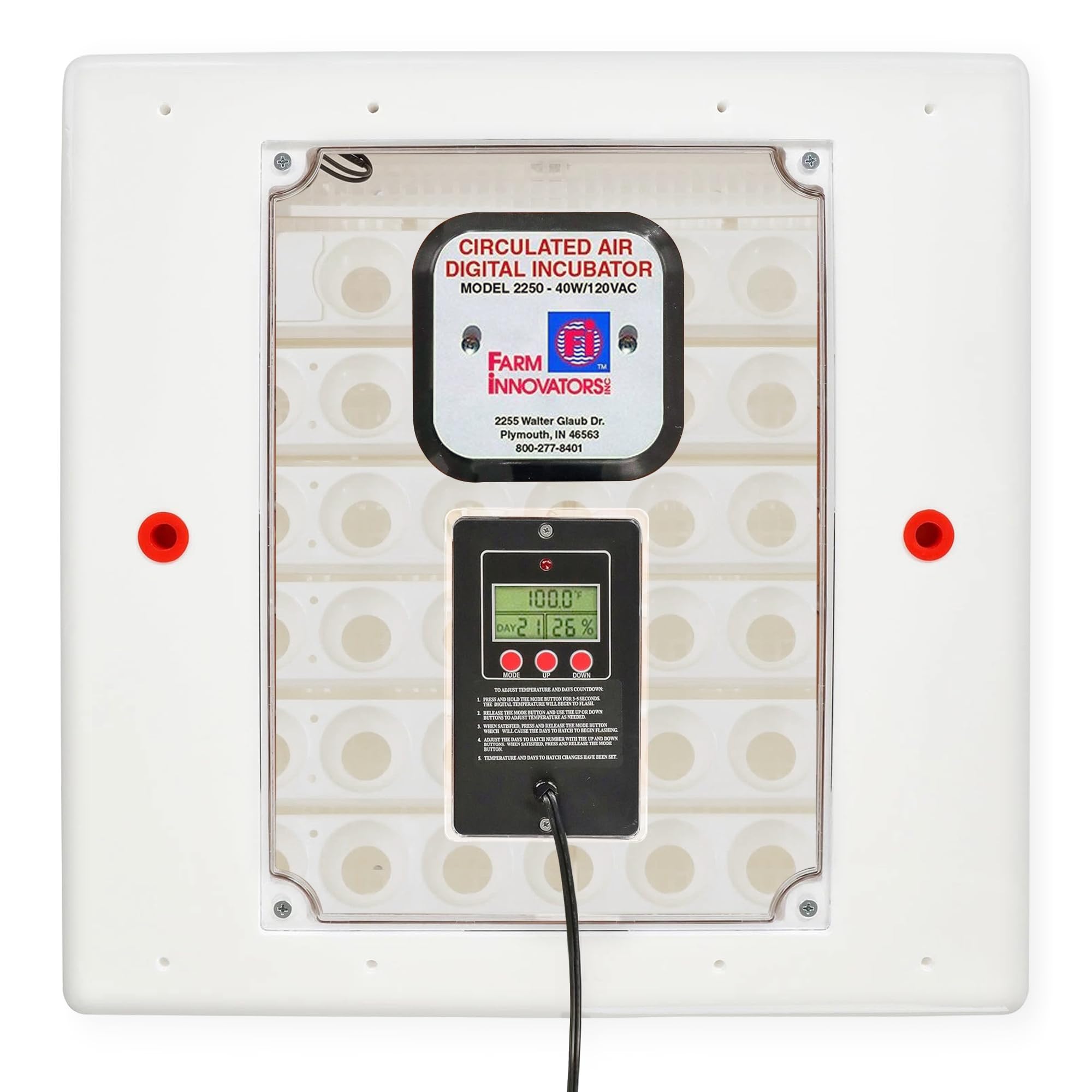
Image: The Farm Innovators 40W Digital Circulated Air Incubator with its lid open, revealing the internal fan, heating element, and egg tray. The digital control panel is visible on the lid.
- Placement: Place the incubator in a room with a stable temperature, ideally between 72°F and 80°F, and good ventilation. Avoid direct sunlight or drafty areas. Placing the incubator on a stable, insulated surface is recommended to maintain consistent internal temperatures.

Image: A diagram illustrating the five key factors for successful egg incubation: Temperature, Humidity, Ventilation and Air Circulation, Egg Turning, and Sanitation. Each factor is accompanied by a brief explanation.
- Power Connection: Connect the power adapter to the incubator and then to a 120V AC power outlet. The digital display will illuminate.
- Egg Tray Installation: Ensure the egg turning mechanism (if applicable) is correctly installed. The incubator is designed to automatically rotate eggs.
Video: A demonstration of the Farm Innovators 40W Digital Egg Incubator, showing its features and how the automatic egg turning mechanism operates. The video highlights the ease of use and the digital display.
- Water Filling: Utilize the EZ fill water channels to add water to the incubator's bottom tray. This can be done without removing the lid. Maintain appropriate humidity levels as specified for your egg type.

Image: A hand demonstrates adding water to the incubator through an EZ fill channel using a dropper, illustrating how to replenish humidity without opening the lid.
Operating Instructions
- Temperature Setting: The incubator is preset to 100°F. To adjust, press and hold the MODE button for 3-5 seconds until the digital temperature flashes. Use the UP or DOWN buttons to adjust. Press MODE again to confirm.

Image: A close-up of the incubator's digital display, showing temperature (100.0°F), days (21), and humidity (26%). Buttons for MODE, UP, and DOWN are visible below the display, along with instructions for adjusting settings.
- Hatch Days Countdown: To customize the days-to-hatch countdown, press and hold the MODE button for 3-5 seconds. Once the temperature flashes, press MODE again until the days-to-hatch number flashes. Use the UP or DOWN buttons to adjust. Press MODE again to confirm.
- Humidity Monitoring: The digital display shows real-time humidity. Maintain ideal humidity between 57-60% during incubation, increasing to 65% during the last 3 days before hatching. Use the EZ fill channels to add water as needed.
- Egg Turning: The integrated automatic egg turner will gently rotate eggs to prevent the yolk from sticking to the shell. This feature simplifies the incubation process.
- High/Low Temperature Notification: The incubator is equipped with a notification light that alerts you to any temperature deviations outside the optimal range.
- Ventilation: Ensure adequate fresh air circulation. Open vent plugs as needed, especially during the last few days of hatching.
Maintenance
- Cleaning: Sanitize the incubation equipment thoroughly both before and after each hatch. Use a mild disinfectant and ensure all surfaces are dry before reuse.
- Storage: When not in use, store the incubator in a clean, dry place away from direct sunlight and extreme temperatures.
Troubleshooting
- Inconsistent Temperature Readings: If the internal temperature varies from the digital display, consider using an additional calibrated thermometer/hygrometer inside the incubator for verification. Ensure the incubator is placed in a stable room environment, not on cold surfaces like metal tables, which can affect temperature stability.
- Low Hatch Rates: Ensure proper egg handling, including correct egg orientation (pointed side down) and consistent turning. Verify that temperature and humidity settings are appropriate for the specific type of eggs being incubated.
- Humidity Control Issues: If humidity is difficult to maintain, ensure water channels are consistently filled. Placing a slightly damp cloth in the bottom tray (if compatible with your setup) can help stabilize humidity.
Specifications
- Product Dimensions: 18 x 18 x 8 inches
- Item Weight: 4 pounds
- Manufacturer: Farm Innovators
- Item Model Number: 2250
- Capacity: Up to 48 eggs (approx. 4 dozen)
- Voltage: 120 Volt
- Wattage: 40 Watt
- Features: Digital display, circulated air, large picture window, EZ fill water channels.
Warranty and Support
For warranty information or technical support, please refer to the contact details provided in your product packaging or visit the official Farm Innovators website. Keep your purchase receipt for warranty claims.

