
APC SRT5KRMXLT
APC Smart-UPS SRT 5000VA RM 208V User Manual
Model: SRT5KRMXLT
1. Introduction and Overview
This manual provides essential information for the safe and efficient operation of your APC Smart-UPS SRT 5000VA Rack-Mountable Uninterruptible Power Supply (UPS). This UPS is designed to provide reliable power protection for critical electronic equipment, ensuring continuous operation during power outages, fluctuations, and surges.
The Smart-UPS SRT 5000VA RM 208V is a 3U rack-mountable unit with a capacity of 5000 VA / 4250 W, operating at 208 V AC. It features multiple NEMA L6-20R and NEMA L6-30R receptacles for connecting various devices.

Figure 1: Front view of the APC Smart-UPS SRT 5000VA RM 208V. This image shows the main chassis of the UPS, highlighting its rack-mountable design and the front grille with the APC logo.
2. Safety Information
WARNING: Risk of Electric Shock. Do not open the UPS. There are no user-serviceable parts inside. Refer servicing to qualified service personnel.
- Always connect the UPS to a grounded outlet.
- Do not use the UPS in direct sunlight, near heat sources, or in areas with excessive dust or humidity.
- Ensure proper ventilation around the UPS. Do not block ventilation openings.
- Disconnect the UPS from the power source before performing any maintenance or installation procedures.
- The UPS contains internal batteries. Do not dispose of batteries in a fire, as they may explode.
- This product contains chemicals known to the State of California to cause cancer and birth defects or other reproductive harm.
3. Setup and Installation
3.1 Unpacking
Carefully unpack the UPS and inspect it for any shipping damage. Retain the packaging materials for future use or return shipping.
3.2 Physical Installation
The Smart-UPS SRT 5000VA is a 3U rack-mountable unit. Install it in a standard 19-inch equipment rack using the provided rack-mounting hardware. Ensure the rack can support the UPS's weight of approximately 123 pounds (55.8 kg).
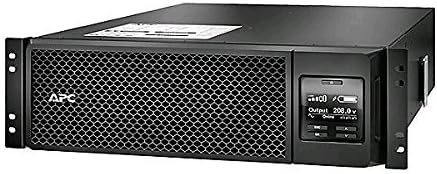
Figure 2: Front panel of the APC Smart-UPS SRT 5000VA, showing the display and control buttons. This display provides real-time information on the UPS status, input/output voltage, and battery charge.
3.3 Electrical Connections
Connect the UPS to a dedicated 208 V AC power source. Ensure the circuit breaker rating is sufficient for the UPS's maximum load.
Connect your equipment to the output receptacles on the rear of the UPS. This model includes two NEMA L6-20R and two NEMA L6-30R receptacles.

Figure 3: Rear view of the APC Smart-UPS SRT 5000VA, illustrating the various input and output connections, including NEMA L6-20R and NEMA L6-30R receptacles, and communication ports.
3.4 Initial Power-Up
- After all connections are secure, press the power button on the front panel to turn on the UPS.
- The UPS will perform a self-test. The display will show status information.
- Allow the batteries to charge for at least 1.5 hours before connecting critical loads, although the UPS will provide power immediately.
4. Operation
4.1 Front Panel Display and Controls
The front panel display provides real-time information about the UPS status, input/output voltage, battery charge level, and load percentage. Use the navigation buttons to cycle through different display screens and configure settings.
4.2 Power On/Off
- To turn on the UPS: Press and hold the power button until the display illuminates.
- To turn off the UPS: Press and hold the power button until the display indicates shutdown.
4.3 Battery Operation
In the event of a power outage, the UPS will automatically switch to battery power, providing continuous power to connected equipment. The duration of battery backup depends on the connected load. The typical battery recharge time is 1.5 hours.
4.4 Load Management
Monitor the load percentage on the front panel display to ensure you do not overload the UPS. The maximum load capacity is 5000 VA / 4250 W.
5. Maintenance
5.1 Battery Replacement
The UPS batteries are user-replaceable. Over time, batteries will degrade and require replacement. Refer to the front panel display or management software for battery health status. Always use genuine APC replacement battery cartridges (RBCs) to ensure optimal performance and safety.
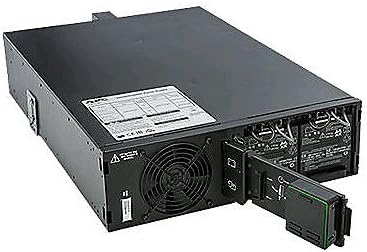


Figures 4, 5, 6: Sequence showing the removal of the battery module from the APC Smart-UPS SRT 5000VA. These images demonstrate the process of sliding out the battery pack for replacement or maintenance.
5.2 Cleaning
Keep the ventilation openings clear of dust and debris. Use a soft, dry cloth to clean the exterior of the UPS. Do not use liquid cleaners or solvents.
5.3 Environmental Considerations
The APC Smart-UPS SRT 5000VA is designed with environmental responsibility in mind, holding certifications such as RoHS, Energy Star, and REACH. Dispose of the UPS and its batteries according to local regulations.
6. Troubleshooting
This section provides solutions to common issues you might encounter with your UPS. For problems not listed here, contact APC technical support.
| Problem | Possible Cause | Solution |
|---|---|---|
| UPS does not turn on. | No input power; Battery not connected or discharged. | Check power cord connection. Ensure utility power is present. Allow batteries to charge. |
| UPS beeps continuously. | On battery power; Overload condition. | Check utility power. Reduce connected load. |
| Connected equipment loses power. | UPS shut down due to low battery or overload. | Allow UPS to recharge. Reduce load. |
| Battery indicator shows low charge after recharge. | Battery nearing end of life. | Replace the battery cartridge. |
7. Specifications
| Feature | Detail |
|---|---|
| Model Number | SRT5KRMXLT |
| Capacity | 5000 VA / 4250 W |
| Input Voltage | 208 V AC |
| Output Voltage | 208 V AC |
| Receptacles | 2 x NEMA L6-20R, 2 x NEMA L6-30R |
| Form Factor | 3U Rack-mountable |
| Dimensions (H x W x D) | 24 x 13 x 38 inches (Product Dimensions) |
| Weight | 123 pounds (55.8 kg) |
| Battery Type | Sealed Lead Acid |
| Typical Battery Recharge Time | 1.5 hours |
| Environmental Certifications | RoHS, Energy Star, REACH |
| First Available Date | December 24, 2014 |
| Color | Black |
| Amperage | 20.29 Amps |
| Voltage (Battery) | 275 Volts |
8. Warranty and Support
8.1 Warranty Information
This APC Smart-UPS SRT 5000VA RM 208V comes with a manufacturer's warranty. Please refer to the warranty card included with your product or visit the official APC website for detailed warranty terms and conditions. Note that the product has a 30-day return policy from the point of purchase.
8.2 Technical Support
For technical assistance, troubleshooting, or service inquiries, please contact APC customer support. You can find contact information on the official APC website or through the Schneider Electric store on Amazon:
Visit the Schneider Electric Store on Amazon
When contacting support, please have your model number (SRT5KRMXLT) and serial number ready.
Related documentsSRT5KRMXLT


Ask a question about this manual
Ask about setup, troubleshooting, compatibility, parts, safety, or missing instructions. Manuals+ will review the question and use this page’s manual context to help answer it.