
1. Product Overview
The Intermatic WP5100W is an extra-duty plastic weatherproof cover designed to protect outdoor electrical receptacles. This single-gang cover is suitable for various applications, ensuring electrical safety and functionality in outdoor environments.
Key Features:
- Versatile Configuration: Single-gang models include 3 patented inserts that create 16 different combinations, allowing for vertical or horizontal mounting.
- Durable Construction: Features a reinforced hinge pin designed to exceed a 40 lb. hinge hang/stress test.
- Impact Resistance: Impact rated with a 12 lb. impact test to ensure the cover remains intact under stress.
- Security: Includes a lockable hasp that accepts shanks up to 0.25 inches in diameter.
- Extreme Weather Performance: Meets requirements for cold impact testing down to -60°F (-51°C), ensuring reliability in harsh conditions.
2. Installation Instructions
Proper installation of the WP5100W weatherproof cover is crucial for optimal protection and safety. This cover is designed for face mounting over a single-gang electrical box.
Components:
- Weatherproof Cover Assembly (including hinged lid)
- Mounting Plate/Base
- Various Inserts (for different receptacle types like duplex, GFCI, or single outlets)
- Gasket (pre-installed on the back of the mounting plate)
- Mounting Screws (typically included with the electrical box or cover)
Installation Steps:
- Prepare the Electrical Box: Ensure the power to the electrical box is turned off at the circuit breaker before beginning installation. Remove any existing cover or receptacle.
- Select Appropriate Insert: Choose the correct insert from the provided options that matches your electrical receptacle (e.g., standard duplex, GFCI, or single outlet). The cover comes with 3 patented inserts to accommodate 16 different combinations.
- Mount the Receptacle: Install your desired electrical receptacle (e.g., GFCI outlet) into the electrical box using the appropriate screws.
- Position the Mounting Plate: Place the WP5100W mounting plate over the installed receptacle and align the mounting holes with those on the electrical box. Ensure the pre-installed gasket is properly seated against the wall surface to create a watertight seal.
- Secure the Mounting Plate: Use the provided mounting screws to firmly attach the mounting plate to the electrical box. Do not overtighten.
- Attach the Cover: The hinged lid is typically pre-attached to the mounting plate. Ensure it opens and closes smoothly. The cover can be hung vertically or horizontally depending on your installation needs.
- Test Functionality: Restore power to the circuit. Test the receptacle and ensure the cover closes securely over any plugged-in cords, maintaining its weatherproof seal.

Figure 1: Interior view of the WP5100W cover showing the mounting plate and space for inserts.

Figure 2: Back view of the WP5100W cover, highlighting the foam gasket for a secure seal.
3. Operating the Weatherproof Cover
The Intermatic WP5100W is designed for "in-use" applications, meaning it provides continuous protection even when a device is plugged into the outlet. Its operation is straightforward:
- Accessing the Outlet: To plug in a device, simply open the hinged lid of the cover.
- In-Use Protection: Once a cord is plugged in, the lid can be closed over the cord, providing a protective, watertight seal around the plug and receptacle. This is essential for outdoor safety and compliance with electrical codes.
- Securing the Cover: For added security or to prevent unauthorized access, a padlock (up to 0.25" shank diameter) can be inserted through the lockable hasp on the cover.

Figure 3: The WP5100W cover in its closed position, providing protection to the outlet.
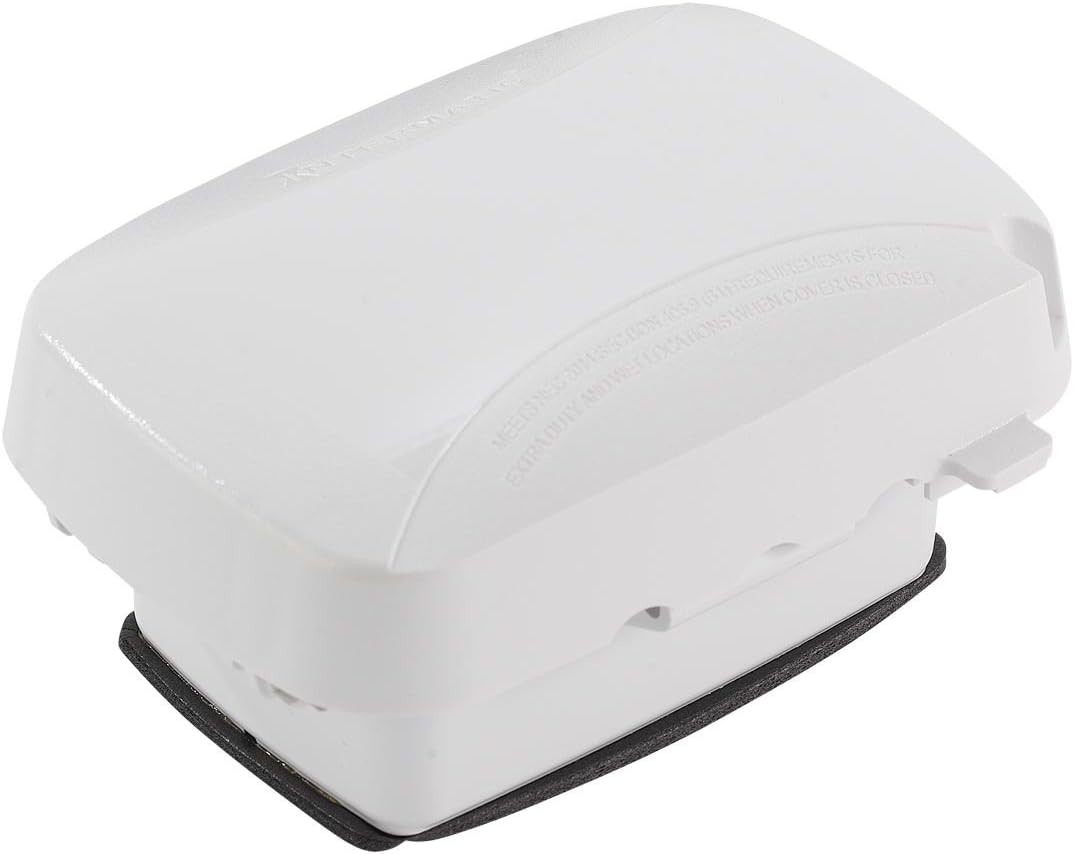
Figure 4: Side view of the WP5100W cover, illustrating its compact design when closed.
Relevant Video:
Video 1: This video, "Top 8 Holiday Lighting and Decorating Hacks," demonstrates the use of the Intermatic WP5100 Extra-Duty In-Use Weatherproof Outlet Cover (at 2:00 mark) to protect outdoor electrical connections from harsh weather conditions, even when lights are plugged in.
4. Maintenance
To ensure the longevity and continued effectiveness of your Intermatic WP5100W weatherproof cover, perform the following maintenance checks periodically:
- Regular Cleaning: Wipe down the exterior of the cover with a damp cloth to remove dirt, dust, and debris. Avoid abrasive cleaners that could damage the plastic.
- Gasket Inspection: Periodically check the integrity of the gasket on the back of the mounting plate. Ensure it is free from cracks, tears, or compression that could compromise the watertight seal.
- Hinge and Latch Check: Verify that the hinged lid opens and closes smoothly and that the latch mechanism engages securely. The reinforced hinge is designed for durability, but regular checks are recommended.
- Damage Assessment: Inspect the cover for any signs of physical damage, such as cracks, chips, or discoloration, which might affect its weatherproof capabilities. Replace the cover if significant damage is observed.
5. Troubleshooting
The Intermatic WP5100W is a passive protective device, so troubleshooting is generally limited to installation and physical integrity issues.
| Problem | Possible Cause | Solution |
|---|---|---|
| Water/Moisture inside cover | Improperly seated gasket, damaged gasket, or loose mounting. | Ensure mounting screws are tight. Inspect gasket for damage and replace if necessary. Re-seat the cover firmly against the wall. |
| Lid does not close securely | Obstruction, damaged hinge, or misaligned mounting. | Check for debris or objects preventing closure. Inspect hinge for damage. Re-check mounting alignment and adjust if needed. |
| Cover appears loose on wall | Loose mounting screws. | Tighten mounting screws. Do not overtighten to avoid cracking the plastic. |
6. Specifications
| Attribute | Detail |
|---|---|
| Brand | Intermatic |
| Model Number | WP5100W |
| Material | Plastic |
| Color | White |
| Product Dimensions | 4.75 x 2.75 x 6.5 inches |
| Item Weight | 7.8 ounces |
| Mounting Type | Face Mount |
| Maximum Weight Capacity (Hinge) | 40 Pounds |
| Certification | UL Listed |
| UPC | 078275145672, 785577438363 |
7. Warranty and Support
Warranty: For detailed warranty information, please refer to the manufacturer's description or contact Intermatic directly. Warranty terms may vary.
Customer Support: If you require further assistance with installation, operation, or troubleshooting, please visit the official Intermatic website or contact their customer support department. Contact information can typically be found on the manufacturer's website or product packaging.
For more information, visit the Intermatic Store on Amazon.


