
1. Introduction
This manual provides essential information for the safe and efficient operation of your COTEC SP-1500-212 Pure Sine Wave Inverter. Please read these instructions thoroughly before installation and use to ensure proper functionality and to prevent damage to the unit or connected devices.
1.1 Safety Information
Always observe the following safety precautions to reduce the risk of electric shock, fire, or injury:
- Ensure proper ventilation around the inverter. Do not block ventilation openings.
- Do not expose the inverter to rain, moisture, or excessive heat.
- Connect the inverter only to a 12VDC battery system.
- Ensure all connections are tight and secure to prevent overheating and arcing.
- Do not open the inverter casing. There are no user-serviceable parts inside.
- Always disconnect the battery before performing any maintenance or wiring.
- Warning: Product may contain materials cautioned by California Proposition 65.
2. Product Features
The COTEC SP-1500-212 Inverter is designed with advanced features for reliable power conversion:
- Pure sine wave output for sensitive electronics.
- Power ON / OFF remote control capability (Green Terminal).
- Input & output fully isolation for enhanced safety.
- Temperature & load controlled cooling fan for optimal performance.
- User-friendly interface.
- Type 1 Indoor Aluminum Enclosure.
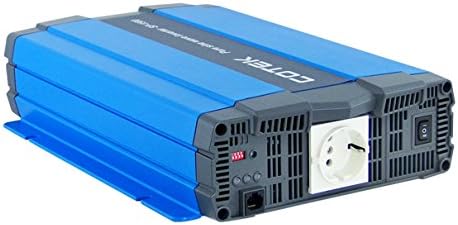
Figure 2.1: Angled view of the COTEC SP-1500-212 Pure Sine Wave Inverter, showcasing its blue and gray casing and output socket.
3. Setup and Installation
Proper installation is crucial for the inverter's performance and safety. Follow these guidelines carefully.
3.1 Placement
Install the inverter in a dry, well-ventilated area, away from direct sunlight, heat sources, and flammable materials. Ensure there is adequate space around the unit for airflow, especially around the cooling fan vents.
3.2 DC Input Connection (12VDC)
Connect the inverter to a 12VDC battery bank using appropriate gauge cables. Ensure correct polarity: connect the positive (+) terminal of the inverter to the positive (+) terminal of the battery, and the negative (-) terminal of the inverter to the negative (-) terminal of the battery. Use fuses or circuit breakers on the DC input line as recommended by local electrical codes and the inverter's specifications.

Figure 3.1: Front view of the inverter showing the DC input terminals (red for positive, black for negative) and the chassis ground screw.
3.3 AC Output Connection (230VAC)
Connect your AC appliances to the inverter's 230VAC output socket. Ensure the total power consumption of all connected devices does not exceed the inverter's rated output power (1500W continuous). Avoid connecting high-surge devices that exceed the inverter's surge capacity.

Figure 3.2: Rear view of the inverter displaying the 230VAC output socket, power switch, and indicator lights.
3.4 Remote Control Connection
The inverter supports a remote control function via the Green Terminal. Refer to the remote control unit's manual for specific wiring and operation instructions. This allows for convenient power ON/OFF control from a distance.
3.5 Grounding
Proper grounding is essential for safety. Connect the chassis ground terminal of the inverter to a reliable earth ground or the vehicle chassis (for mobile applications) using a suitable ground wire.
4. Operating Instructions
Once properly installed, operating the inverter is straightforward.
4.1 Powering On/Off
- To Power On: Ensure all DC and AC connections are secure. Flip the main power switch on the inverter to the 'ON' position. The indicator lights will illuminate, signifying the inverter is operational.
- To Power Off: Disconnect all AC loads from the inverter. Flip the main power switch to the 'OFF' position.
4.2 Load Management
Always ensure that the total wattage of all appliances connected to the inverter does not exceed its continuous power rating. Overloading the inverter can cause it to shut down or sustain damage. For inductive loads (e.g., motors, refrigerators), consider their surge power requirements, which can be several times their continuous rating.
4.3 LED Indicators
The inverter features LED indicators to display its operational status and any fault conditions. Consult the detailed specifications or the manufacturer's full manual for a complete explanation of each indicator's meaning (e.g., power, fault, overload, low battery).
5. Maintenance
Regular maintenance helps ensure the longevity and optimal performance of your inverter.
- Cleaning: Periodically clean the exterior of the inverter with a dry, soft cloth. Do not use liquid cleaners or solvents. Ensure ventilation openings are free from dust and debris.
- Connections: Periodically check all DC and AC connections to ensure they remain tight and free from corrosion. Loose connections can lead to overheating and power loss.
- Ventilation: Ensure the area around the inverter remains clear to allow for proper airflow and cooling.
6. Troubleshooting
This section addresses common issues you might encounter with your inverter.
| Problem | Possible Cause | Solution |
|---|---|---|
| Inverter does not turn on | No DC input power; Loose battery connections; Blown fuse/breaker; Low battery voltage | Check battery connections; Verify battery voltage; Check DC fuses/breakers; Recharge or replace battery. |
| No AC output | Overload; Over-temperature; Low/High input voltage; Fault condition | Reduce AC load; Allow inverter to cool; Check battery voltage; Cycle power to reset. |
| Inverter shuts down frequently | Overload; Poor ventilation; Low battery voltage; High ambient temperature | Reduce load; Improve ventilation; Recharge battery; Move inverter to cooler location. |
| Fan runs constantly or loudly | High internal temperature; Heavy load | Ensure adequate ventilation; Reduce load if possible. This is normal operation under certain conditions. |
7. Specifications
Detailed technical specifications for the COTEC SP-1500-212 Pure Sine Wave Inverter.
| Specification | Value |
|---|---|
| Model Name | SP-1500-212 |
| Input Voltage | 12 Volts DC |
| Output Voltage | 230 Volts AC |
| Continuous Power | 1500W |
| Output Waveform | Pure Sine Wave |
| Product Dimensions | 17 x 10 x 6 inches |
| Item Weight | 11.56 pounds |
| Manufacturer | Cotek |
| Power Source | Battery Powered |
| Color | Blue |

Figure 7.1: Manufacturer's detailed specifications table for the SP-1500 series, including electrical parameters and environmental conditions.

Figure 7.2: Mechanical drawings providing dimensional information for the COTEC SP-1500 series inverter.
8. Product Disposal
When the inverter reaches the end of its service life, it should be disposed of responsibly. Do not dispose of electronic waste with general household waste. Follow local regulations for the recycling of electronic products. Contact your local waste management authority for information on proper disposal and recycling options.

