
1. Introduction
This manual provides essential instructions for the safe and efficient operation of your COTEK SP-1500-112 Pure Sine Wave Inverter. This device is designed to convert 12V DC battery power into stable 120V AC household power, making it suitable for a wide range of electronic devices, including sensitive equipment.
2. Safety Information
Please read and understand all safety instructions before installing or operating the inverter. Failure to follow these instructions may result in electric shock, fire, or serious injury.
General Safety Precautions
- Ventilation: Ensure the inverter is installed in a well-ventilated area to prevent overheating. Do not block ventilation openings.
- Moisture: Do not expose the inverter to rain, moisture, or excessive humidity.
- Flammable Materials: Keep the inverter away from flammable materials, gases, or liquids.
- Wiring: All wiring must comply with local and national electrical codes. Use appropriate gauge wiring for DC input and AC output connections.
- Grounding: The inverter must be properly grounded. Connect the chassis ground terminal to a reliable earth ground.
- Disconnect Power: Always disconnect all power sources (DC input and AC output) before performing any maintenance or servicing.
- Qualified Personnel: Installation and servicing should be performed by qualified personnel only.

Image: Safety gear including a hard hat, safety glasses, and gloves, emphasizing the importance of personal protection during installation.

Image: A car battery, representing the DC power source for the inverter, highlighting the need for proper battery handling.
3. Product Features
The COTEK SP-1500-112 Inverter offers the following key features:
- Pure sine wave output for sensitive electronics.
- Power ON / OFF remote control capability (Green Terminal).
- Input & output fully isolated for enhanced safety.
- Temperature & load controlled cooling fan for efficient operation.
- User-friendly interface.
- Type 1 Indoor Aluminum Enclosure for durability.
4. Product Overview

Image: Angled view of the COTEK SP-1500-112 Pure Sine Wave Inverter, showcasing its blue and gray casing.
Front Panel
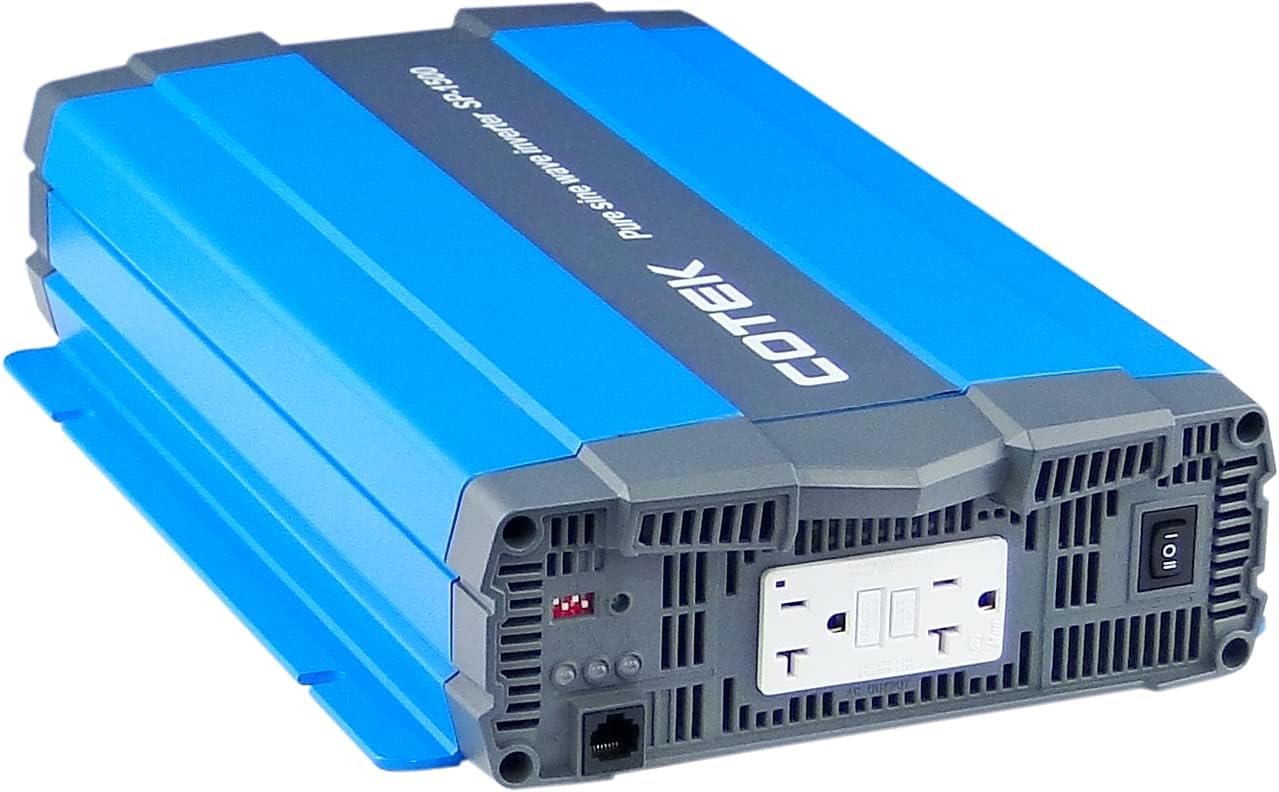
Image: Front view of the COTEK SP-1500-112 Pure Sine Wave Inverter, showing the dual GFCI AC output receptacles, power switch, and indicator lights.
Rear Panel

Image: Rear view of the COTEK SP-1500-112 Pure Sine Wave Inverter, displaying the DC input terminals, chassis ground connection, and remote control port.
Side View

Image: Side view of the COTEK SP-1500-112 Pure Sine Wave Inverter, highlighting the cooling fins and robust aluminum enclosure.
5. Installation and Setup
Proper installation is crucial for the safe and reliable operation of your inverter.
Mounting
- Choose a dry, cool, and well-ventilated location.
- Mount the inverter securely to a stable surface.
- Ensure there is adequate clearance around the inverter for proper airflow and cooling.
Wiring
- DC Input Connection: Connect the DC input cables from your 12V battery bank to the inverter's DC input terminals. Ensure correct polarity (positive to positive, negative to negative) and secure connections. Use appropriately sized cables to minimize voltage drop.
- Chassis Ground: Connect the inverter's chassis ground terminal to a reliable earth ground or vehicle chassis using a suitable ground wire.
- AC Output Connection: Plug your AC loads directly into the inverter's AC output receptacles. Ensure the total wattage of your connected devices does not exceed the inverter's continuous power rating.
Remote Control (Optional)
If using a remote control, connect it to the designated remote control port on the inverter. Refer to the remote control's specific instructions for setup and operation.
6. Operation
Follow these steps for basic operation of your COTEK SP-1500-112 Inverter.
Powering On/Off
- To turn on the inverter, press the power switch on the front panel to the 'ON' position. The power indicator light should illuminate.
- To turn off the inverter, press the power switch to the 'OFF' position.
- If using a remote control, use its power button to control the inverter.
Connecting Loads
Once the inverter is powered on, you can connect your AC devices to the output receptacles. Always ensure the total power consumption of your devices does not exceed the inverter's continuous power rating of 1500W.
Indicator Lights
The inverter features indicator lights to provide status information:
- Power Indicator: Illuminates when the inverter is operating normally.
- Fault/Warning Indicator: Illuminates or flashes to indicate a fault condition (e.g., overload, over-temperature, low battery voltage). Refer to the troubleshooting section for details.
7. Maintenance
Regular maintenance helps ensure the longevity and optimal performance of your inverter.
- Cleaning: Periodically clean the exterior of the inverter with a dry, soft cloth. Do not use liquid cleaners or solvents.
- Ventilation: Ensure that all ventilation openings are free from dust, debris, or obstructions. The cooling fan should operate freely.
- Connections: Regularly check all DC input and AC output connections for tightness. Loose connections can cause overheating and poor performance.
- Battery Maintenance: Maintain your battery bank according to the battery manufacturer's recommendations.
8. Troubleshooting
This section provides solutions to common issues you might encounter with your inverter.
| Issue | Possible Cause | Solution |
|---|---|---|
| Inverter does not turn on | No DC input power; Low battery voltage; Loose DC connections; Blown DC fuse. | Check battery connections and voltage; Ensure battery is charged; Inspect and replace DC fuse if necessary. |
| No AC output | Inverter in fault mode (overload, over-temperature, low voltage); AC output circuit breaker tripped. | Reduce AC load; Allow inverter to cool down; Recharge battery; Reset AC circuit breaker. |
| Overload warning/shutdown | Connected load exceeds inverter's rating. | Reduce the total wattage of connected AC devices. |
| Over-temperature warning/shutdown | Poor ventilation; High ambient temperature; Excessive load. | Improve ventilation; Reduce ambient temperature; Reduce AC load. |
| Low battery voltage warning/shutdown | Battery voltage has dropped below safe operating level. | Recharge or replace the battery bank. |
9. Specifications
Key technical specifications for the COTEK SP-1500-112 Pure Sine Wave Inverter:
| Specification | Value |
|---|---|
| Model Name | SP-1500-112 |
| Wattage (Continuous) | 1500 watts |
| Input Voltage | 12VDC |
| Output Voltage | 120VAC |
| Output Waveform | Pure Sine Wave |
| Item Weight | 11.76 pounds |
| Package Dimensions | 19.02 x 11.97 x 5.91 inches |
| Power Source | Battery Powered |
| Recommended Uses | Vehicle |

Image: Detailed specifications sheet for the COTEK SP-1500 series inverters, showing electrical parameters, environmental ratings, and certifications.

Image: Mechanical drawings and dimensions of the COTEK SP-1500 series inverter, useful for installation planning.
10. Applications
The COTEK SP-1500-112 Pure Sine Wave Inverter is suitable for various applications requiring reliable AC power from a DC source.

Image: Mobile homes or an RV park at dusk, illustrating typical off-grid or mobile power applications for the inverter.

Image: A glowing lightbulb, symbolizing energy and power solutions provided by the inverter for various electrical needs.
11. Warranty Information
The COTEK SP-1500-112 Pure Sine Wave Inverter is covered by a 2-year manufacturer's warranty. This warranty covers defects in materials and workmanship under normal use. Please retain your proof of purchase. For full terms and conditions, refer to the warranty card included with your product or visit the official COTEK website.
12. Customer Support
For technical assistance, troubleshooting guidance, or service inquiries regarding your COTEK SP-1500-112 Inverter, please contact COTEK customer support. You can typically find contact information, including phone numbers and email addresses, on the official COTEK website or in the product packaging.
When contacting support, please have your product model number (SP-1500-112) and purchase date available.


