
1. Introduction
The TPI 100 Digital Handheld Multimeter is a compact and easy-to-use instrument designed for basic electrical measurements. It features automatic selection between AC voltage, DC voltage, and resistance measurements, simplifying operation by eliminating the need for manual range switching. This manual provides essential information for the safe and effective use of your TPI 100 multimeter.
Key Features:
- Automatic Function and Range Selection: The meter automatically detects and switches between ACV, DCV, and Ohms (resistance), and selects the appropriate range.
- Single Button Operation: A single ON/OFF button controls the device, making it straightforward to use.
- Wide Measurement Range: Capable of measuring 0 to 600 volts AC and DC.
- High Internal Impedance: Features 10 MΩ internal impedance to prevent inaccurate readings caused by circuit loading.
- Auto Power Off: Automatically conserves battery life by powering down when not in use.
2. Safety Information
To ensure safe operation and service of the TPI 100 Multimeter, follow these safety precautions:
- Always inspect the meter and test leads for damage before use. Do not use if damaged.
- Do not apply more than the rated voltage, as marked on the meter, between terminals or between any terminal and ground. The TPI 100 is rated for CAT III 600V.
- Use caution when working with voltages above 30V AC RMS, 42V peak, or 60V DC. These voltages pose a shock hazard.
- Keep fingers behind the finger guards on the test probes during measurements.
- Replace the battery immediately when the low battery indicator appears to ensure accurate readings.
- Do not operate the meter in explosive gas, vapor, or dust environments.
- Refer all servicing to qualified personnel.
3. Product Overview
The TPI 100 is designed for straightforward electrical testing. Familiarize yourself with its components:
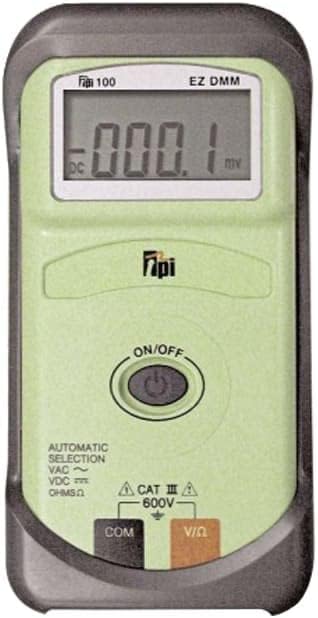
Figure 1: Front view of the TPI 100 Digital Handheld Multimeter. It features a large LCD screen at the top, an 'ON/OFF' button in the center, and two input jacks labeled 'COM' (Common) and 'V/Ω' (Voltage/Ohms) at the bottom. The device is green with a dark gray protective casing. The display shows '000.1 mV DC'.
Components:
- LCD Display: Shows measurement readings, units (VAC, VDC, Ω), and other indicators like low battery.
- ON/OFF Button: Powers the multimeter on or off.
- COM Input Jack: Common (negative) input for test leads.
- V/Ω Input Jack: Positive input for voltage and resistance measurements.
- Automatic Selection Indicator: Labels on the device indicate automatic selection for VAC, VDC, and OHMSΩ.
4. Setup
4.1 Battery Installation
The TPI 100 Multimeter requires a 9V battery (not included) for operation. To install or replace the battery:
- Ensure the multimeter is powered off and test leads are disconnected from any circuit.
- Locate the battery compartment cover on the back of the unit.
- Use a screwdriver to remove the screw securing the battery cover.
- Carefully remove the cover.
- Connect a new 9V battery to the battery clips, observing correct polarity.
- Place the battery into the compartment.
- Replace the battery cover and secure it with the screw.
When the low battery indicator appears on the display, replace the battery promptly to maintain measurement accuracy.
5. Operating Instructions
The TPI 100 simplifies measurements with its automatic function and range selection. Simply connect the test leads, and the meter will detect the type of measurement (ACV, DCV, or Resistance) and display the reading.
5.1 Powering On/Off
- Press the ON/OFF button to power on the multimeter. The display will illuminate.
- Press the ON/OFF button again to power off the multimeter.
- The meter will automatically power off after a period of inactivity to conserve battery life.
5.2 Connecting Test Leads
Always connect the test leads correctly for accurate and safe measurements:
- Insert the black test lead into the COM (Common) input jack.
- Insert the red test lead into the V/Ω input jack for voltage and resistance measurements.
5.3 Measuring AC/DC Voltage
The TPI 100 automatically detects AC or DC voltage.
- Connect the test leads as described in Section 5.2.
- Ensure the multimeter is powered on.
- Carefully touch the red test probe to the positive side of the circuit and the black test probe to the negative side or ground.
- Read the voltage value displayed on the LCD screen. The meter will indicate whether it is ACV or DCV.
5.4 Measuring Resistance (Ohms)
The TPI 100 automatically detects resistance.
- Ensure the circuit or component to be measured is completely de-energized before measuring resistance. Disconnect power to avoid damage to the meter or inaccurate readings.
- Connect the test leads as described in Section 5.2.
- Ensure the multimeter is powered on.
- Touch the red and black test probes across the component or circuit where resistance is to be measured.
- Read the resistance value displayed on the LCD screen, indicated by the Ω symbol.
6. Maintenance
6.1 Cleaning
To clean the multimeter:
- Wipe the case with a damp cloth and mild detergent. Do not use abrasives or solvents.
- Ensure the meter is completely dry before use.
6.2 Battery Replacement
Refer to Section 4.1 for detailed instructions on battery replacement. Always replace the battery when the low battery indicator appears to ensure accurate measurements and proper operation.
6.3 Storage
When not in use for extended periods, remove the battery to prevent leakage and store the multimeter in a cool, dry place away from direct sunlight and extreme temperatures.
7. Troubleshooting
If you encounter issues with your TPI 100 Multimeter, refer to the following common problems and solutions:
| Problem | Possible Cause | Solution |
|---|---|---|
| No display when powered on | Dead or incorrectly installed battery | Replace or correctly install the 9V battery. |
| Inaccurate readings | Low battery; Incorrect lead connection; External interference | Replace battery; Ensure leads are correctly inserted; Move away from strong electromagnetic fields. |
| Display shows 'OL' (Overload) | Measurement exceeds meter's range | Ensure the measured value is within the meter's specifications (e.g., max 600V). |
8. Specifications
| Specification | Value |
|---|---|
| Brand | TPI |
| Model Number | 100 |
| Measurement Type | Multimeter (Digital) |
| Voltage Range (AC/DC) | 0 to 600V |
| Internal Impedance | 10 MΩ |
| Power Source | 9V Battery (not included) |
| Item Weight | 6.6 pounds (approx. 3 Kilograms) |
| Product Dimensions (L x W x H) | 8.7 x 6.4 x 2.2 inches |
| Safety Rating | CAT III 600V |
| Auto Power Off | Yes |
| Usage | Professional |
9. Warranty and Support
For warranty information and technical support, please refer to the documentation provided with your purchase or contact TPI customer service directly. Keep your purchase receipt as proof of purchase for warranty claims.
For further assistance, visit the official TPI website or contact their authorized service centers.


