
Introduction
The Hisonic HS308L is a versatile 2-in-1 microphone system designed for both wireless and wired operation. This manual provides detailed instructions for setting up, operating, maintaining, and troubleshooting your HS308L microphone to ensure optimal performance.

Image: The Hisonic HS308L microphone, highlighting its ergonomic design and control switch.
Package Contents
Please check the package carefully to ensure all items are present:
- Metal Microphone (Transmitter)
- Wireless Receiver (with 1/4 inch TS plug)
- Antenna for Receiver
- Wired Microphone Cable (XLR to 1/4 inch TS, approximately 6 feet long)
- User Manual
- Warranty Card
Note: AA batteries for both the microphone and receiver are required but not included in the package.

Image: Contents of the Hisonic HS308L package, including the microphone, receiver, cable, and antenna.
Setup Instructions
1. Wireless Mode Setup
- Insert Batteries: Open the battery compartments on both the microphone (transmitter) and the wireless receiver. Insert one AA battery into each device, ensuring correct polarity.
- Connect Antenna: Attach the antenna to the designated port on the wireless receiver.
- Connect Receiver to Audio System: Plug the 1/4 inch TS plug of the wireless receiver directly into the 1/4 inch MIC input jack on your PA system, singing machine, or karaoke amplifier.
- Power On Receiver: Turn on the wireless receiver. An indicator light should illuminate.
- Power On Microphone: Set the switch on the microphone to the "ON" position. Avoid setting it to "MIC" during initial power-up to prevent sudden loud noises.
- Tune Receiver (if necessary): The receiver is tunable. If you experience poor reception or interference, adjust the tuning on the receiver to find the clearest frequency, similar to tuning an FM radio station.
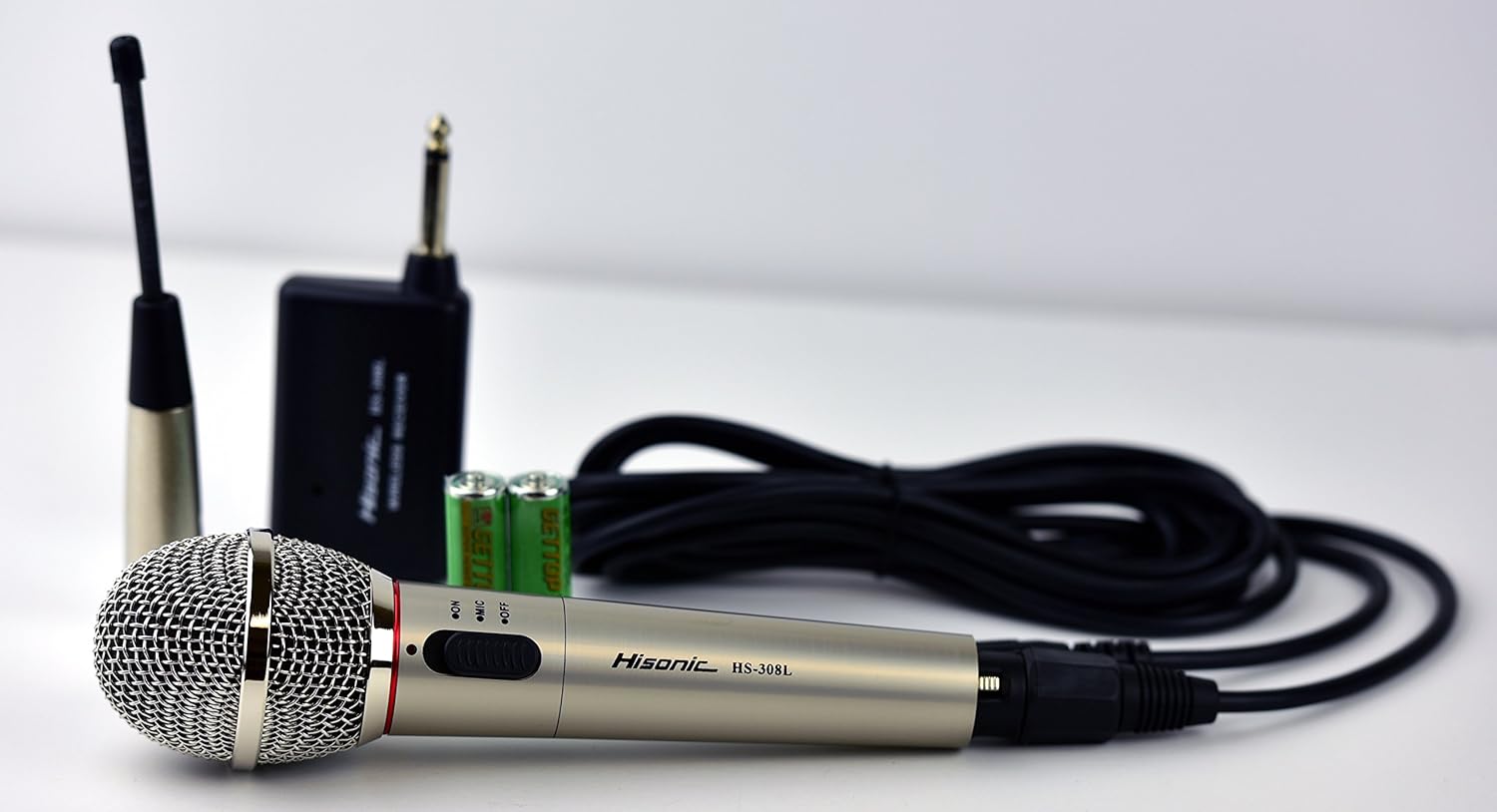
Image: Detailed view of the microphone and receiver, illustrating connection points.
2. Wired Mode Setup
- Connect Cable: Plug the XLR end of the provided wired microphone cable into the microphone's output port.
- Connect to Audio System: Connect the 1/4 inch TS end of the cable to the MIC input jack on your PA system, singing machine, or karaoke amplifier.
- Power On Microphone: Set the switch on the microphone to the "ON" position. The microphone will function as a standard wired microphone.
Operating Instructions
- Microphone Switch: The microphone features a three-position switch:
- ON: Powers on the microphone for both wired and wireless operation.
- MIC: This position is typically for wired use or can act as a momentary mute in some systems. For general wireless use, keep it on "ON".
- OFF: Powers off the microphone. Always turn off the microphone when not in use to conserve battery life.
- Mute Function: Use the "MIC" position or the "OFF" position to mute the microphone and avoid unwanted noise or feedback when turning the system on or off, or when not speaking.
- Wireless Range: The microphone operates wirelessly within a range of approximately 15-30 feet. Optimal performance is achieved within this range without significant obstructions.
Maintenance
- Cleaning: Wipe the microphone and receiver with a soft, dry cloth. Do not use liquid cleaners or solvents.
- Battery Replacement: Replace AA batteries in both the microphone and receiver when performance degrades or the indicator light dims. Always use fresh batteries.
- Storage: Store the microphone system in a dry, cool place away from direct sunlight and extreme temperatures. Remove batteries if storing for extended periods to prevent leakage.
- Antenna Care: Handle the receiver antenna carefully. Avoid bending or stressing it, as this can affect wireless performance.
Troubleshooting
| Problem | Possible Cause | Solution |
|---|---|---|
| No sound in wireless mode. |
|
|
| Static or interference in wireless mode. |
|
|
| Microphone not working in wired mode. |
|
|
| Receiver LED light does not turn on. |
|
|
Specifications
| Model Number | HS308L |
| Frequency Range (Wireless) | 110 MHz - 120 MHz |
| Working Range (Wireless) | 15 - 30 feet |
| Connectivity Technology | Wireless (VHF), Wired |
| Receiver Output Connector | 1/4 inch TS |
| Microphone Wired Connector | XLR (output), 1/4 inch TS (cable end) |
| Power Source | Battery Powered (AA batteries, not included) |
| Signal-to-Noise Ratio | 70 dB |
| Enclosure Material | Metal |
| Item Dimensions (L x W x H) | 9.5 x 5.5 x 2.8 inches |
Consumer Alert: Most users do not need a license to operate this wireless microphone system. However, operation without a license is subject to certain restrictions: the system may not cause harmful interference; it must operate at a low power level (not exceeding 50 milliwatts); and it has no protection from interference received from any other device. Purchasers should be aware that the FCC is currently evaluating the use of wireless microphone systems, and these rules are subject to change. For more information, contact the FCC at 1-888-CALL-FCC (TTY: 1-888-TELL-FCC) or visit the FCC's wireless microphone website at fcc.gov/cgb/wirelessmicrophones.
Warranty and Support
The Hisonic HS308L microphone system includes a warranty card in the package. Please refer to this card for specific warranty terms and conditions.
For technical support, service, or inquiries regarding your product, please contact Hisonic customer service. Contact information may be provided on the warranty card or the manufacturer's official website.

Image: The Hisonic HS308L microphone and documentation inside its packaging.


