
Introduction
The AprilAire 865 Whole-House Steam Humidifier is designed to provide optimal humidity levels in homes without a traditional HVAC duct system, covering up to 10,300 square feet in tightly built homes. This manual provides essential information for the safe and efficient installation, operation, and maintenance of your humidifier.
Maintaining optimal humidity between 40% and 60% has been shown to reduce the incidence of respiratory infections, dry skin, and static shock, while also preserving household items susceptible to damage from dry conditions.

Image: The AprilAire 865 Whole-House Steam Humidifier unit with its accompanying wall-mount fan pack.
Safety Information
Always ensure that installation and maintenance are performed by a qualified HVAC professional. Disconnect power to the unit before performing any service or maintenance. Follow all local electrical and plumbing codes. This unit operates with high voltage and produces hot steam; exercise extreme caution during operation and servicing.
Product Overview
Included Components
The AprilAire 865 Humidifier package includes the following items:
- Steam Humidifier Unit
- Model #65 Manual Digital Humidifier Control with Sensor
- Wall Mount Fan Pack
- Steam Hose (6 feet)
- 7/8 inch Drain Tubing (10 feet)
- Hose Clamps
- Saddle Valve
- Mounting Hardware
- Model 4028 Drain Tee and Trap Assembly
- Model #80 Steam Canister
- Installation Instructions
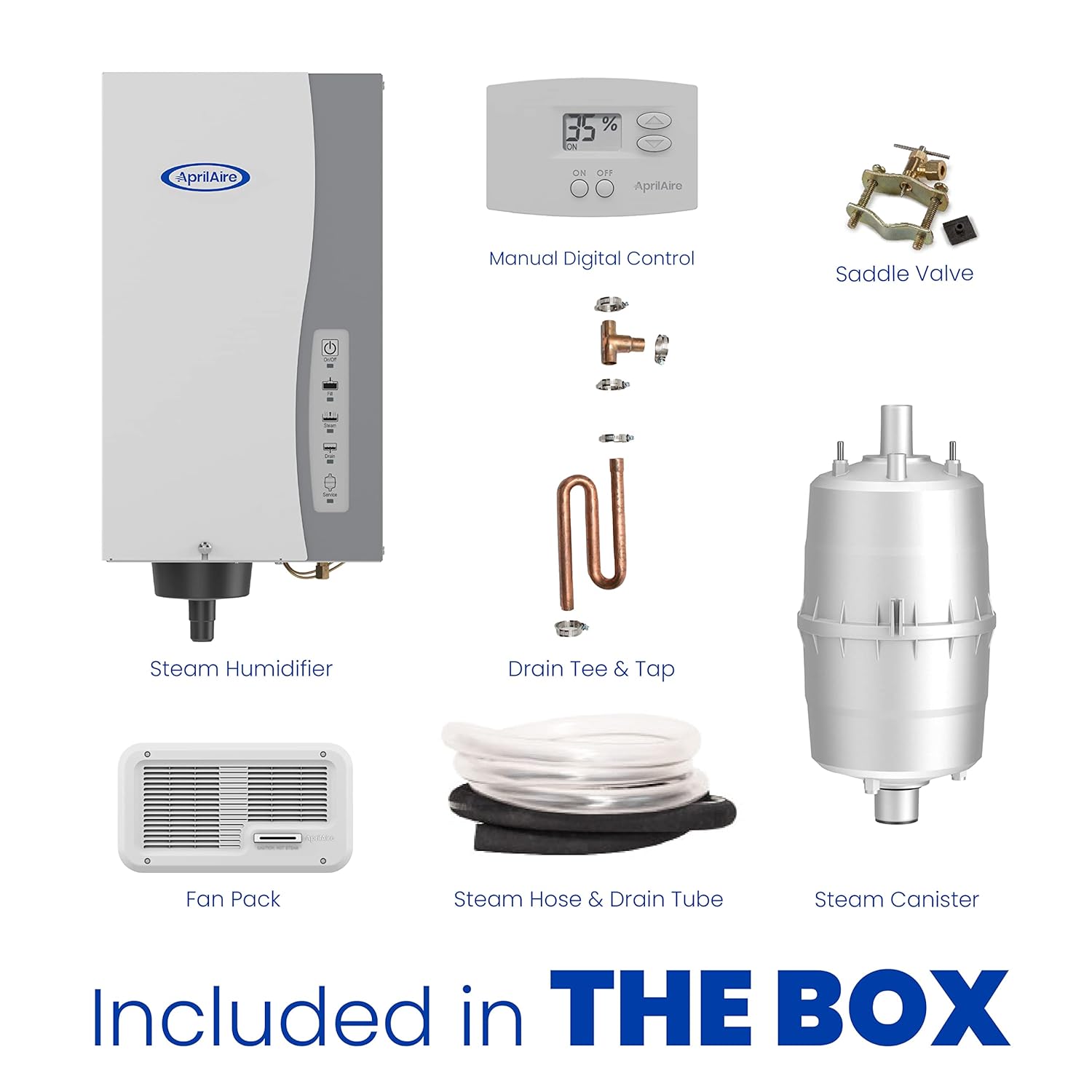
Image: All components included in the AprilAire 865 Whole-House Steam Humidifier box.
Setup
Installation Overview
The AprilAire 865 is designed for homes without an HVAC duct system, utilizing a wall-mount fan to distribute humidified air directly into the living space. Professional installation is highly recommended to ensure proper function and safety.
- Placement: The humidifier unit and fan pack should be strategically placed to ensure effective steam distribution and proper drainage.
- Electrical Connection: The unit requires a dedicated electrical circuit. The fan pack is powered by the humidifier unit via a 24-volt connection.
- Water Supply: Connect the humidifier to a cold water line. The electrode technology works best with water hardness between 3 and 36 grains; water filtration is not typically required. If using reverse osmosis or deionized water, plumb the humidifier before the filtration equipment.
- Drainage: Ensure proper drainage for the unit using the provided drain tubing and trap assembly.
- Steam Hose: The 6-foot steam hose connects the humidifier to the fan pack. For longer distances, use copper pipe or comparable insulated piping rated to 212°F.
Fan Pack Installation
The wall-mount fan pack is crucial for distributing steam into your home. It pushes humidified air into the living space, making it ideal for homes without forced-air systems.

Image: The AprilAire wall-mounted fan pack installed in a living area, distributing humidified air.
For detailed visual instructions on installing the fan pack, please refer to the video below:
Video: This video demonstrates the installation process for the AprilAire Steam Humidifier Fan Pack Model 865, including connecting the steam hose and electrical wiring.
Operating Instructions
The AprilAire 865 features a manual digital humidifier control (Model #65) with a built-in sensor to monitor indoor relative humidity. This allows you to manually set and maintain your desired humidity level.
- Humidity Control: Use the manual digital control to adjust the humidity percentage in your home. The unit offers 6 levels of output, adding 11.5 to 34.6 gallons of moisture per day, depending on voltage and installation.
- Automatic Operation: Once set, the humidifier will automatically operate to maintain the selected humidity level, turning on and off as needed.
- Optimal Range: Aim for a relative humidity level between 40% and 60% for maximum comfort and health benefits.

Image: The AprilAire Model 65 manual digital humidifier control, used to set and maintain humidity levels.
For an overview of the humidifier's features, watch the video below:
Video: This video highlights the key features and benefits of the AprilAire 800 Whole-Home Steam Humidifier, which shares many characteristics with the 865 model.
Maintenance
Regular maintenance ensures the longevity and efficient operation of your AprilAire 865 Humidifier.
- Steam Canister Replacement: The Model #80 steam canister contains electrodes that heat the water. At the end of each humidifier season, the canister should be replaced. This eliminates the need for cleaning or scrubbing, simplifying maintenance.
- Service Filter Indicator: The unit is equipped with a service filter indicator to alert you when maintenance is required.
- Drain Tee and Trap: Periodically inspect the drain tee and trap assembly for any blockages or buildup to ensure proper water drainage.

Image: An internal view of the AprilAire 865 Humidifier, showing the replaceable steam canister.
Troubleshooting
If you encounter issues with your AprilAire 865 Humidifier, consider the following common troubleshooting steps:
- No Steam Production: Check the power supply to the unit and ensure the humidifier control is set to an appropriate humidity level. Verify that the water supply is connected and turned on. Inspect the steam canister for proper installation and ensure it is not at the end of its service life.
- Insufficient Humidity: Confirm the humidifier control setting. Ensure the fan pack is operating correctly and not obstructed. Check for drafts or excessive ventilation in the home that might be dissipating humidity.
- Water Leaks: Inspect all water connections, including the saddle valve, steam hose, and drain tubing, for secure fittings and signs of damage. Ensure the drain trap is correctly installed and not clogged.
- Unusual Noises: Gurgling sounds can sometimes occur; ensure the drain trap is properly installed and filled with water. If other unusual noises persist, contact a professional.
- Error Codes/Service Indicator: Refer to the humidifier control's display for any error codes or service indicators. Consult the detailed installation manual for specific code interpretations.
For persistent issues, it is recommended to contact a qualified HVAC professional or AprilAire customer support.
Specifications
| Feature | Detail |
|---|---|
| Model Number | 865 |
| Coverage Area | Up to 10,300 sq. ft. (tightly built homes) |
| Moisture Output | 11.5 to 34.6 gallons per day (variable, based on voltage/installation) |
| Operation Mode | Steam |
| Control Type | Manual Digital Humidifier Control (Model #65) |
| Special Features | Adjustable Humidity Control, Auto Shut Off, Digital Display, Humidistat, Service Filter Indicator |
| Water Hardness Range | 3 to 36 grains |
| Product Dimensions | 7.13 x 10.13 x 20.88 inches |
| Weight | 0.01 ounces (Note: This weight seems incorrect and likely refers to packaging or a specific component. Actual unit weight will be significantly higher.) |
| Color | Gray |
| Manufacturer | Research Products Corporation |
Warranty and Support
For specific warranty details and to register your AprilAire 865 Whole-House Steam Humidifier, please refer to the documentation included with your product or visit the official AprilAire website. For technical support, replacement parts, or service inquiries, please contact AprilAire customer service directly.