
HACH HQ14D53000000
Hach HQ14d Portable Conductivity Meter User Manual
Model: HQ14D53000000
1. Product Overview
The Hach HQ14d Portable Conductivity Meter is designed for accurate measurement of critical water quality parameters in various field and laboratory settings. This robust instrument eliminates the need for multiple devices, offering a streamlined solution for conductivity measurements.
Key Features:
- Portable Design: Measures critical water quality parameters without the need for multiple instruments.
- Intuitive Interface: Ensures simple operation and accurate results.
- IntelliCAL Smart Probes: Probes store all calibration data, enhancing measurement reliability.
- Durable Construction: Designed to withstand demanding environmental conditions.
- Comprehensive Kit: Includes all necessary components to begin testing immediately.
2. Meter Components

Figure 2.1: Front view of the Hach HQ14d Portable Conductivity Meter, showing the display screen, navigation buttons, and function keys. The HACH logo is visible on the screen and at the bottom of the device.
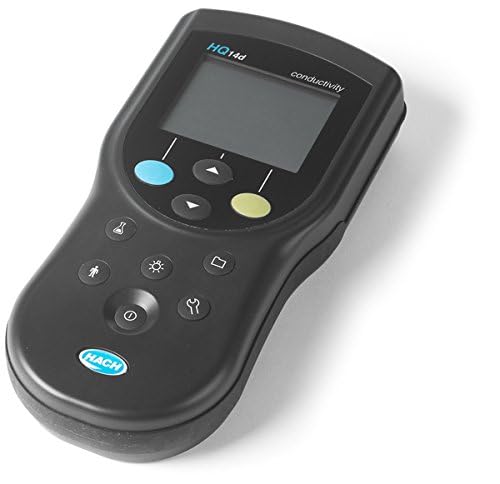
Figure 2.2: Angled view of the Hach HQ14d Portable Conductivity Meter, highlighting its ergonomic design and compact form factor. The side profile shows the slight curvature for comfortable handling.
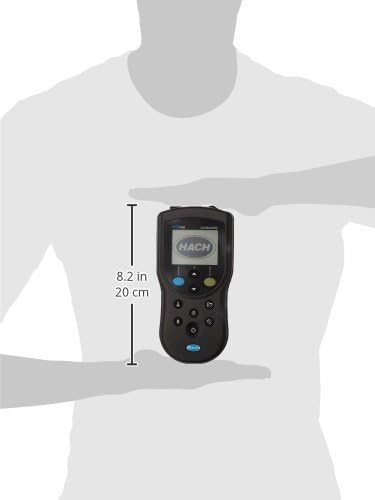
Figure 2.3: The Hach HQ14d Portable Conductivity Meter held in a hand, illustrating its compact size and portability. A ruler indicates a height of approximately 8.2 inches (20 cm) for scale.
3. Initial Setup
3.1 Unpacking and Inspection
Carefully unpack all components from the packaging. Verify that all items listed in the packing list are present and undamaged. If any items are missing or damaged, contact Hach customer support immediately.
3.2 Battery Installation
The HQ14d meter operates on standard AA batteries (included). To install:
- Locate the battery compartment cover on the back of the meter.
- Use a coin or screwdriver to open the cover by turning it counter-clockwise.
- Insert the batteries, ensuring correct polarity as indicated inside the compartment.
- Replace the cover and turn clockwise to secure.
3.3 Probe Connection
Connect the IntelliCAL conductivity probe to the meter's input port. Ensure the connection is secure to prevent water ingress and ensure accurate readings.
4. Operating Instructions
4.1 Powering On/Off
Press the ⑂ (Power) button located at the bottom of the keypad to turn the meter on or off. The display will illuminate upon power-on.
4.2 Navigation
Use the ▲ (Up) and ▼ (Down) arrow buttons to navigate through menus and adjust settings. The blue button typically acts as a Menu/Back button, and the green button as an Enter/Confirm button.
4.3 Taking a Measurement
- Ensure the appropriate IntelliCAL conductivity probe is connected and calibrated.
- Immerse the probe into the sample solution, ensuring the sensor is fully submerged and free of air bubbles.
- Wait for the reading to stabilize on the display. The meter will typically indicate when a stable reading is achieved.
- Record the measurement as needed.
4.4 Calibration
The HQ14d meter utilizes IntelliCAL smart probes, which store calibration data directly within the probe. This simplifies the calibration process. Refer to your IntelliCAL probe's specific manual for detailed calibration procedures. Generally, calibration involves:
- Accessing the calibration menu via the meter's interface.
- Selecting the appropriate calibration standard.
- Immersing the probe in the standard solution.
- Allowing the meter to automatically recognize and record the calibration point.
5. Maintenance and Care
5.1 Cleaning the Meter
Wipe the meter's exterior with a damp, lint-free cloth. Do not use abrasive cleaners or solvents. Ensure no liquid enters the battery compartment or probe connectors.
5.2 Probe Maintenance
Refer to the specific IntelliCAL probe manual for detailed cleaning and storage instructions. Proper probe maintenance is crucial for accurate and consistent measurements.
5.3 Storage
When not in use, store the meter and probes in a clean, dry environment, away from direct sunlight and extreme temperatures. Ensure probe caps are securely in place to prevent drying out of sensors.
6. Troubleshooting
| Problem | Possible Cause | Solution |
|---|---|---|
| Meter does not power on. | Dead or incorrectly installed batteries. | Check battery polarity; replace batteries. |
| Unstable readings. | Probe not fully immersed; air bubbles on sensor; dirty probe; damaged probe. | Ensure full immersion; gently tap probe to remove bubbles; clean probe; inspect probe for damage and replace if necessary. |
| Calibration error. | Expired or incorrect calibration standard; dirty probe; damaged probe. | Use fresh, correct standard; clean probe; replace probe if damaged. |
| No probe detected. | Loose or faulty probe connection; damaged probe. | Ensure probe is securely connected; try another probe if available; contact support. |
7. Technical Specifications
| Model Number | HQ14D53000000 |
| Product Type | Portable Conductivity Meter |
| Brand | HACH |
| Package Dimensions | 12.3 x 9.4 x 2.3 inches; 1 Pounds |
| Manufacturer | Hach |
| First Available Date | December 16, 2014 |
8. Warranty and Support
8.1 Warranty Information
Hach products are manufactured to high quality standards. For specific warranty terms and conditions, please refer to the warranty card included with your product or visit the official Hach website. Keep your proof of purchase for warranty claims.
8.2 Customer Support
For technical assistance, troubleshooting, or service inquiries, please contact Hach customer support. Contact information can typically be found on the Hach website or in the product documentation.
Online Resources: www.hach.com
Ask a question about this manual
Ask about setup, troubleshooting, compatibility, parts, safety, or missing instructions. Manuals+ will review the question and use this page’s manual context to help answer it.