
1. Introduction
Thank you for choosing the Workpro Orbital Buffer. This manual provides essential information for the safe operation, maintenance, and troubleshooting of your new tool. Please read it thoroughly before first use and keep it for future reference. This orbital buffer is designed for polishing and waxing various surfaces, offering a smooth, swirl-free finish.
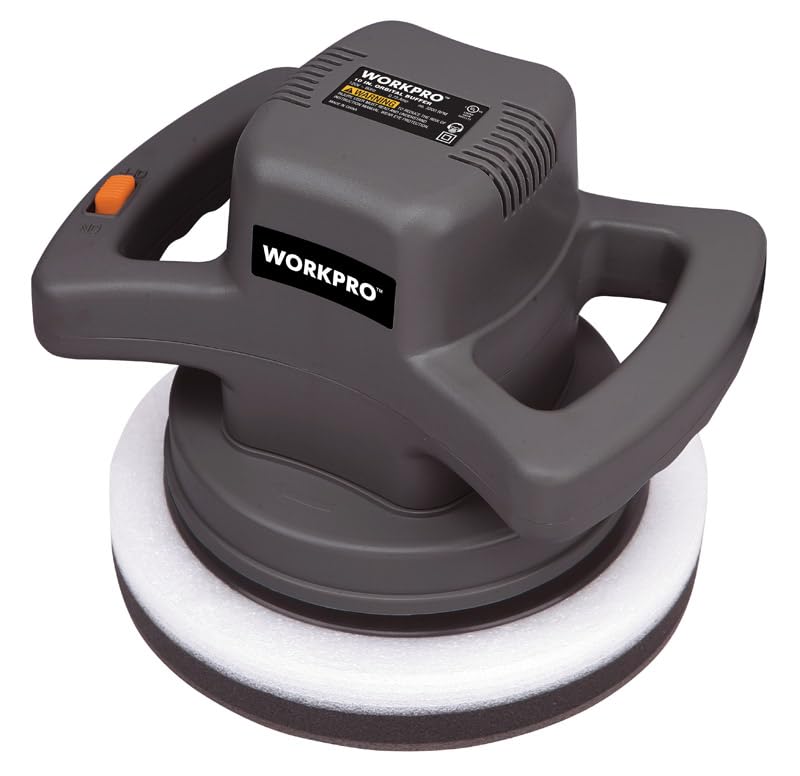
Figure 1: Workpro Orbital Buffer. This image shows the main unit of the orbital buffer with a polishing pad attached, ready for use.
2. General Safety Instructions
WARNING: Read all safety warnings, instructions, illustrations, and specifications provided with this power tool. Failure to follow all instructions listed below may result in electric shock, fire, and/or serious injury.
2.1 Work Area Safety
- Keep work area clean and well lit. Cluttered or dark areas invite accidents.
- Do not operate power tools in explosive atmospheres, such as in the presence of flammable liquids, gases, or dust. Power tools create sparks which may ignite the dust or fumes.
- Keep children and bystanders away while operating a power tool. Distractions can cause you to lose control.
2.2 Electrical Safety
- Power tool plugs must match the outlet. Never modify the plug in any way.
- Avoid body contact with earthed or grounded surfaces, such as pipes, radiators, ranges, and refrigerators. There is an increased risk of electric shock if your body is earthed or grounded.
- Do not expose power tools to rain or wet conditions. Water entering a power tool will increase the risk of electric shock.
- Do not abuse the cord. Never use the cord for carrying, pulling, or unplugging the power tool. Keep cord away from heat, oil, sharp edges, or moving parts.
2.3 Personal Safety
- Always wear eye protection. Use safety glasses, goggles, or a face shield.
- Dress properly. Do not wear loose clothing or jewelry. Keep your hair and clothing away from moving parts.
- Stay alert, watch what you are doing, and use common sense when operating a power tool.
3. Package Contents
Carefully unpack all items and ensure you have received everything listed below. If any items are missing or damaged, please contact customer support.
- Workpro Orbital Buffer Large 0.75 Amp 3200 RPM 10" (Main Unit)
- Polishing Pad (typically included, though not explicitly listed as separate in source data, it's implied for a buffer)
- Instruction Manual (this document)
4. Setup
4.1 Attaching the Polishing Pad
- Ensure the orbital buffer is unplugged from the power source.
- Align the polishing pad with the backing plate on the buffer.
- Press the pad firmly onto the backing plate. Most pads attach via hook-and-loop fasteners.
- Verify the pad is securely centered and attached before use.
4.2 Power Connection
Connect the buffer's power cord to a standard 120V AC electrical outlet. Ensure the outlet is properly grounded. Do not use extension cords unless absolutely necessary, and if so, ensure it is rated for the tool's amperage (0.75 Amp).
5. Operating Instructions
5.1 Preparing the Surface
- Clean the surface thoroughly to remove dirt, dust, and debris.
- Ensure the surface is dry before applying any compounds or waxes.
5.2 Applying Compound/Wax
- Apply a small amount of polishing compound or wax directly to the polishing pad or the surface to be treated. Do not over-apply.
5.3 Using the Orbital Buffer
- Place the buffer flat on the surface before turning it on.
- Turn on the buffer using the power switch.
- Move the buffer in a slow, overlapping motion across the surface. Avoid applying excessive pressure; let the tool do the work.
- Maintain constant contact with the surface. Lifting the buffer while it's running can cause the pad to spin freely and potentially damage the surface or the pad.
- Work in small sections, typically 2x2 feet, to ensure even coverage and optimal results.
- After completing a section, turn off the buffer before lifting it from the surface.
- Repeat the process for all desired areas.
Note: The orbital action of this buffer is designed to minimize swirl marks, providing a smooth finish. The 3200 RPM speed is suitable for general polishing and waxing tasks.
6. Maintenance
6.1 Cleaning
- Always unplug the buffer before cleaning.
- Remove the polishing pad after each use. Clean the pad according to its manufacturer's instructions (usually rinsing with water and mild soap). Allow it to air dry completely.
- Wipe down the exterior of the buffer with a clean, damp cloth. Do not use harsh chemicals or abrasive cleaners.
- Ensure ventilation openings are clear of dust and debris. Use compressed air if necessary.
6.2 Storage
- Store the buffer in a clean, dry place, out of reach of children.
- Avoid storing in direct sunlight or areas with extreme temperatures.
- Coil the power cord neatly to prevent damage.
7. Troubleshooting
| Problem | Possible Cause | Solution |
|---|---|---|
| Buffer does not turn on. | No power supply. Faulty power switch. | Check if the power cord is securely plugged into a working outlet. Test the outlet with another device. If still no power, contact customer support. |
| Excessive vibration or noise. | Polishing pad improperly attached or damaged. Internal component issue. | Ensure the polishing pad is securely and centrally attached. Replace if damaged. If the issue persists, discontinue use and contact customer support. |
| Poor polishing results (swirls, uneven finish). | Incorrect technique. Worn or dirty polishing pad. Incorrect compound/wax. | Review operating instructions for proper technique (even pressure, overlapping passes). Clean or replace the polishing pad. Ensure you are using appropriate polishing compounds or waxes for the surface. |
8. Specifications
| Feature | Specification |
|---|---|
| Model Number | 2206944 |
| Brand | Ace Trading-Great Star |
| Amperage Capacity | 0.75 Amps (AC Adapter Current: 0.7 Amps) |
| Maximum Rotational Speed | 3200 RPM |
| Disc Diameter | 10 inches |
| Item Weight | 15 Pounds |
| UPC | 820909100010, 843518016381 |
9. Warranty Information
This Workpro Orbital Buffer is covered by a manufacturer's warranty. For specific details regarding the warranty period, coverage, and claims process, please refer to the warranty card included with your product or contact Ace Trading-Great Star customer support directly. Keep your purchase receipt as proof of purchase.
10. Customer Support
If you have any questions, require technical assistance, or need to report a problem with your Workpro Orbital Buffer, please contact Ace Trading-Great Star customer support. Contact information can typically be found on the product packaging, the manufacturer's website, or the warranty documentation.