
1. Introduction
Welcome to your new Coralife Fixture LED Aqualight. This manual provides essential instructions for the safe and efficient use of your 24-inch LED aquarium lighting system. Designed to illuminate your aquatic environment, this fixture offers reliable performance for various aquarium setups, promoting healthy growth and vibrant colors.
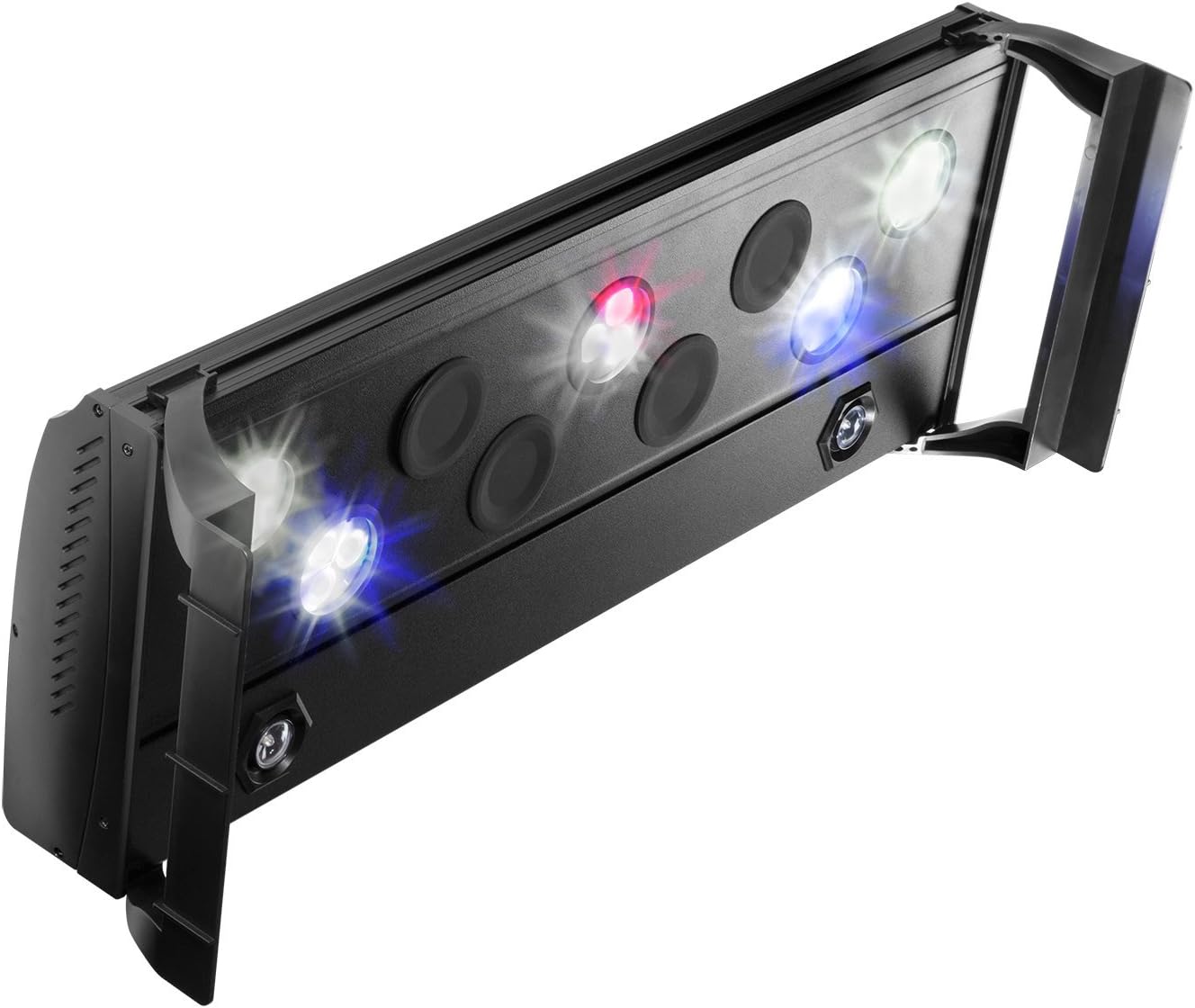
This image displays the Coralife Fixture LED Aqualight, a 24-inch black lighting unit. The fixture features several LED bulbs, including white, blue, and red lights, indicating a multi-spectrum lighting capability. The design includes adjustable mounting brackets on each end for secure placement over an aquarium.
2. Safety Information
- Always disconnect the power supply before performing any maintenance or cleaning.
- Do not immerse the fixture or power adapter in water. This product is not submersible.
- Ensure hands are dry when handling the power adapter and electrical connections.
- Use only with a GFCI (Ground Fault Circuit Interrupter) protected electrical outlet.
- Keep out of reach of children and pets.
- Do not operate if any part of the fixture or power cord is damaged.
- Ensure proper ventilation around the fixture to prevent overheating.
3. Package Contents
Please verify that all items are present and undamaged upon opening the package:
- 1 x Coralife Fixture LED Aqualight (24-inch)
- 1 x Power Adapter
- 2 x Adjustable Mounting Brackets
- 1 x User Manual (this document)
4. Setup
- Unpacking: Carefully remove all components from the packaging. Retain packaging for future storage or transport.
- Attaching Mounting Brackets: Slide the adjustable mounting brackets onto each end of the LED fixture. Ensure they are securely fastened.
- Positioning the Fixture: Place the fixture with attached brackets securely on the rim of your aquarium. Adjust the brackets to achieve the desired height and position over the water surface. Ensure the fixture is stable and level.
- Power Connection: Connect the power adapter cable to the designated port on the LED fixture. Then, plug the power adapter into a standard GFCI-protected electrical outlet. Ensure the drip loop is formed to prevent water from traveling along the cord to the outlet.
5. Operating Instructions
- Power On/Off: Once connected to power, the fixture can be turned on or off using the integrated power switch (if present) or by plugging/unplugging the power adapter from the outlet.
- Light Modes: The Coralife Fixture LED Aqualight may feature different light spectrums (e.g., white, blue, red) or combinations thereof. Refer to any specific controls on the unit itself for cycling through modes or adjusting intensity. Typically, pressing a button on the fixture or power cord will cycle through available lighting options.
6. Maintenance
- Cleaning: Regularly clean the exterior of the fixture to prevent salt creep or mineral buildup. Disconnect the power supply before cleaning. Use a soft, damp cloth to wipe the surface. Do not use abrasive cleaners or solvents, as these can damage the fixture.
- LED Care: Avoid touching the LED lenses directly, as oils from your skin can reduce light output. Ensure the fixture's ventilation slots are clear of obstructions to maintain optimal operating temperature and prolong LED lifespan.
7. Troubleshooting
- Light Not Turning On:
- Check that the power adapter is securely plugged into both the fixture and a working electrical outlet.
- Verify that the electrical outlet is functional by plugging in another device.
- Ensure the power switch on the fixture (if applicable) is in the 'ON' position.
- Dim or Flickering Lights:
- Inspect all power connections for looseness.
- Ensure the fixture is not covered or obstructed, which could lead to overheating.
- If the issue persists, contact customer support.
8. Specifications
| Model Number | 100534063 |
| Fixture Length | 24 inches |
| Manufacturer | Pro-Motion Distributing - Direct |
| ASIN | B00QW2L8B0 |
9. Warranty and Support
For specific warranty information regarding your Coralife Fixture LED Aqualight, please refer to the warranty card included with your purchase or visit the official Coralife website. Keep your original purchase receipt as proof of purchase for any warranty claims.
For technical assistance, troubleshooting not covered in this manual, or to inquire about replacement parts, please contact Coralife customer support through their official channels.


