
1. Introduction
This manual provides comprehensive instructions for the safe and efficient operation of your Behringer EUROLIVE F1220D Bi-Amped Monitor Speaker System. Please read this manual thoroughly before using the product to ensure optimal performance and to prevent damage. Retain this manual for future reference.
2. Safety Instructions
Always follow basic safety precautions when using electrical products to reduce the risk of fire, electric shock, and injury to persons. This includes, but is not limited to:
- Read all instructions before operating the appliance.
- Do not use this apparatus near water.
- Clean only with a dry cloth.
- Do not block any ventilation openings. Install in accordance with the manufacturer's instructions.
- Do not install near any heat sources such as radiators, heat registers, stoves, or other apparatus (including amplifiers) that produce heat.
- Do not defeat the safety purpose of the polarized or grounding-type plug. A polarized plug has two blades with one wider than the other. A grounding-type plug has two blades and a third grounding prong. The wide blade or the third prong are provided for your safety. If the provided plug does not fit into your outlet, consult an electrician for replacement of the obsolete outlet.
- Protect the power cord from being walked on or pinched, particularly at plugs, convenience receptacles, and the point where they exit from the apparatus.
- Only use attachments/accessories specified by the manufacturer.
- Unplug this apparatus during lightning storms or when unused for long periods of time.
- Refer all servicing to qualified service personnel. Servicing is required when the apparatus has been damaged in any way, such as power-supply cord or plug is damaged, liquid has been spilled or objects have fallen into the apparatus, the apparatus has been exposed to rain or moisture, does not operate normally, or has been dropped.
3. What's in the Box
Your Behringer EUROLIVE F1220D package should include the following items:
- Behringer EUROLIVE F1220D Bi-Amped 250W Monitor Speaker System
- Power Cable
- User Manual (this document)
Please inspect all components for any signs of damage upon unpacking. If any items are missing or damaged, contact your retailer immediately.
4. Product Overview
The Behringer EUROLIVE F1220D is a lightweight 250-Watt 2-way monitor speaker system designed for live performances and music playback. It features a 12-inch woofer and a 3-inch tweeter, delivering exceptional sound quality with wide frequency bandwidth and dynamic range. The unit incorporates revolutionary Class-D amplifier technology for powerful performance in a super-lightweight design. It also includes an adjustable feedback filter and an integrated limiter for system control and speaker protection.
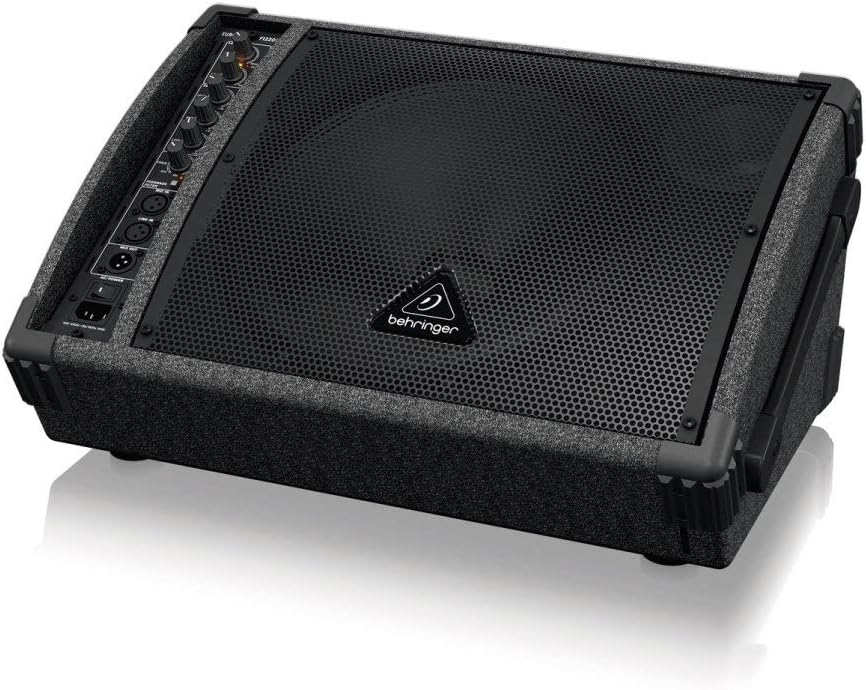
Figure 1: Angled view of the Behringer EUROLIVE F1220D monitor speaker, showcasing its compact design and front grille.

Figure 2: Close-up of the rear control panel of the Behringer EUROLIVE F1220D, showing the various knobs and input/output ports.
Product Overview Video
Video 1: A brief product overview of the Behringer EUROLIVE F1220D, highlighting its features and design. (Source: Amazon Product Imaging)
5. Setup
Follow these steps for initial setup of your EUROLIVE F1220D monitor speaker:
- Placement: Position the monitor speaker on a stable surface or a compatible speaker pole. The F1220D features a pole mount socket for elevated placement. Ensure adequate ventilation around the unit.
- Power Connection: Connect the supplied power cable to the AC input on the rear panel of the speaker and then to a suitable power outlet. Ensure the power switch is in the 'OFF' position before connecting.
- Audio Input: Connect your audio source (e.g., mixer, microphone, instrument) to the appropriate input jacks on the control panel. The F1220D offers XLR and 1/4-inch TRS/TS inputs for versatility.
- Link Output (Optional): If connecting multiple monitors, use the 'LINK OUT' port to send the audio signal to another speaker.
- Power On: Once all connections are secure, switch the power button to the 'ON' position. The 'POWER' LED indicator should illuminate.
General Setup Guide (RSM Series)
Video 2: A general guide on how to set up RSM12A V2 Powered Stage Floor Monitors. While not specific to the F1220D, it demonstrates common monitor setup practices. (Source: Audiosavings)
Video 3: Another general guide on setting up RSM Series Monitors. Useful for understanding basic connections and configurations. (Source: Audiosavings)
6. Operating Instructions
The EUROLIVE F1220D offers intuitive controls for sound adjustment:
- Main Level: This knob controls the overall output volume of the monitor. Start with a low setting and gradually increase to your desired level.
- EQ Section (High, Mid, Low): Adjust these knobs to fine-tune the tonal characteristics of your audio. Increase 'High' for more clarity, 'Mid' for vocal presence, and 'Low' for bass response.
- Feedback Filter: This adjustable filter helps to eliminate unwanted acoustic feedback. If you experience feedback, activate the filter and adjust the frequency knob until the feedback is minimized.
- Input Level Controls: Individual level controls are provided for each input channel (Mic/Line Input). Adjust these to ensure proper signal strength without clipping (indicated by the 'CLIP' LED).
- Limiter: The integrated limiter protects the speaker from excessive signal levels, preventing distortion and potential damage.
7. Maintenance
Proper maintenance ensures the longevity and performance of your monitor speaker:
- Cleaning: Use a soft, dry cloth to clean the exterior of the speaker. Do not use liquid cleaners or solvents, as they may damage the finish or internal components.
- Ventilation: Ensure that the ventilation openings are clear of dust and debris to prevent overheating.
- Storage: When not in use, store the speaker in a cool, dry place, away from direct sunlight and extreme temperatures. If transporting, use appropriate protective covers or cases.
- Cable Care: Regularly check all cables for wear and tear. Replace any damaged cables immediately to prevent electrical hazards or signal loss.
8. Troubleshooting
If you encounter issues with your EUROLIVE F1220D, refer to the following common problems and solutions:
| Problem | Possible Cause | Solution |
|---|---|---|
| No Sound Output | No power; incorrect input connection; low volume levels; faulty cable. | Check power connection and switch; ensure audio source is connected to correct input; increase Main Level and input level controls; test with a different cable. |
| Distorted Sound | Input signal too high (clipping); EQ settings incorrect; faulty speaker. | Reduce input level from source or on the monitor until 'CLIP' LED is off; adjust EQ settings; contact support if distortion persists. |
| Feedback (High-pitched squeal) | Microphone too close to speaker; microphone pointed at speaker; high gain settings. | Reposition microphone; activate and adjust the Feedback Filter; reduce input gain. |
| Intermittent Sound | Loose cable connection; faulty cable; power fluctuations. | Check all cable connections; replace cables if necessary; ensure stable power supply. |
9. Specifications
| Feature | Specification |
|---|---|
| Model Name | F1220D |
| Speaker Type | 2-way Bi-Amped Monitor Speaker System |
| Output Wattage | 250 Watts |
| Woofer Diameter | 12 Inches |
| Tweeter Size | 3 Inches |
| Impedance | 8 Ohm |
| Frequency Response | 45 Hz (Lower limit) |
| Connectivity Technology | XLR, 1/4 inch TRS/TS, RCA |
| Audio Output Mode | Mono |
| Control Method | Touch (knobs/switches) |
| Power Source | Corded Electric |
| Item Weight | 23.6 Pounds |
| Product Dimensions | 19.69 x 13.94 x 9.37 inches |
| Indoor/Outdoor Usage | Indoor |
| Special Features | Adjustable feedback filter, integrated limiter, Class-D amplifier technology |
10. Warranty and Support
The Behringer EUROLIVE F1220D comes with a limited manufacturer's warranty. For specific warranty terms and conditions, please refer to the documentation included with your product or visit the official Behringer website.
For technical support, troubleshooting assistance beyond this manual, or service inquiries, please contact Behringer customer support through their official channels. Keep your purchase receipt and product serial number handy when contacting support.


