
1. Introduction
Thank you for choosing the Extol Craft 9920 Soldering Gun. This manual provides essential information for the safe and efficient operation, maintenance, and troubleshooting of your new tool. Please read these instructions carefully before using the soldering gun and keep this manual for future reference.
2. Safety Instructions
Always observe basic safety precautions when using electrical tools to reduce the risk of fire, electric shock, and personal injury. Failure to follow these instructions may result in serious injury or property damage.
- Read All Instructions: Familiarize yourself with the controls and proper use of the tool.
- Eye Protection: Always wear safety glasses or goggles to protect your eyes from solder splatter and fumes.
- Ventilation: Use the soldering gun in a well-ventilated area to avoid inhaling harmful fumes produced during soldering.
- Hot Tip: The soldering tip reaches very high temperatures. Avoid contact with skin or flammable materials. Allow the tool to cool completely before handling the tip or storing.
- Unplug When Not In Use: Always unplug the soldering gun from the power outlet when not in use, before changing accessories, or before performing any maintenance.
- Keep Away From Children: Store the tool out of reach of children and untrained persons.
- Proper Power Supply: Ensure the power supply voltage matches the specifications listed on the tool.
- Inspect Tool: Before each use, inspect the tool for any damage to the cord, plug, or housing. Do not use a damaged tool.
3. Product Overview
The Extol Craft 9920 Soldering Gun is designed for various soldering tasks. It features a pistol-grip design for comfortable handling and a quick-heating tip.
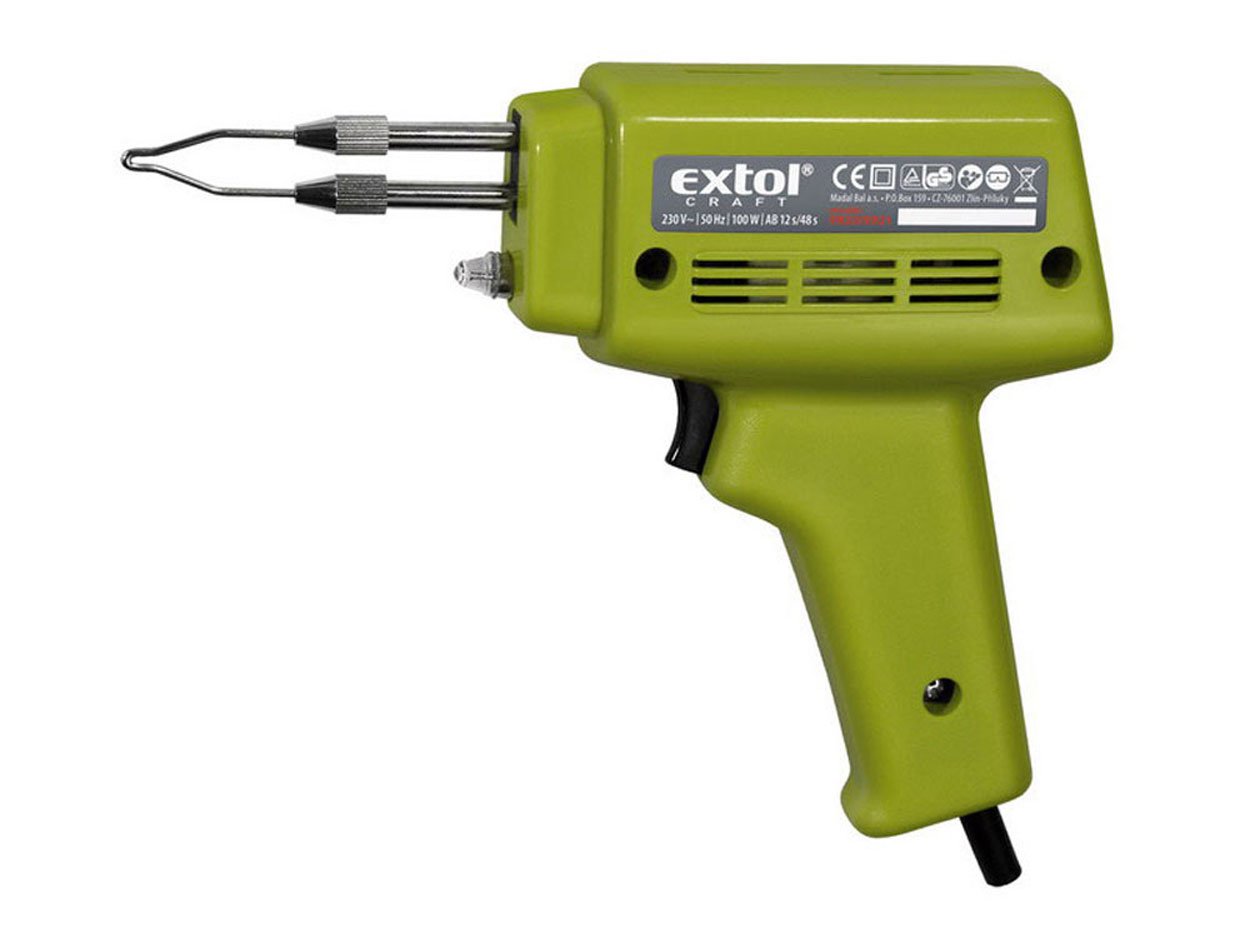
Figure 1: Extol Craft 9920 Soldering Gun. This image shows the complete soldering gun, highlighting its pistol-grip handle, metal tip, and power cord connection point.
Components:
- Soldering Tip: The heated element that melts solder.
- Handle: Ergonomically designed for grip and control.
- Trigger/Power Button: Activates the heating element.
- Power Cord: Connects the tool to the electrical outlet.
4. Setup
- Unpack: Carefully remove the soldering gun and any accessories from its packaging.
- Inspect: Check the tool for any signs of damage during shipping. Do not use if damaged.
- Tip Installation: Ensure the soldering tip is securely installed. If replacing, follow the maintenance instructions.
- Work Area: Prepare a clean, well-ventilated workspace. Ensure there are no flammable materials nearby.
- Power Connection: Plug the power cord into a suitable 230V/50Hz electrical outlet.
5. Operating Instructions
Follow these steps for safe and effective soldering:
- Pre-heating: Press and hold the trigger. The tip will heat up quickly.
- Apply Solder: Once the tip is hot, touch it to the joint you wish to solder. Simultaneously, touch the solder wire to the heated joint and tip. The solder should melt and flow smoothly.
- Intermittent Operation: This soldering gun is designed for intermittent use. Operate for a maximum of 12 seconds continuously, then allow a minimum 30-second pause before resuming operation. This prevents overheating and prolongs tool life.
- Remove Heat: Once enough solder has flowed, remove the solder wire first, then lift the soldering gun from the joint.
- Cool Down: Release the trigger to allow the tip to cool. Place the gun in a safe, heat-resistant holder while it cools.
6. Maintenance
Regular maintenance ensures optimal performance and extends the life of your soldering gun.
6.1 Cleaning the Tip
- Always unplug the tool and allow the tip to cool completely before cleaning.
- Gently wipe the tip with a damp sponge or a specialized tip cleaner to remove excess solder and oxidation.
- Do not use abrasive materials or harsh chemicals, as these can damage the tip plating.
6.2 Replacing the Tip
- Ensure the tool is unplugged and the tip is cool.
- Carefully unscrew or unfasten the old tip.
- Insert the new tip, ensuring it is properly seated and secured.
- Only use genuine Extol Craft replacement tips to ensure compatibility and performance.
6.3 Storage
- Store the soldering gun in a dry, clean place, away from direct sunlight and moisture.
- Ensure the power cord is not kinked or damaged during storage.
7. Troubleshooting
If you encounter issues with your soldering gun, refer to the following common problems and solutions:
| Problem | Possible Cause | Solution |
|---|---|---|
| Soldering gun does not heat up. | No power supply, faulty power cord, loose tip, or damaged heating element. | Check power connection. Inspect power cord for damage. Ensure tip is securely fastened. If problem persists, contact customer support. |
| Solder does not melt or flows poorly. | Tip is not hot enough, tip is dirty/oxidized, or incorrect solder type. | Ensure proper pre-heating time. Clean the soldering tip. Use appropriate solder for your application. |
| Excessive smoke or burning smell. | Contaminants on the tip or workpiece, or tool overheating. | Clean the tip and workpiece. Ensure you are following the intermittent operation guidelines (12s ON / 30s OFF). |
8. Specifications
| Feature | Specification |
|---|---|
| Brand | Extol Craft |
| Model Number | 9920 (Internal: 999011638908) |
| Voltage / Frequency | 230V / 50Hz |
| Power Consumption / Wattage | 100W |
| Operation Cycle | Max. 12 seconds continuous operation, followed by a minimum 30-second pause. |
| Power Source | Corded Electric |
| Handle Material | Wood |
| ASIN | B00QAVHZJ2 |
9. Warranty and Support
For warranty information or technical support, please refer to the documentation provided with your purchase or contact Extol Craft customer service directly. Keep your proof of purchase for any warranty claims.
