
ENDEAVOUR FIRES Castleton E114R/115S
ENDEAVOUR FIRES Castleton 39-inch Electric Fireplace User Manual
Model: Castleton E114R/115S
1. Introduction
Welcome
Thank you for purchasing the ENDEAVOUR FIRES Castleton Electric Fireplace. This manual provides essential information for the safe and efficient operation of your new appliance. Please read these instructions thoroughly before installation and use, and retain them for future reference.
Important Safety Information
- Read all instructions before using this appliance.
- Do not operate any fireplace with a damaged cord or plug, or if the heater has malfunctioned, been dropped, or damaged in any manner.
- Do not use outdoors. This fireplace is intended for indoor use only.
- Keep combustible materials, such as furniture, pillows, bedding, papers, clothes, and curtains at least 3 feet (0.9 m) from the front of the fireplace.
- Always unplug the fireplace when not in use.
- Do not run cord under carpeting. Do not cover cord with throw rugs, runners, or similar coverings. Arrange cord away from traffic area and where it will not be tripped over.
- To disconnect the fireplace, turn controls to off, then remove plug from outlet.
- This fireplace is hot when in use. To avoid burns, do not let bare skin touch hot surfaces.
- Always use a grounded, fused electrical outlet.
- Ensure the power supply voltage matches the rating label on the appliance.
- The heater outlet is located at the front. Do not obstruct the heater outlet.
- This appliance is equipped with a safety cut-off device to prevent overheating. If the heater stops working, unplug the unit, wait 10-15 minutes, and then plug it back in.
2. Package Contents
Carefully unpack all components and check against the list below. Ensure all items are present and undamaged before proceeding with assembly.
- Castleton Fireplace Surround (Off-White MDF)
- Electric Fire Unit with Log Effect Fuel Bed
- Multi-function Remote Control
- AAA Batteries (2) for Remote Control
- Assembly Hardware (screws, dowels, etc.)
- Instruction Manual
3. Assembly and Installation
Before You Begin
Ensure you have sufficient space for assembly and that the chosen location for the fireplace meets the safety requirements outlined in Section 1.
Tools Required
- Phillips Head Screwdriver
Assembly Steps
- Assemble the Fireplace Surround: The surround is supplied flat-packed. Follow the detailed diagrams provided in the separate assembly guide (if included) or the general instructions to connect the MDF panels using the provided hardware. Ensure all connections are secure.
- Insert the Electric Fire Unit: Once the surround is assembled, carefully slide the electric fire unit into the designated opening from the front. Ensure it sits flush and is properly aligned within the surround.
- Secure the Fire Unit: Use the provided screws to secure the electric fire unit to the fireplace surround from the inside or designated attachment points.

Figure 1: Rear view of the electric fire unit, illustrating its compact design for easy insertion into the surround.
Placement Considerations
- Place the assembled fireplace on a flat, stable surface.
- Ensure the power cable (1.7m length, right side) can reach a suitable grounded electrical outlet without being stretched or obstructed.
- Maintain adequate clearance from walls and other objects as specified in the safety information.
- The design allows for a television to be placed on top of the mantelpiece.
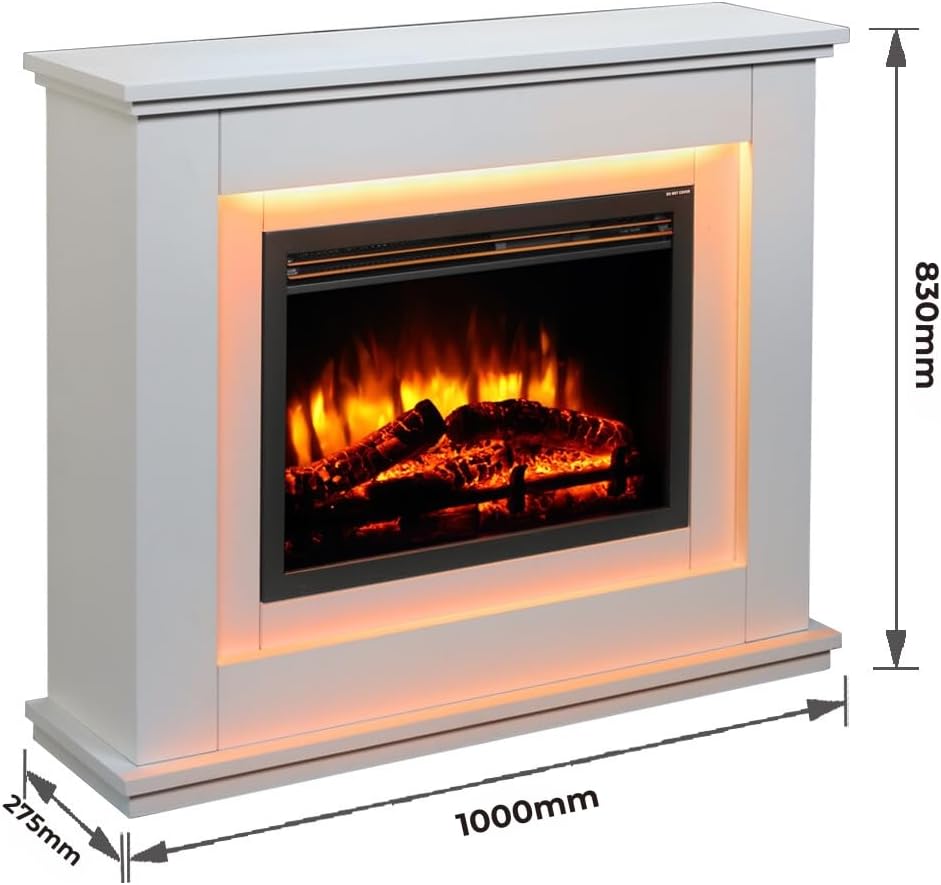
Figure 2: Dimensions of the Castleton fireplace surround (1000mm W x 830mm H x 275mm D).

Figure 3: The Castleton electric fireplace integrated into a modern living space.
4. Operation
The fireplace is operated using the supplied multi-function remote control.
Remote Control Functions

Figure 4: Multi-function remote control with LCD display.
- Power Button (On/Off): Turns the fireplace unit on or off.
- Flame Effect Button: Activates or deactivates the flame effect. The intensity and brightness can be adjusted.
- Mood Lighting Select: Cycles through the 13 available ambient light colors or sets it to automatically transition between colors. Includes a dimming function.
- Heating/Advance (M): Activates the heater. Press to cycle between 1kW and 2kW heat settings.
- Thermostatic Sensor: The remote control includes a thermostatic sensor for accurate room temperature detection.
- Timer: Sets the operational timer from 30 minutes up to 9 hours.
- Scroll Left/Right Arrows: Used to navigate through flame and lighting options on the LCD display.
- Up/Down Arrows: Adjusts flame intensity, heat levels, or light brightness.
- Back Button: Returns to the previous menu or setting.
Using the Thermostat and Programmer
The remote control allows for thermostatic control and 7-day programmable heating. Refer to the remote control's specific instructions for detailed programming steps to set desired temperatures and operating times.
5. Key Features
- Realistic Flame Effect: Features an incredibly vivid flame effect with a molded log fuel bed, enhancing the ambiance of any room.
- 13 Colour Mood Lighting: Offers 13 ambient light color options, which can be set to a fixed color or cycle automatically. Includes a dimming function for customizable atmosphere.

Figure 5: Examples of the 13 available mood lighting colors.
- Independent Operation: The flame effect and ambient lighting can be operated independently of the heating function, allowing for year-round use.
- Quiet Heater: Features a quiet heating operation with forward-facing output, providing warmth without significant noise.
- Eco-Design Compliant: Designed and manufactured to meet Eco-design 2018 (Lot 20) requirements for optimal energy efficiency.
- Safety Cut-Off: Equipped with an automatic safety cut-off to prevent overheating.
6. Maintenance
Cleaning
- Always unplug the fireplace from the power outlet before cleaning.
- Wipe the exterior surfaces of the fireplace surround with a soft, damp cloth. Do not use abrasive cleaners or solvents.
- Gently dust the electric fire unit's glass panel and log bed with a soft, dry cloth.
- Ensure no moisture enters the electrical components.
Storage
If storing the fireplace for an extended period, ensure it is clean, dry, and unplugged. Store in a cool, dry place, protected from dust and extreme temperatures.
7. Troubleshooting
Before contacting customer support, please refer to the following troubleshooting guide for common issues.
| Problem | Possible Cause | Solution |
|---|---|---|
| Fireplace does not turn on. | No power to the unit. | Check if the power cord is securely plugged into a working electrical outlet. Check the circuit breaker. |
| Heater stops working. | Overheating safety cut-off activated. | Unplug the unit, wait 10-15 minutes for it to cool down, then plug it back in. Ensure the heater outlet is not obstructed. |
| Remote control not responding. | Dead batteries or obstruction. | Replace the AAA batteries in the remote control. Ensure there is no obstruction between the remote and the fireplace sensor. |
| Flame effect not visible or flickering. | Flame effect turned off or brightness too low. | Press the Flame Effect button on the remote. Adjust the flame brightness using the Up/Down arrows. |
8. Technical Specifications
| Feature | Specification |
|---|---|
| Brand | ENDEAVOUR FIRES |
| Model Number | E114R/115S |
| Product Name | Castleton Electric Fireplace |
| Color | Off White |
| Fireplace Surround Dimensions (W x H x D) | 1000mm x 830mm x 275mm (approx. 39.4" x 32.7" x 10.8") |
| Electric Fire Unit Dimensions (W x H x D) | 600mm x 434mm x 210mm (approx. 23.6" x 17.1" x 8.3") |
| Weight | 36 Kilograms |
| Voltage | 220-240Vac, 50Hz |
| Heat Output | 1kW and 2kW selectable |
| Material | Engineered Wood (MDF) |
| Power Cable Length | 1.7 meters |
| Special Features | Safety Cut-off, Realistic Flame Effect, LED Flame, 13 Multi-color Flame/Mood Lighting, Adjustable Flame Brightness, Thermostatic Control, 7-Day Programmable Remote |
9. Warranty and Support
Warranty Information
Please refer to the warranty card included with your purchase or contact your retailer for specific warranty terms and conditions. Keep your proof of purchase for any warranty claims.
Customer Support
If you encounter any issues not covered in the troubleshooting section or require further assistance, please contact the retailer or manufacturer's customer support. Contact details can typically be found on the product packaging or the retailer's website.
Related documentsCastleton E114R/115S


Ask a question about this manual
Ask about setup, troubleshooting, compatibility, parts, safety, or missing instructions. Manuals+ will review the question and use this page’s manual context to help answer it.