
Pentax SMC Pentax-M 50mm F1.7
Pentax SMC-M 50mm F1.7 Manual Focus Lens User Manual
Model: SMC Pentax-M 50mm F1.7
Introduction
This manual provides essential instructions for the proper use, setup, operation, and maintenance of your Pentax SMC-M 50mm F1.7 manual focus lens. Please read this manual thoroughly before using the lens to ensure optimal performance and longevity.
Setup
Attaching the Lens
- Ensure both the camera body and the lens are clean and free of dust.
- Align the red dot (or corresponding mark) on the lens barrel with the mounting index mark on your Pentax K-mount camera body.
- Gently insert the lens into the camera's lens mount.
- Rotate the lens clockwise until it clicks into place, indicating it is securely locked. Do not force the lens.
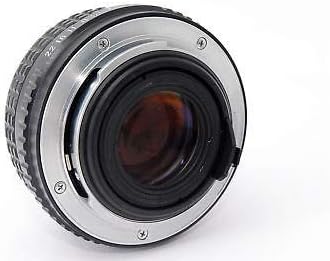
Figure 1: Rear view of the Pentax SMC-M 50mm F1.7 lens, illustrating the K-mount bayonet for attachment to compatible camera bodies.
Detaching the Lens
- Turn off your camera.
- Press and hold the lens release button on the camera body.
- While holding the button, rotate the lens counter-clockwise until it detaches from the camera body.
- Immediately attach the front and rear lens caps to protect the lens elements from dust and damage.
Operating the Lens
Manual Focus
The SMC Pentax-M 50mm F1.7 is a manual focus lens. To achieve sharp focus:
- Look through your camera's viewfinder or use Live View on your camera's LCD screen.
- Rotate the focus ring (the wider ring closer to the front of the lens) until your subject appears sharp.
- Many modern Pentax cameras offer focus peaking or focus confirmation indicators to assist with manual focusing. Refer to your camera's manual for details.

Figure 2: Top view of the lens, highlighting the focus distance scale (in feet and meters) and the aperture ring with f-stop markings.
Aperture Control
The aperture controls the amount of light entering the lens and affects the depth of field. To adjust the aperture:
- Locate the aperture ring, which is typically closer to the camera body.
- Rotate the ring to select your desired f-stop (e.g., F1.7, F2.8, F5.6, F16). A smaller f-number (e.g., F1.7) indicates a wider aperture, allowing more light and creating a shallower depth of field. A larger f-number (e.g., F16) indicates a narrower aperture, allowing less light and creating a greater depth of field.
- For cameras that do not automatically meter with M-series lenses, you may need to use stop-down metering or shoot in manual mode and adjust settings based on a light meter or trial and error.
Maintenance
Cleaning the Lens
- Lens Elements: Use a lens blower brush to remove loose dust. For smudges or fingerprints, use a clean microfiber lens cloth and a small amount of lens cleaning solution. Apply the solution to the cloth, not directly to the lens. Wipe gently in a circular motion from the center outwards.
- Lens Body: Wipe the lens barrel with a soft, dry cloth. Avoid using harsh chemicals or solvents.
Storage
- Always attach front and rear lens caps when the lens is not in use.
- Store the lens in a cool, dry place, away from direct sunlight and extreme temperatures.
- If storing for extended periods, consider using a dehumidifying cabinet or silica gel packets to prevent mold growth.
Troubleshooting
| Problem | Possible Cause | Solution |
|---|---|---|
| Images are blurry or out of focus. | Incorrect manual focus; camera shake; dirty lens elements. | Carefully adjust the focus ring. Use a faster shutter speed or tripod. Clean the lens elements. |
| Images are too dark or too bright. | Incorrect aperture setting; incorrect camera exposure settings (shutter speed, ISO). | Adjust the aperture ring to a wider (smaller f-number) or narrower (larger f-number) setting. Adjust camera's shutter speed and ISO. Ensure camera metering mode is appropriate for manual lenses. |
| Lens not attaching securely to camera. | Misalignment; obstruction in mount. | Ensure the red alignment marks are matched. Check for any debris in the lens or camera mount. Do not force the lens. |
Specifications
- Brand: Pentax
- Model: SMC Pentax-M 50mm F1.7
- Focal Length: 50mm
- Maximum Aperture: F1.7
- Lens Type: Standard, Manual Focus
- Compatible Mountings: Pentax KAF (K-mount)
- Product Dimensions: 2 x 2.25 x 2.25 inches
- Item Weight: 9.1 ounces
- Manufacturer: Asahi Optical Co.
- Date First Available: November 23, 2011
Warranty Information
This product is sold "as is" without warranty. Please refer to the seller's terms and conditions at the time of purchase for any applicable return policies.
Support
For further assistance or detailed information regarding Pentax products, please visit the official Pentax support website or consult your camera's instruction manual for compatibility and advanced settings.
Official Pentax Website: Ricoh Imaging (Pentax)
Related documentsSMC Pentax-M 50mm F1.7


Ask a question about this manual
Ask about setup, troubleshooting, compatibility, parts, safety, or missing instructions. Manuals+ will review the question and use this page’s manual context to help answer it.