
1. Introduction
The McKesson LUMEON Electronic Thermometer, Model 3074, is designed for accurate and rapid temperature measurement via oral or axillary (underarm) methods. This device provides reliable readings with an intuitive interface and a flexible probe for user comfort and accuracy. Please read this manual thoroughly before use to ensure proper operation and to maintain the device's longevity.
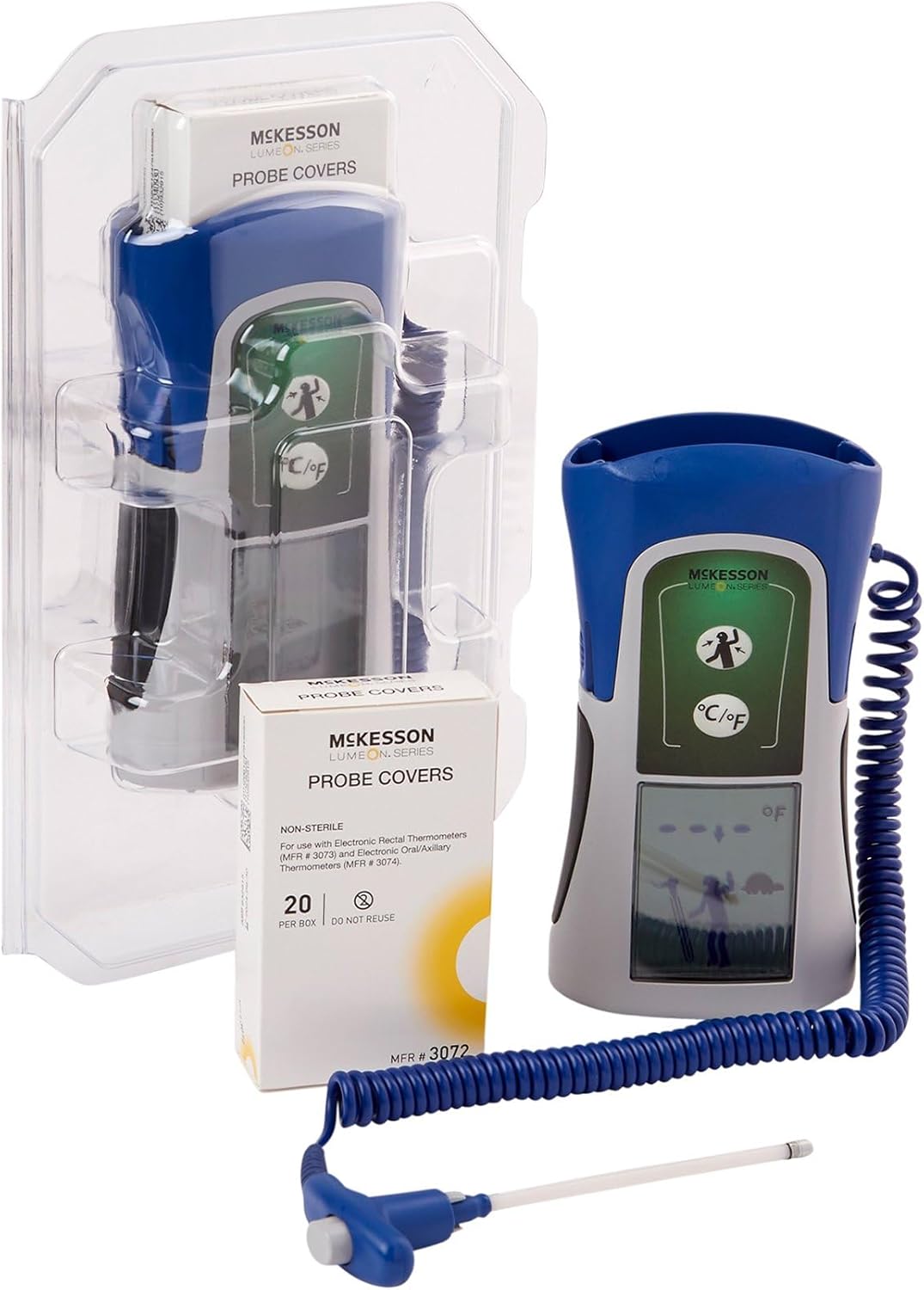
The McKesson LUMEON Electronic Thermometer, shown with its flexible probe and a box of probe covers, packaged in clear plastic.
2. Safety Information
- This thermometer is intended for oral and axillary use only. Do not use for rectal temperature measurement.
- Always use a new, disposable probe cover for each measurement to prevent cross-contamination.
- Keep the device out of reach of children. Small parts may pose a choking hazard.
- Do not bite the probe.
- Avoid exposing the thermometer to direct sunlight, extreme temperatures, or moisture.
- Do not attempt to disassemble or repair the device. Contact customer support if service is required.
- Statements regarding dietary supplements have not been evaluated by the FDA and are not intended to diagnose, treat, cure, or prevent any disease or health condition.
3. Product Features
- Provides quick, accurate readings in approximately 4 seconds.
- Features a dual measuring scale with Fahrenheit (°F) and Celsius (°C) capabilities.
- Intuitive, icon-based interface for simple operation and reliable readings.
- Flexible probe enhances durability and helps minimize technique-related errors.
- Equipped with an easy-to-read LCD screen with backlight.
- Extended battery life supports up to 6,000 readings.
4. Package Contents
- McKesson LUMEON Electronic Thermometer (Model 3074)
- Probe Covers (20 per box, MFR #3072)
- User Manual

Close-up of the McKesson LUMEON Probe Covers packaging, showing the barcode (01206124791958551120081321A2053479) and manufacturing details.
5. Setup
5.1 Battery Installation
The thermometer requires 4 AA batteries for operation. To install or replace batteries:
- Locate the battery compartment cover on the back of the device.
- Open the cover.
- Insert 4 AA batteries, ensuring correct polarity (+/-).
- Close the battery compartment cover securely.
5.2 Unit Selection (°F / °C)
The thermometer can display temperatures in Fahrenheit (°F) or Celsius (°C). To switch between units:
- With the thermometer off, press and hold the power button for approximately 3 seconds until the unit changes on the display.
- Release the button when the desired unit is shown. The device will remember this setting for future use.
6. Operating Instructions
Always ensure the thermometer is clean and a new probe cover is attached before each use.

The McKesson LUMEON Electronic Thermometer displaying a temperature reading of 91.1°F, with its flexible probe and a box of probe covers.
6.1 Oral Temperature Measurement
- Attach a new, disposable probe cover to the thermometer tip.
- Press the power button to turn on the thermometer.
- Place the covered probe tip under the tongue, as far back as comfortable, and close the mouth.
- Hold the thermometer in place until a stable reading is displayed (approximately 4 seconds). A beep will indicate completion.
- Read the temperature on the LCD screen.
- Discard the used probe cover and turn off the thermometer.
6.2 Axillary (Underarm) Temperature Measurement
- Attach a new, disposable probe cover to the thermometer tip.
- Press the power button to turn on the thermometer.
- Place the covered probe tip in the center of the armpit, ensuring good skin contact.
- Hold the arm firmly against the body to keep the probe in place.
- Wait until a stable reading is displayed (this method may take slightly longer than oral). A beep will indicate completion.
- Read the temperature on the LCD screen.
- Discard the used probe cover and turn off the thermometer.
7. Reading Interpretation
The thermometer will display the measured temperature on its LCD screen. Normal body temperature varies by individual, age, and measurement site. Consult a healthcare professional for guidance on interpreting temperature readings, especially if you have concerns about fever or hypothermia.

The McKesson LUMEON Electronic Thermometer placed on a desk, demonstrating its compact size and readiness for use.
8. Maintenance
8.1 Cleaning
After each use, and after removing the disposable probe cover, wipe the thermometer probe and body with a soft cloth dampened with isopropyl alcohol or a mild disinfectant. Do not immerse the thermometer in water or any cleaning solution. Allow the device to air dry completely before storage.
8.2 Storage
Store the thermometer in its protective case in a cool, dry place, away from direct sunlight and extreme temperatures. Remove batteries if the device will not be used for an extended period.

Side view of the McKesson LUMEON Electronic Thermometer, highlighting its ergonomic design and flexible probe with a probe cover.
9. Troubleshooting
| Problem | Possible Cause | Solution |
|---|---|---|
| No display when powered on | Dead or incorrectly installed batteries | Replace batteries with 4 new AA batteries, ensuring correct polarity. |
| Inaccurate readings | Improper placement of probe; used probe cover; environmental factors | Ensure correct probe placement; use a new probe cover; avoid taking temperature immediately after eating, drinking, or exercising. |
| Error codes displayed | Device malfunction; out of temperature range | Refer to the specific error code in the full product documentation or contact McKesson customer support. Ensure ambient temperature is within operating range. |
10. Specifications
| Feature | Detail |
|---|---|
| Model Number | 3074 |
| Measurement Time | Approximately 4 seconds |
| Measurement Range | 90°F to 110°F (32°C to 43.3°C) |
| Display | Digital LCD with backlight |
| Power Source | 4 AA batteries |
| Battery Life | Up to 6,000 readings |
| Product Dimensions | 10.6 x 6.6 x 3.7 inches |
| Weight | 1.41 Pounds |
| Material | Plastic |
| Compliance | FDA compliant |
11. Warranty and Support
For warranty information or technical support regarding your McKesson LUMEON Electronic Thermometer, please refer to the warranty card included with your product or contact McKesson customer service directly. Contact details can typically be found on the product packaging or the official McKesson website. Please have your model number (3074) and purchase information available when contacting support.