
Introduction
This manual provides instructions for the Redi-Remote replacement remote control, model RTAXD1027. This remote is designed to function as a direct replacement for specific Pioneer units, ensuring full compatibility without the need for programming.
Compatible Pioneer Models: C90, CUC003, CU002, AXD1027, C90BK, AXD1009, C900S.
This remote control is a custom-built replacement and is not an original Pioneer product. It is designed to perform all functions of the original remote for the specified units.
Setup
Battery Installation
The remote control requires 4 AAA batteries (included). Follow these steps to install them:
- Locate the battery compartment cover on the back of the remote control.
- Slide the cover downwards or press the latch (if present) to open the compartment.
- Insert the 4 AAA batteries, ensuring the positive (+) and negative (-) terminals align correctly with the markings inside the compartment.
- Replace the battery compartment cover, sliding it back into place until it clicks securely.
Note: Ensure batteries are inserted correctly to prevent damage to the remote control. Remove batteries if the remote will not be used for an extended period.
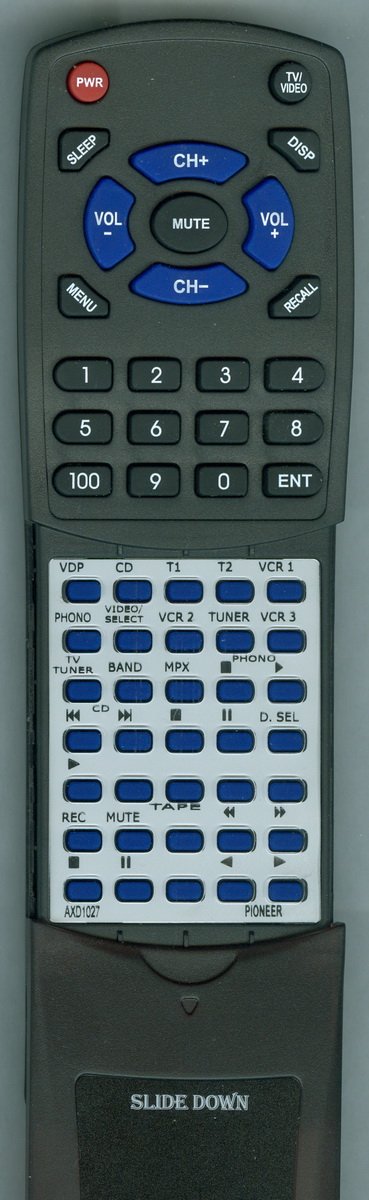
Image: Front view of the Redi-Remote replacement remote control, showing its buttons and general layout. This image helps users identify the product and its main features.
Operating Instructions
Basic Operation
This Redi-Remote control is pre-programmed for the specified Pioneer units and requires no additional setup. Simply point the remote at your Pioneer unit and press the desired function button.
- Power Button: Turns the Pioneer unit on or off.
- Volume Up/Down: Adjusts the audio volume.
- Channel Up/Down: Changes channels (if applicable to your Pioneer unit).
- Input/Source: Selects different input sources (e.g., CD, DVD, AUX).
Accessing Lower Half Buttons
The remote features a sliding cover over its lower half. To access additional functions:
- Locate the cover on the lower section of the remote.
- Gently slide the cover downwards to reveal the hidden buttons.
- After use, slide the cover back up to protect the buttons.
Note: Redi-Remotes are designed to control only the specific unit they are intended for and cannot be programmed to control auxiliary devices.
Maintenance
Cleaning the Remote
To maintain the remote control's appearance and functionality:
- Wipe the surface with a soft, dry cloth.
- For stubborn dirt, slightly dampen the cloth with water or a mild, non-abrasive cleaner.
- Avoid using harsh chemicals, solvents, or abrasive materials, as these can damage the remote's finish or internal components.
Battery Care
Replace batteries when the remote's performance diminishes. Always replace all batteries at the same time with new ones of the same type. Do not mix old and new batteries or different types of batteries.
Troubleshooting
Remote Not Responding
- Check Batteries: Ensure batteries are correctly installed with the correct polarity (+/-). Replace old or depleted batteries with new ones.
- Line of Sight: Make sure there is a clear line of sight between the remote control and the Pioneer unit's infrared sensor. Obstructions can block the signal.
- Distance: Ensure you are within the effective operating range of the remote control.
- Unit Compatibility: Verify that your Pioneer unit model is listed as compatible with this Redi-Remote control.
Specific Functions Not Working
- Sliding Cover: If certain buttons are not working, ensure the sliding cover is fully open to reveal all controls.
- Unit Capability: Confirm that the function you are trying to use is supported by your specific Pioneer unit.
Specifications
| Feature | Detail |
|---|---|
| Model Number | RTAXD1027 |
| Brand | Redi-Remote |
| Product Dimensions | 7 x 2.5 x 1 inches |
| Item Weight | 4.5 ounces |
| Batteries | 4 AAA batteries (included) |
| Special Feature | No Programming Required |
| Max Number of Supported Devices | 1 |
| Compatible Devices | Receiver (Pioneer C90, CUC003, CU002, AXD1027, C90BK, AXD1009, C900S) |
| Connectivity Technology | Infrared |
Warranty and Support
This Redi-Remote control is a custom-built replacement. For any concerns with the remote after purchase, please contact the seller directly for support and warranty information. The seller's contact information can typically be found on your purchase receipt or order details page.
Redi-Remotes are not equipped with laser pointers or LED lights.