
Hanna HI2020
Hanna HI2020 Multiparameter pH Meter User Manual
Model: HI2020 | Brand: Hanna
Introduction
This manual provides essential information for the proper operation and maintenance of your Hanna HI2020 Multiparameter pH Meter. Please read thoroughly before initial use to ensure accurate measurements and prolong the life of your instrument. This device is designed for precise pH and temperature measurements in various laboratory and field applications.
Safety Information
- Always handle the meter and electrodes with care to prevent damage.
- Do not immerse the meter body in water or other liquids. The meter is not waterproof.
- Use only specified buffer solutions for calibration and electrode storage.
- Keep all chemicals, including buffer solutions, out of reach of children and pets.
- Dispose of used batteries and expired solutions according to local environmental regulations.
- Avoid exposing the meter to extreme temperatures, direct sunlight, or high humidity.
Package Contents
Please verify that all items listed below are present and undamaged upon unpacking:
- Hanna HI2020 Multiparameter pH Meter
- pH Electrode (typically HI1131B or similar)
- Temperature Probe (if separate from pH electrode)
- (3) 4oz pH Buffer Solutions (pH 4.01, 7.01, 10.01)
- Electrode Cleaning Solution
- USB Cable
- Power Adapter
- Quality Certificate
- Instruction Manual (this document)
Setup
Follow these steps to prepare your HI2020 meter for first use and ensure proper functionality.
- Unpacking: Carefully remove all components from the packaging. Retain packaging for future storage or transport.
- Power Connection: Connect the provided power adapter to the meter's USB port and a standard power outlet. The meter can also operate on its internal rechargeable battery. Ensure the battery is sufficiently charged for portable use.
- Electrode Connection: Connect the pH electrode and, if separate, the temperature probe to their respective ports on the top of the meter. Ensure connections are secure and fully inserted.
- Initial Power On: Press the power button (usually located on the front or side) to turn on the meter. The display should illuminate and show initial readings or a welcome screen.

Image: Front view of the Hanna HI2020 Multiparameter pH Meter, showcasing its large LCD display and intuitive button layout. The display indicates a pH reading of 7.02 and a temperature of 25.1°C, along with battery status and electrode condition.
Operating Instructions
Basic pH Measurement
- Electrode Preparation: Ensure the pH electrode is clean and properly conditioned. Remove the protective storage cap and rinse the electrode bulb and junction with distilled or deionized water.
- Sample Immersion: Submerge the electrode tip and temperature probe into the sample solution. Ensure the liquid level covers the sensing bulb and the reference junction of the electrode.
- Reading Stability: Gently stir the solution to ensure homogeneity. Allow the reading on the display to stabilize. The meter will typically indicate stability with an icon or message.
- Recording: Once the reading is stable, record the pH and temperature values displayed.
- Post-Measurement: Rinse the electrode thoroughly with distilled water and replace the storage cap with fresh storage solution.
Button Functions
- CAL / MODIFY: Initiates the calibration process; used to modify settings within menus.
- RANGE: Toggles between different measurement ranges or parameters (if applicable).
- UP / DOWN Arrows: Navigates through menu options and adjusts numerical values.
- LOG: Records the current stable measurement data into the meter's memory.
- GLP / CFM: Accesses Good Laboratory Practice (GLP) data, including calibration history; used to confirm selections.
- SETUP / CLR: Enters the meter's setup menu for configuration; used to clear logged data or settings.
- RCL: Recalls previously logged measurement data from the meter's memory.
Calibration
Regular calibration is essential for maintaining the accuracy of your pH meter. It is recommended to calibrate the meter at least once a day, or when using a new electrode, after cleaning the electrode, or if high accuracy is required.
- Preparation: Have your pH 4.01, 7.01, and 10.01 buffer solutions ready. Ensure they are fresh and at room temperature. Use separate beakers for each buffer to avoid contamination.
- Initiate Calibration: Turn on the meter. Rinse the electrode with distilled water. Press the CAL button. The meter will prompt you for the first buffer solution, typically pH 7.01.
- First Buffer (pH 7.01): Immerse the electrode tip and temperature probe into the pH 7.01 buffer solution. Gently stir and wait for the reading to stabilize. The meter will automatically recognize the buffer and confirm calibration for this point.
- Second Buffer (pH 4.01 or 10.01): Rinse the electrode thoroughly with distilled water. Immerse it into the next buffer solution (e.g., pH 4.01 for acidic range measurements or pH 10.01 for alkaline range measurements). Wait for stabilization and confirmation.
- Third Buffer (Optional): For a three-point calibration, rinse the electrode again and immerse it in the remaining buffer solution. Wait for stabilization and confirmation.
- Save Calibration: Follow the on-screen prompts to save the calibration data. The meter will display a message indicating successful calibration.
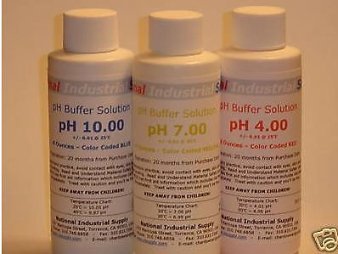
Image: Three bottles of pH buffer solutions, typically pH 4.00, pH 7.00, and pH 10.00, which are crucial for accurate calibration of the pH meter. These solutions ensure the meter provides precise readings across the pH scale.
Maintenance
Electrode Care
- Storage: Always store the pH electrode in its protective cap filled with Hanna storage solution or pH 7.01 buffer. Never store the electrode dry, as this will dehydrate the sensing bulb and lead to sluggish response and inaccurate readings.
- Cleaning: If readings become sluggish, erratic, or inaccurate despite calibration, the electrode may need cleaning. Use a specialized electrode cleaning solution recommended by Hanna. Follow the cleaning solution's instructions carefully.
- Rinsing: Rinse the electrode thoroughly with distilled or deionized water before and after each measurement to prevent cross-contamination and buildup.
Meter Care
- Cleaning: Wipe the meter body with a soft, damp cloth. Do not use abrasive cleaners, solvents, or harsh chemicals, as these can damage the casing or display.
- Storage: Store the meter in a cool, dry place away from direct sunlight, extreme temperatures, and corrosive environments when not in use.
- Battery: For prolonged storage, ensure the internal battery is partially charged (around 50%) to maintain battery health.
Troubleshooting
This section provides solutions to common issues you might encounter with your HI2020 meter.
| Problem | Possible Cause | Solution |
|---|---|---|
| Inaccurate pH readings | Electrode not calibrated; dirty or fouled electrode; expired or contaminated buffer solutions; incorrect temperature compensation. | Perform a fresh calibration; clean the electrode thoroughly; use fresh, uncontaminated buffer solutions; ensure temperature probe is functioning correctly. |
| Slow response time | Electrode dehydrated or fouled; low battery; air bubbles around the sensing bulb. | Rehydrate electrode in storage solution for several hours; clean electrode; charge/replace batteries; gently tap electrode to dislodge bubbles. |
| Meter does not turn on | No power supply; completely discharged battery; faulty power adapter/cable. | Check power connection; charge the battery for at least 30 minutes; try a different USB cable or power adapter. |
| "Err" or "Over Range" message | Measurement outside the meter's range; damaged electrode; calibration error. | Ensure sample pH is within the meter's range (0-14 pH); check electrode for visible damage; recalibrate the meter. |
Specifications
- Model: HI2020
- Manufacturer: Hanna Instruments
- Parameters: pH, Temperature
- pH Range: 0.00 to 14.00 pH
- pH Resolution: 0.01 pH
- pH Accuracy: ±0.02 pH
- Temperature Range: 0.0 to 100.0 °C (32.0 to 212.0 °F)
- Temperature Resolution: 0.1 °C / 0.1 °F
- Temperature Accuracy: ±0.5 °C / ±0.9 °F
- Calibration: Up to three-point pH calibration with 5 standard buffers (4.01, 6.86, 7.01, 9.18, 10.01)
- Electrode: Digital pH electrode with built-in temperature sensor
- Power Supply: 5 VDC adapter (included) or internal rechargeable Li-ion battery
- Battery Life: Approximately 8 hours of continuous use
- Logging: Data logging capability (number of points may vary by firmware)
- Connectivity: USB port for charging and data transfer
- Dimensions: Approximately 202 x 140 x 12.7 mm (7.9 x 5.5 x 0.5 inches)
- Weight: Approximately 250 g (0.55 lbs)
Warranty and Support
For detailed warranty information, technical support, and service inquiries, please refer to the official Hanna Instruments website or contact their customer service department directly. It is recommended to keep your purchase receipt as proof of purchase for warranty claims.
Manufacturer: Hanna Instruments
Product ASIN: B00PV29OOA
Related documentsHI2020


Ask a question about this manual
Ask about setup, troubleshooting, compatibility, parts, safety, or missing instructions. Manuals+ will review the question and use this page’s manual context to help answer it.