
Introduction
This manual provides detailed instructions for the operation and maintenance of your Timex Women's Ironman Essential 30 Mid-Size Watch. This watch is designed for active lifestyles, featuring a durable resin construction, a clear digital display, and multiple functions including a chronograph, countdown timer, and alarm. Please read this manual thoroughly to ensure proper use and to maximize the lifespan of your watch.
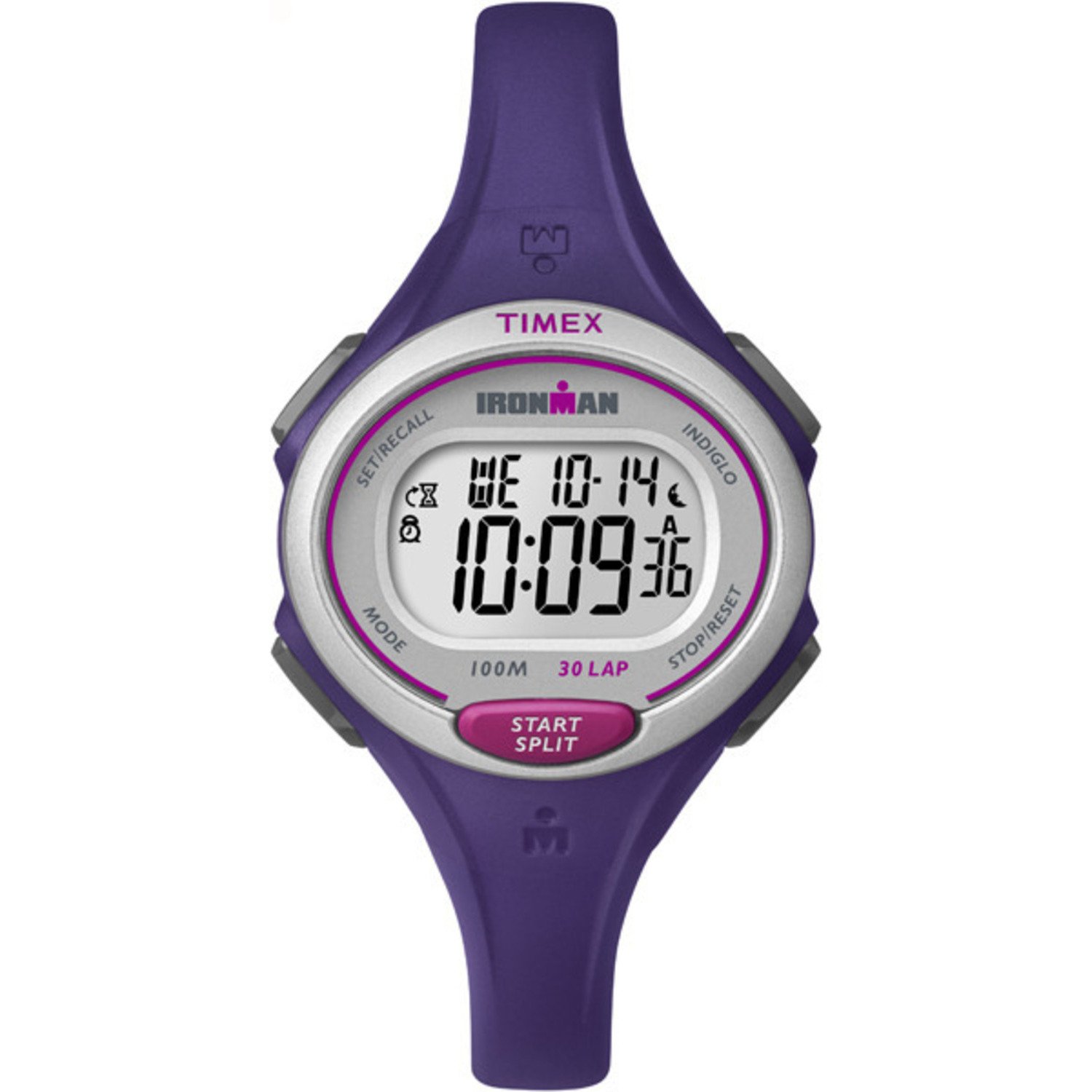
This image displays the Timex Women's Ironman Essential 30 Mid-Size Watch. It features a purple resin strap and case, a silver-tone bezel, and a clear digital display showing the time, day, and date. The watch has buttons labeled 'MODE', 'SET/RECALL', 'INDIGLO', 'STOP/RESET', and 'START/SPLIT'.
Initial Setup
Setting Time and Date
- Press the MODE button repeatedly until the time setting screen appears (usually indicated by flashing digits).
- Use the START/SPLIT button to adjust the flashing digit (hours, minutes, seconds).
- Press the STOP/RESET button to move to the next digit or setting (e.g., AM/PM, month, day, year).
- Repeat steps 2 and 3 until all time and date settings are correct.
- Press the MODE button to exit the setting mode and return to the normal time display.
Battery Information
Your watch comes with one Lithium Metal battery (included). The battery is pre-installed and the watch is ready for use. When the display dims or functions become erratic, it may be time for a battery replacement. Refer to the Maintenance section for more details.
Operating Your Watch
Time Display
The default display shows the current time, day of the week, and date. Press the MODE button to cycle through different functions.
Indiglo Night-Light
Press the INDIGLO button (top left) to illuminate the watch face for easy viewing in low-light conditions. The light will remain on for a few seconds.
Chronograph (Stopwatch)
Your watch features a 100-hour chronograph with 30-lap memory.
- Press MODE until 'CHRONO' or 'STOPWATCH' appears.
- Press START/SPLIT to begin timing.
- Press START/SPLIT again to record a lap time while the main timer continues running.
- Press STOP/RESET to pause the chronograph. Press START/SPLIT to resume.
- To reset, press STOP/RESET when the chronograph is paused.
- To recall lap times, use the SET/RECALL button in chronograph mode.
Countdown Timer
The watch includes a 24-hour countdown timer.
- Press MODE until 'TIMER' or 'CDT' appears.
- Use SET/RECALL to enter setting mode for the timer.
- Use START/SPLIT to adjust the hours, minutes, and seconds. Use STOP/RESET to move between digits.
- Press SET/RECALL to confirm the set time.
- Press START/SPLIT to start the countdown.
- An alarm will sound when the timer reaches zero.
Alarm
Set a customizable alarm for daily reminders.
- Press MODE until 'ALARM' appears.
- Use SET/RECALL to enter alarm setting mode.
- Use START/SPLIT to adjust the alarm time. Use STOP/RESET to move between hours and minutes.
- Press SET/RECALL to confirm the alarm time.
- To activate/deactivate the alarm, press START/SPLIT while in alarm mode (not setting mode). An alarm icon will indicate activation.
24-Hour Military Time Mode
Your watch supports both 12-hour (AM/PM) and 24-hour (military) time formats. This setting is typically adjusted during the initial time setting process or through a dedicated option in the time setting mode.
Dual Time Zones
The watch allows you to set and view a second time zone (T2). This is useful for travel or tracking time in another region.
- Press MODE until 'T2' or 'DUAL TIME' appears.
- Use SET/RECALL to enter T2 setting mode.
- Adjust the time for the second zone using START/SPLIT and STOP/RESET.
- Press SET/RECALL to confirm.
Water Resistance
This watch is water resistant to 100 meters (330 feet). It is suitable for swimming and snorkeling. It is not recommended for diving. Avoid pressing buttons underwater to prevent water ingress.
An official product video showcasing the Timex Women's Ironman Essential 30 Watch. The video demonstrates various angles and features of the watch, highlighting its design and functionality.
Care and Maintenance
- Cleaning: Clean your watch with a soft, damp cloth. Avoid harsh chemicals or abrasive cleaners.
- Battery Replacement: When the battery needs replacement, it is recommended to have it done by a qualified watch technician to ensure the water resistance seal is properly maintained.
- Water Resistance: While water resistant, avoid exposing the watch to extreme temperature changes (e.g., hot showers followed by cold water) as this can compromise seals. Do not operate buttons underwater.
- Storage: Store your watch in a cool, dry place away from direct sunlight and extreme temperatures when not in use.
Troubleshooting
| Problem | Solution |
|---|---|
| Display is blank or dim. | The battery may be low or depleted. Replace the battery. |
| Buttons are unresponsive. | Try resetting the watch (if a reset button is available, or by temporarily removing the battery). Ensure no buttons are stuck. |
| Time is incorrect. | Refer to the 'Setting Time and Date' section to re-adjust the time. |
| Water appears inside the watch. | Immediately take the watch to a qualified service center. Do not attempt to open it yourself. |
Product Specifications
- Model Number: TW5K901009J
- Case Material: Resin
- Strap Material: Resin
- Case Diameter: 35mm
- Strap Width: 12mm
- Water Resistance: 100m (330ft)
- Battery Type: 1 Lithium Metal battery (included)
- Functions: 100-hour chronograph with 30-lap memory, 24-hour countdown timer, customizable alarm, 24-hour military time mode, 2 time zones, day/date/month calendar, Indiglo night-light.
- Product Dimensions: 3.5 x 0.25 x 3 inches; 0.96 ounces
Warranty and Support
For information regarding your product's warranty, please refer to the warranty card included with your purchase or visit the official Timex website. If you require further assistance or have questions not covered in this manual, please contact Timex customer support.
You can find contact information and additional resources on the official Timex website: www.timex.com


