
Introduction
The Cat CBC40EW is a fully automatic 40 Amp 12V rolling battery charger and maintainer designed to provide efficient and reliable battery charging and maintenance for various vehicles and equipment. It features a 110A engine start function, alternator check, and cable clamps for versatile use. This manual provides essential information for safe and effective operation, setup, maintenance, and troubleshooting.

Image: The Cat CBC40EW battery charger, a yellow and black rolling unit with a digital display and battery clamps.
Important Safety Information
Always read and understand all safety warnings and instructions before operating this battery charger. Failure to follow these instructions may result in electric shock, fire, or serious injury. Keep the manual for future reference.
- Use the charger in a well-ventilated area.
- Do not expose the charger to rain or wet conditions.
- Ensure proper polarity when connecting to a battery.
- Keep out of reach of children.
- Wear eye protection and gloves when working with batteries.
- Avoid sparks or flames near the battery.
Product Features
The Cat CBC40EW is equipped with several features designed for optimal battery care and vehicle starting:
- 40 Amp Rolling Battery Charger: Maintains and charges AGM, GEL, or WET automotive or marine 12V batteries.
- Fully Automatic High Frequency Charging: Delivers 3 stages of charging (fast charge, top-off, shut-off mode).
- Battery Reconditioning Feature: Helps extend battery life.
- 110 Amp Engine Start: Delivers 792 watts to assist in starting vehicles in less than 90 seconds.
- Reverse Polarity Protection: Built-in circuit protection against incorrect connections.
- Digital LCD Screen: Displays charging status and battery status with easy-to-understand icons.
- Alternator Check and Battery Voltage Meter: Evaluate battery voltage under load to indicate if the alternator is maintaining battery level.
- Built-in 6-foot Cord, Rubber Tires, and Telescoping Handle: For ease of use, mobility, and storage.

Image: Close-up of the Cat CBC40EW control panel, showing the digital display, charge indicator, and buttons for Engine Start, Alternator Check, Battery Voltage, and Battery Recondition.
Setup
Unpacking and Initial Inspection
Carefully remove the battery charger from its packaging. Inspect the unit for any signs of damage during shipping. Ensure all components, including the charger unit, battery clamps, and power cord, are present and in good condition.
Connecting to a Battery
- Ensure the charger is unplugged from the AC power outlet.
- Connect the red positive (+) clamp to the positive (+) terminal of the battery.
- Connect the black negative (-) clamp to the negative (-) terminal of the battery. For vehicles, connect the black clamp to a non-painted metal part of the vehicle chassis away from the battery and fuel line.
- Ensure connections are secure and free from corrosion.
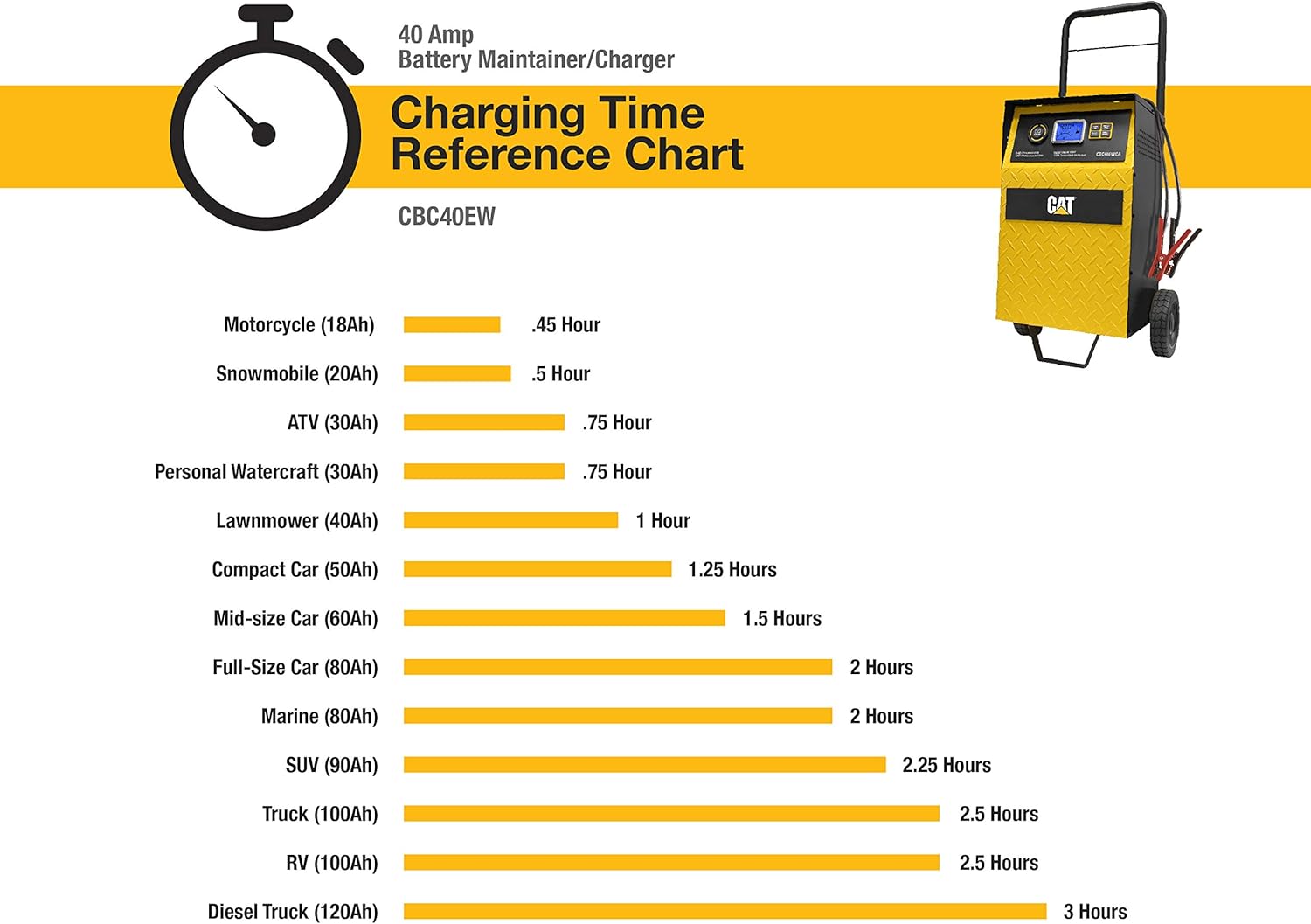
Image: The Cat CBC40EW battery charger positioned next to a vehicle, with its cables connected to the vehicle's battery terminals, ready for operation.
Connecting to AC Power
Once the battery clamps are securely connected, plug the charger's AC power cord into a standard 110V AC electrical outlet.
Operating Instructions
Automatic Charging
After connecting the charger to the battery and AC power, the unit will automatically detect the battery type and begin the charging process. The LCD screen will display the charging status, current (Amps), and battery voltage. The charger will cycle through fast charge, top-off, and then switch to a maintenance (float) mode once the battery is fully charged.
Engine Start Function
If your vehicle's battery is too low to start the engine, the 110 Amp Engine Start function can provide a quick boost. With the charger connected to the battery and AC power, press the "Engine Start" button on the control panel. This will deliver a high burst of power to assist in starting the vehicle. Attempt to start the vehicle within 90 seconds of activating this function.
Alternator Check
To check your vehicle's alternator, connect the charger to the battery and AC power. Press the "Alternator Check" button. The charger will analyze the alternator's output to determine if it is properly charging the vehicle's battery while the engine is running.
Battery Recondition
The Battery Recondition feature can help to improve the performance and extend the life of older batteries by breaking down sulfate crystals that can build up over time. Consult the display for instructions on activating this mode.
Understanding the LCD Display
The digital LCD screen provides real-time information. Key indicators include:
- Amperage (A): Shows the current charging rate.
- Voltage (V): Displays the battery's current voltage.
- Battery Icon: Indicates the battery's charge level.
- Status Icons: Provide information on charging mode (e.g., charging, charged, reconditioning, error).
Video: An overview demonstrating the features and operation of the Cat CBC40EW battery charger, including its rolling design and control panel functions.
Charging Time Reference
The following chart provides estimated charging times for various battery capacities using the 40 Amp Battery Maintainer/Charger (CBC40EW). Actual times may vary based on battery condition and ambient temperature.

Image: A bar chart illustrating approximate charging times for different vehicle types and battery capacities (e.g., Motorcycle, Snowmobile, ATV, Compact Car, SUV, Truck, RV, Diesel Truck) using the Cat CBC40EW charger.
Maintenance
Regular maintenance ensures the longevity and optimal performance of your Cat CBC40EW battery charger.
- Cleaning: Disconnect the charger from power and battery. Wipe the exterior with a soft, dry cloth. Do not use abrasive cleaners or solvents.
- Cable and Clamp Inspection: Periodically check the battery cables and clamps for any signs of damage, fraying, or corrosion. Replace if necessary.
- Storage: Store the charger in a cool, dry place when not in use. Ensure cables are neatly wrapped and clamps are secured in their designated holders.
Troubleshooting
If you encounter issues with your Cat CBC40EW, refer to the following common problems and solutions:
| Problem | Possible Cause | Solution |
|---|---|---|
| Charger does not turn on / No display | No AC power; Faulty outlet; Internal issue. | Check AC power connection and outlet. Try a different outlet. Ensure power cord is not damaged. |
| "No Battery Connected" error | Incorrect or loose battery clamp connection; Battery is completely dead (below minimum voltage for detection). | Ensure clamps are securely connected to correct battery terminals. If battery is completely dead, it may not be detected by the charger. Consider a professional battery test. |
| Charger not charging / Charging stops prematurely | Battery fully charged; Battery fault; Overheating; Reverse polarity. | Check LCD for "Charged" indicator. Disconnect and reconnect clamps. Allow charger to cool if hot. Verify correct polarity. If battery is faulty, it may need replacement. |
| Engine Start function not working | Insufficient battery charge; Incorrect connection; Vehicle issue. | Ensure battery is connected correctly. Allow charger to charge the battery for a few minutes before attempting Engine Start. Check vehicle's starter system. |
If the problem persists after attempting these solutions, contact customer support.
Specifications
| Attribute | Value |
|---|---|
| Brand | Cat |
| Model | CBC40EW |
| Amperage | 40 Amps |
| Engine Start Amperage | 110 Amps (792 Watts) |
| Output Voltage | 12 Volts |
| Input Voltage | 110 Volts |
| Item Weight | 22.8 pounds |
| Product Dimensions | 20.8 x 14.4 x 13.2 inches |
| Specification Met | ETL Certified |
| First Available Date | November 16, 2014 |
Warranty Information
The Cat CBC40EW battery charger and maintainer includes a limited 1-year manufacturer warranty. Please retain your proof of purchase for warranty claims. For specific terms and conditions, refer to the warranty documentation included with your product or contact the manufacturer directly.
Support
For further assistance, technical support, or to inquire about replacement parts, please contact the manufacturer, Baccus Global LLC. You can also refer to the official user manual PDF for detailed diagrams and additional information:


