
Product Overview
The Intex Krystal Clear Sand Filter Pump and Saltwater System with E.C.O. (Electrocatalytic Oxidation) is designed to provide clean, clear, and safe water for above ground pools. This integrated system combines the natural filtration power of sand with the benefits of a saltwater system, reducing the need for traditional packaged chlorine. Sand filters offer efficient filtration and require sand replacement only once every five years, making maintenance simple and cost-effective. The system features an automatic 24-hour timer for convenient daily operation.
This model is suitable for above ground pools with a capacity ranging from 2,600 to 8,500 gallons. It operates on 110-120V with a GFCI for safety, features a 14-inch tank diameter, a 0.5 hp motor, and delivers a system flow rate of 1,500 gallons per hour (pump flow rate 1,600 gph). It has a 55 lb sand capacity or 40 lb glass filtration media capacity, and a chlorine output of 7 g/hr. Two 1.5-inch (38mm) hoses are included.
1. Setup and Installation
Proper setup is crucial for optimal performance and safety. Ensure the pump is placed on a solid, level surface, ideally concrete or a sturdy pad, near the pool and a GFCI-protected electrical outlet.
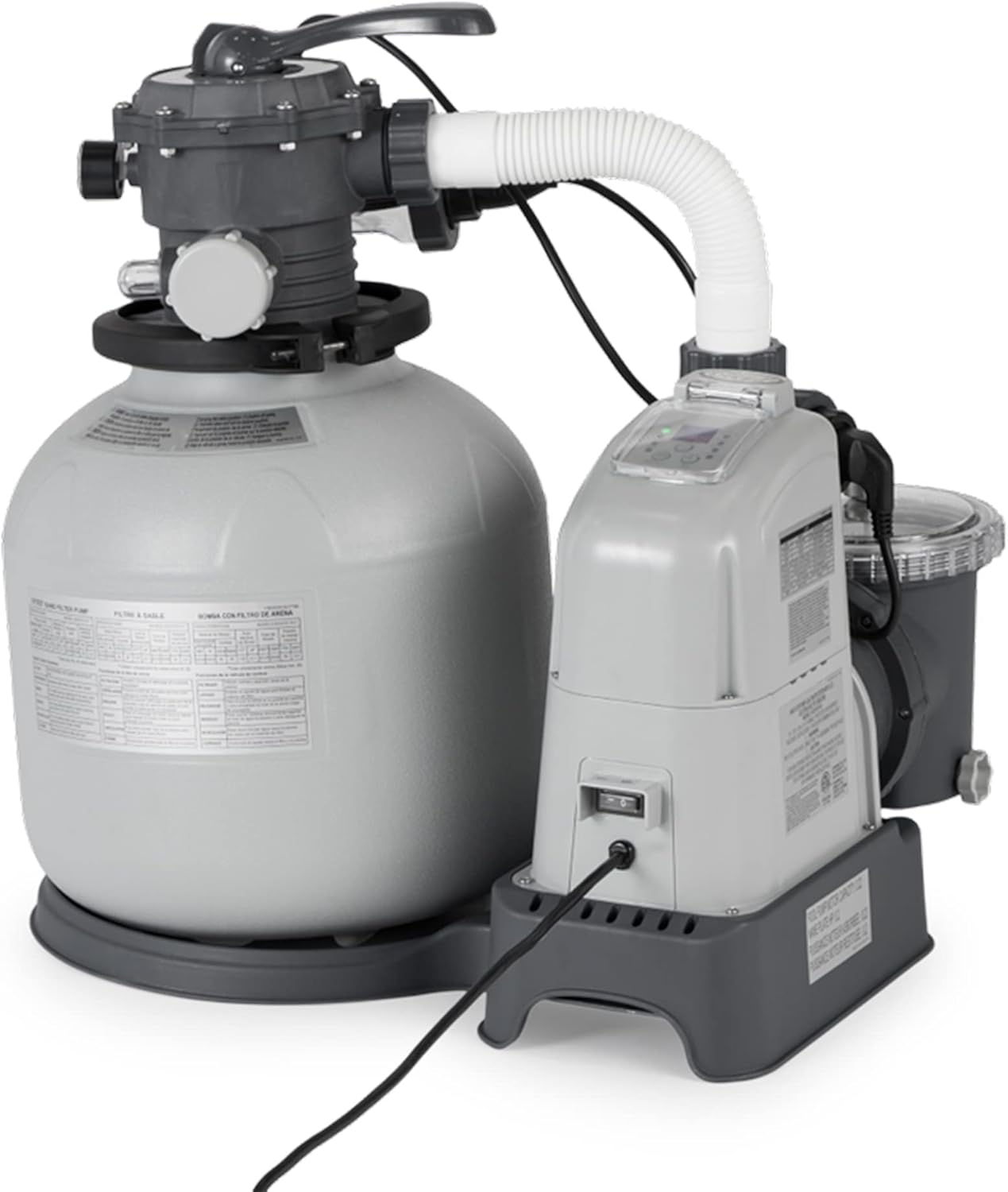
Figure 1: The Intex Krystal Clear Sand Filter Pump and Saltwater System unit.

Figure 2: Proper placement of the filter pump unit on a level surface next to an above ground pool.
1.1. Adding Filter Media
Before connecting to the pool, the filter tank must be filled with the appropriate filter media. This unit requires 55 lbs of filter sand or 40 lbs of glass filtration media. Carefully pour the sand into the tank, ensuring the standpipe is centered and protected from sand entering it during filling.
1.2. Connecting Hoses
Connect the provided 1.5-inch (38mm) hoses from the pool's inlet and outlet fittings to the pump and filter unit. Ensure all connections are secure and watertight to prevent leaks. Refer to the diagrams in the full user manual for specific hose routing.

Figure 3: The filter pump unit with hoses connected to the pool.
1.3. Priming the Pump
Once the hoses are connected and the pool is filled to the recommended level, prime the pump by opening the air release valve on the top of the pump. Allow water to fill the pump until a steady stream of water comes out, then close the valve. This removes air from the system, allowing the pump to operate efficiently.
1.4. Initial Backwash and Rinse
Before regular operation, perform an initial backwash and rinse cycle to remove any fine dust or impurities from the new sand media. Set the multi-port valve to "Backwash" and run the pump until the water in the sight glass is clear. Then, set the valve to "Rinse" and run for approximately 30-60 seconds. Repeat if necessary, then set to "Filter" for normal operation.
2. Operating Instructions
The Intex Krystal Clear Sand Filter Pump and Saltwater System is designed for user-friendly operation with its intuitive controls and automatic features.
2.1. Multi-Port Valve Settings
The multi-port valve on top of the filter tank controls the water flow through the system. Understand each setting for proper operation:
- FILTER: Normal filtering operation. Water flows through the sand bed, trapping debris, and returns to the pool.
- BACKWASH: Reverses water flow through the sand bed to flush out trapped debris to the waste port. Use when pressure gauge indicates high pressure.
- RINSE: Used after backwashing to flush remaining dirty water from the valve and settle the sand bed.
- WASTE: Bypasses the filter and sends water directly to the waste port. Useful for vacuuming heavy debris or lowering pool water level.
- RECIRCULATE: Bypasses the filter and circulates water directly back to the pool. Useful for mixing chemicals without filtering.
- CLOSED: Shuts off all flow to the filter and pump. Use when performing maintenance on the pump or filter.

Figure 4: The multi-port valve with various settings for controlling water flow.
2.2. Control Panel and Timer
The integrated control panel allows for easy programming of the 24-hour timer, ensuring consistent filtration and chlorine generation. The system automatically manages both the sand filter and the E.C.O. saltwater system.

Figure 5: The digital control panel for setting the timer and monitoring system status.
2.3. Electrocatalytic Oxidation (E.C.O.) Saltwater System
The E.C.O. system generates natural chlorine from salt added to the pool water, providing a softer, cleaner swimming experience without the harshness of traditional chlorine. Ensure proper salt levels are maintained in the pool water as per the manual's guidelines (chlorine output: 7 g/hr).
2.4. Official Product Video: Intex Krystal Clear Sand Filter Pump
Video 1: An official Intex video demonstrating the setup, operation, and benefits of the Krystal Clear Sand Filter Pump. This video highlights the ease of use and the clean water results.
3. Maintenance
Regular maintenance ensures the longevity and efficiency of your Intex Krystal Clear system.
3.1. Backwashing and Rinsing
Monitor the pressure gauge on the multi-port valve. When the pressure rises above the normal operating range (typically indicated by a green zone), it's time to backwash the filter. This process cleans the sand bed by reversing water flow. After backwashing, always perform a rinse cycle to settle the sand and flush out any remaining dirty water before returning to filter mode.
3.2. Sand Replacement
One of the key advantages of a sand filter is the infrequent need for media replacement. The filter sand typically needs to be replaced only once every five years, significantly reducing ongoing maintenance costs and effort compared to cartridge filters.
3.3. Saltwater System Maintenance
Regularly check the salt level in your pool water using a reliable test kit. The system's control panel may also indicate low or high salt levels. Maintain the recommended salt concentration for optimal chlorine generation and to prevent damage to the E.C.O. cell. Periodically inspect and clean the electrolytic cell if mineral buildup occurs, following the detailed instructions in the full user manual.
4. Troubleshooting
This section provides solutions to common issues you might encounter with your sand filter pump and saltwater system.
4.1. Low Water Flow or Pressure
- Check Skimmer/Pump Basket: Ensure they are clean and free of debris.
- Backwash/Rinse Filter: A dirty sand bed can restrict flow.
- Check Hoses: Look for kinks or blockages in the hoses.
- Air in System: Re-prime the pump to remove any trapped air.
4.2. Water Not Clear
- Check Filtration Time: Ensure the pump is running for sufficient hours daily (refer to manual for recommended times based on pool size).
- Water Chemistry: Test and adjust pH, alkalinity, and chlorine levels. Ensure adequate salt for the E.C.O. system.
- Backwash/Rinse: A dirty filter cannot effectively clean the water.
- Sand Condition: If sand is old (over 5 years) or clumping, it may need replacement.
4.3. Leaks
- Check Connections: Tighten all hose clamps and threaded connections.
- O-Rings/Gaskets: Inspect O-rings and gaskets for cracks or wear. Lubricate with silicone lubricant or replace if damaged.
- Drain Plugs: Ensure all drain plugs are securely tightened.
5. Specifications
| Feature | Detail |
|---|---|
| Brand | Intex |
| Model Number | 28675EG |
| Voltage | 110-120V with GFCI |
| Pump Flow Rate | 1,600 gph |
| System Flow Rate | 1,500 gph |
| Tank Diameter | 14 inches |
| Motor Horsepower | 0.5 hp |
| Sand Capacity | 55 lbs |
| Glass Media Capacity | 40 lbs |
| Chlorine Output | 7 g/hr |
| Hose Size | 1.5 inches (38mm) |
| Product Dimensions | 17.13 x 17.5 x 34.38 inches |
| Item Weight | 52 Pounds |
6. Warranty Information
The Intex Krystal Clear Sand Filter Pump & Saltwater System (Model 28675EG) comes with a 2-Year Warranty from the date of purchase. Please retain your proof of purchase for warranty claims. The warranty covers manufacturing defects and malfunctions under normal use. For full details on warranty terms and conditions, refer to the complete user manual or contact Intex customer support.
7. Customer Support
For additional assistance, troubleshooting, or to obtain replacement parts, please contact Intex Customer Support. You can also refer to the comprehensive User Manual available online for detailed instructions and diagrams.
- Official User Manual (PDF): Download Here
- Intex Store: Visit the Intex Store on Amazon


