
Introduction
This manual provides detailed instructions for the installation, operation, and maintenance of your Maxwell Remote Up/Down Control. This panel-mounted switch is designed for remote windlass operation from various locations on your vessel, including the helm, flying bridge, or cockpit. It is engineered with marine-grade materials for durability in harsh marine environments and is splash-proof.
The control features a power indicator light and backlighting for enhanced visibility and ease of use. It is compatible with DC 12V or 24V dual-directional solenoids.
Important Safety Information
WARNING:
- Always disconnect power to the windlass system before performing any installation, maintenance, or troubleshooting.
- Ensure all wiring connections are secure and properly insulated to prevent short circuits and electrical hazards.
- Installation should be performed by a qualified marine electrician or technician if you are unsure about any steps.
- Do not operate the windlass if anyone is in the anchor chain's path or near moving parts.
- This device is designed for marine use and is splash-proof, but it is not submersible. Avoid direct submersion.
Package Contents
Please verify that all items are present before beginning installation:
- Maxwell Remote Up/Down Control Unit
- Mounting Hardware (screws, nuts, washers)
- Installation Template (if included)
- Instruction Manual (this document)
Setup and Installation
The Maxwell Remote Up/Down Control is designed for easy panel mounting. Follow these steps for proper installation:
1. Choosing a Mounting Location
Select a flat, secure surface at your helm, flying bridge, or cockpit that is easily accessible for operation and protected from direct, prolonged exposure to extreme weather conditions. Ensure there is sufficient space behind the panel for wiring connections.
2. Panel Preparation
- Using the provided template (if applicable) or the dimensions of the control unit, mark the cutout area on your chosen panel.
- Carefully cut out the opening using appropriate tools. Ensure the edges are smooth.
- Drill mounting holes as indicated by the template or the control unit's mounting points.
3. Wiring Connections
This control unit is designed for use with dual-directional solenoids and is compatible with DC 12V or 24V systems. Refer to your windlass and solenoid manufacturer's wiring diagrams for specific connections. A typical wiring setup involves:
- Power Input: Connect the positive (+) and negative (-) power leads from your vessel's DC power supply to the control unit. Ensure the correct voltage (12V or 24V) is supplied.
- Up/Down Outputs: Connect the 'Up' and 'Down' output wires from the control unit to the corresponding 'Up' and 'Down' terminals on your dual-directional solenoid.
- Ground: Ensure a proper ground connection for the control unit.
Note: All connections must be watertight and corrosion-resistant, especially in a marine environment. Use marine-grade connectors and heat shrink tubing where appropriate.
4. Mounting the Control Unit
- Feed the wiring through the cutout opening.
- Position the control unit into the cutout.
- Secure the control unit to the panel using the provided mounting hardware. Do not overtighten.
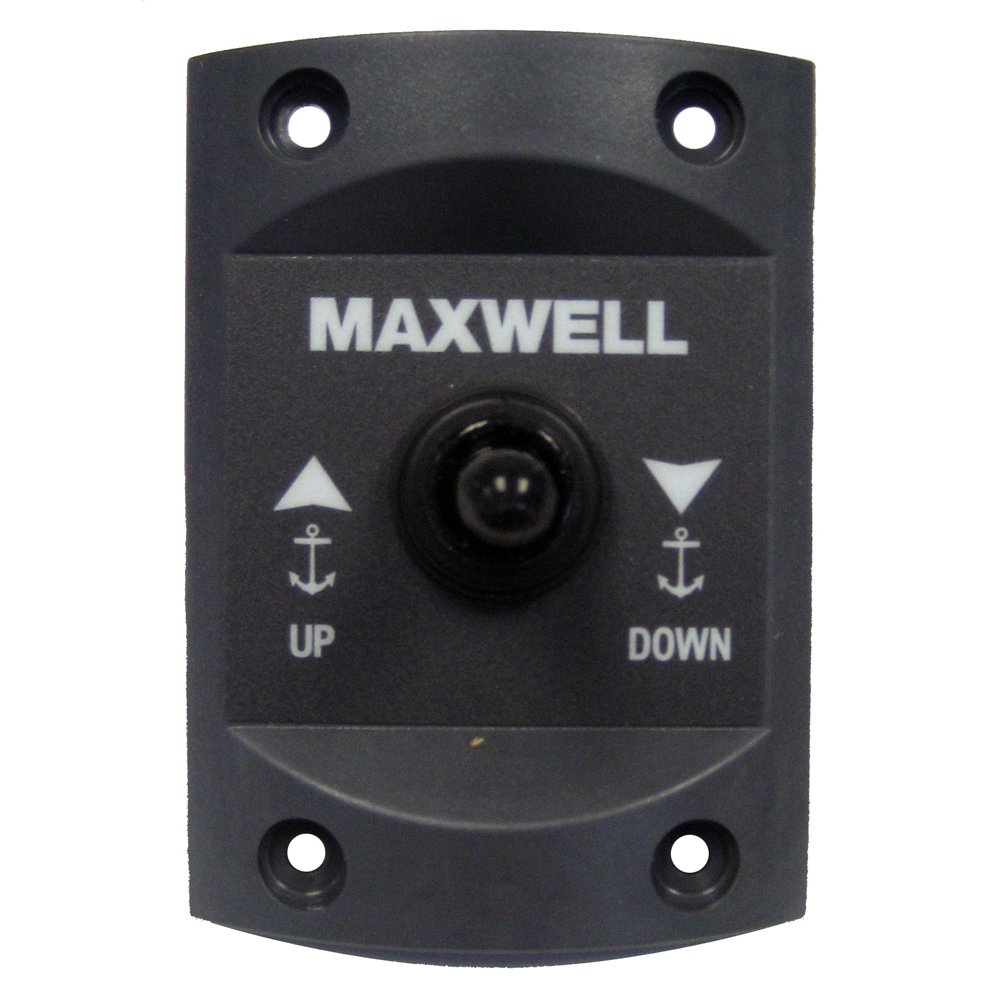
Figure 1: Maxwell Remote Up/Down Control Unit. This image shows the front face of the control unit with its 'Up' and 'Down' buttons, power indicator light, and backlighting.
Operating Instructions
Once installed and wired correctly, operating the Maxwell Remote Up/Down Control is straightforward:
- Power On: Ensure the main power to your windlass system is engaged. The control unit's power indicator light will illuminate, and the backlighting will activate, indicating it is ready for use.
- Anchor Up: Press and hold the 'Up' button to retrieve the anchor chain/rode. Release the button to stop the windlass.
- Anchor Down: Press and hold the 'Down' button to deploy the anchor chain/rode. Release the button to stop the windlass.
Important: Always observe the anchor and chain during operation to prevent tangles or damage. Do not force the windlass if it encounters an obstruction.
Maintenance
The Maxwell Remote Up/Down Control is constructed from marine-grade materials for minimal maintenance. However, regular inspection and cleaning will ensure its longevity and reliable operation:
- Cleaning: Periodically wipe the control unit's surface with a soft, damp cloth to remove salt residue, dirt, and grime. Avoid abrasive cleaners or solvents.
- Inspection: Regularly check all wiring connections for corrosion, fraying, or looseness. Ensure the mounting remains secure.
- Water Exposure: While splash-proof, avoid directing high-pressure water sprays directly at the unit.
Troubleshooting
If you encounter issues with your Maxwell Remote Up/Down Control, refer to the following common problems and solutions:
| Problem | Possible Cause | Solution |
|---|---|---|
| Control unit has no power (indicator light off). | No power to the windlass system; loose wiring connection; blown fuse/breaker. | Check windlass main power switch. Inspect all power connections. Check and replace fuse/reset breaker if necessary. |
| Windlass does not operate when buttons are pressed. | Faulty solenoid; incorrect wiring to solenoid; windlass motor issue. | Verify solenoid operation. Recheck wiring between control and solenoid. Consult windlass manual for motor troubleshooting. |
| Only 'Up' or 'Down' function works. | Wiring issue to one side of the solenoid; faulty button on control unit. | Inspect wiring to the 'Up' and 'Down' terminals on the solenoid. If wiring is correct, the control unit or solenoid may require replacement. |
If the problem persists after attempting these solutions, contact Maxwell customer support or a qualified marine technician.
Specifications
- Brand: Maxwell
- Model Number: RAGE25125MPN
- Compatibility: DC 12V or 24V dual-directional solenoids
- Material: Marine-grade materials
- Features: Splash-proof, Power indicator light, Backlighting
- Controller Type: Button Control
- Item Weight: 3.2 ounces
- Connectivity Technology: Infrared
- Max Number of Supported Devices: 1
Warranty and Support
Maxwell products are manufactured to high standards and are backed by a manufacturer's warranty against defects in materials and workmanship. For specific warranty terms and conditions, please refer to the warranty card included with your product or visit the official Maxwell website.
For technical assistance, troubleshooting, or to inquire about replacement parts, please contact Maxwell customer support through their official website or authorized service centers. When contacting support, please have your product model number (RAGE25125MPN) and purchase information readily available.

