
Introduction
This manual provides detailed instructions for the installation, operation, and maintenance of your Urmet 1122/31 2-Wire Audio Intercom Kit. Please read this manual thoroughly before installation and use to ensure proper function and safety.
The Urmet 1122/31 is a 2-wire single-family audio intercom kit. It includes a MIKRA outdoor call panel and an UTOPIA model 1134 indoor intercom unit. The indoor unit features call volume adjustment and a 'Mute' function. This kit allows control of a second automatic gate opener using an external relay contact, activated by a supplementary button on the indoor intercom, without requiring additional wiring in the riser. Up to 4 intercom units can be connected in parallel. The indoor intercom unit has jumpers for selecting one of two available call melodies.
Safety Information
Always observe basic safety precautions when installing and operating electrical equipment. Improper installation or use can lead to electric shock, fire, or other hazards. For detailed safety guidelines, refer to the official safety document provided with your product:
- Installation should be performed by qualified personnel.
- Disconnect power before performing any installation or maintenance.
- Do not expose the units to excessive moisture or extreme temperatures.
- Ensure all wiring connections are secure and correctly insulated.
Package Contents
The Urmet 1122/31 Kit Audio 2F Mono typically includes the following components:
- 1 x MIKRA Outdoor Call Panel
- 1 x UTOPIA Model 1134 Indoor Intercom Unit
- 1 x Power Supply Unit
- Mounting accessories (screws, wall plugs)
- Instruction Manual (this document)

Image: Overview of the Urmet 1122/31 Kit Audio 2F Mono components, including the outdoor call panel, indoor intercom unit, power supply, and product packaging.
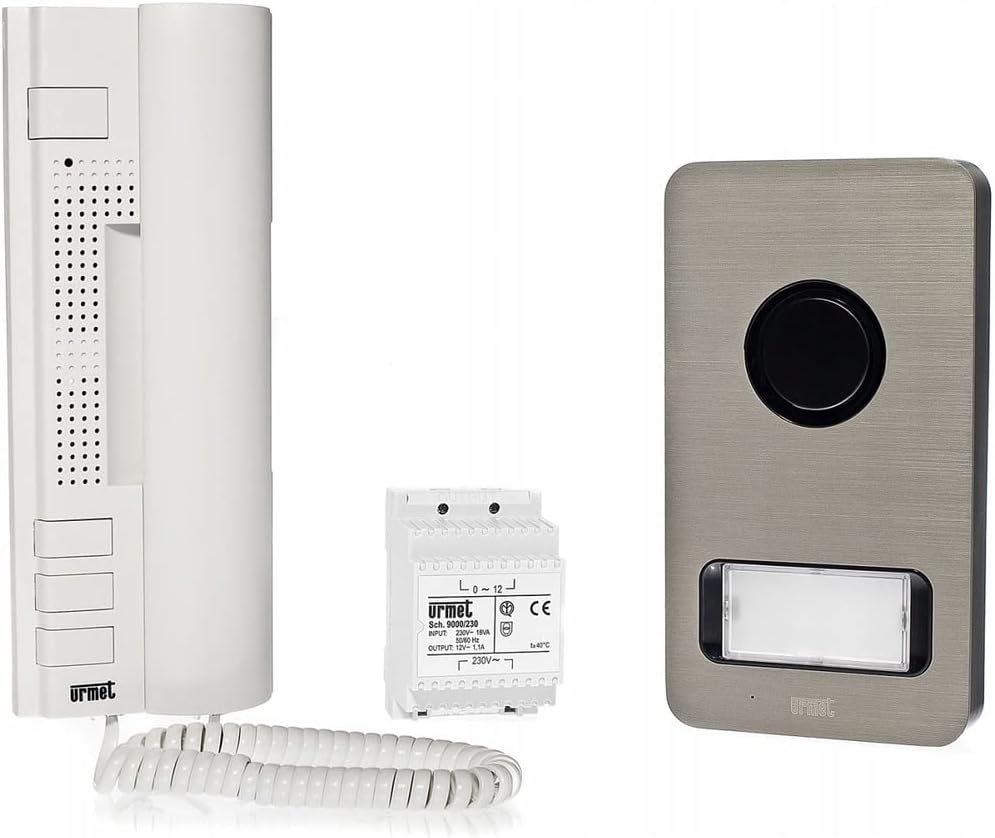
Image: The Urmet 1122/31 Kit Audio 2F Mono components displayed outside their packaging, showing the outdoor call panel, indoor intercom unit, and power supply unit.
Setup and Installation
1. Wiring Diagram
The Urmet 1122/31 system operates on a 2-wire connection. Refer to the detailed wiring diagram provided in the separate installation guide or the safety information PDF for precise connection points. Ensure the system power supply (12V AC) and network power supply (230Vac 50Hz) are correctly connected.
2. Mounting the Outdoor Call Panel (MIKRA)
- Choose a suitable location near the entrance, protected from direct heavy rain if possible, at an accessible height.
- Mark drilling points using the panel as a template.
- Drill holes and insert wall plugs.
- Route the 2-wire cable and any additional gate control wires through the designated opening.
- Connect the wires to the terminals on the back of the call panel according to the wiring diagram.
- Secure the call panel to the wall using the provided screws.
- Insert the name tag into its slot.

Image: The Urmet 1134 indoor intercom unit (left) and the MIKRA outdoor call panel (right), showing their relative sizes and design.
3. Mounting the Indoor Intercom Unit (UTOPIA 1134)
- Select an indoor location for the intercom unit, typically near the main entrance or in a central area.
- Mark drilling points and drill holes.
- Route the 2-wire cable from the outdoor panel and the power supply cable to the intercom unit.
- Connect the wires to the terminals on the back of the intercom unit as per the wiring diagram.
- Secure the intercom unit to the wall.

Image: Close-up of the Urmet 1134 indoor intercom unit, highlighting the handset, speaker, microphone, and control buttons.
4. Parallel Connection (Optional)
Up to 4 UTOPIA 1134 intercom units can be connected in parallel. Refer to the specific wiring instructions for parallel connections in the full installation manual to ensure correct setup.
Operating Instructions
1. Answering a Call
- When a visitor presses the call button on the outdoor panel, the indoor intercom unit will ring.
- Lift the handset of the indoor intercom unit to establish two-way audio communication with the visitor.
2. Opening the Door/Gate
- During a call, press the designated door/gate release button on the indoor intercom unit. This will activate the electric lock or gate opener connected to the system.
3. Second Gate Opener Function
- The UTOPIA 1134 intercom unit includes a supplementary button that activates an external relay contact for a second automatic gate opener.
- Press this supplementary button to open the second gate, provided it has been correctly wired during installation.
4. Adjusting Call Volume and Mute
- The indoor intercom unit features controls for adjusting the call volume. Locate the volume control (typically a slider or rotary knob) on the side or bottom of the unit.
- A 'Mute' function is also available to temporarily silence incoming calls. Activate or deactivate the mute function using the dedicated button or switch.
5. Selecting Call Melodies
- The indoor intercom unit is equipped with jumpers that allow selection between two available call melodies.
- To change the melody, refer to the specific instructions in the full installation manual regarding jumper settings. This typically requires opening the intercom unit.
Maintenance
1. Cleaning
- Clean the outdoor call panel and indoor intercom unit surfaces with a soft, damp cloth.
- Do not use abrasive cleaners, solvents, or harsh chemicals, as these can damage the finish.
- Ensure no liquid enters the internal components.
2. General Care
- Regularly check for any loose connections or visible damage to the cables and units.
- Ensure the name tag on the outdoor panel is clean and legible.
- If the outdoor unit is exposed to harsh weather, consider additional protective measures if not already adequately shielded.
Troubleshooting
If you encounter issues with your Urmet 1122/31 intercom kit, refer to the following common problems and solutions:
| Problem | Possible Cause | Solution |
|---|---|---|
| No sound from indoor unit when call button is pressed. |
|
|
| Door/gate does not open when button is pressed. |
|
|
| Poor audio quality (static, low volume). |
|
|
For complex issues or if troubleshooting steps do not resolve the problem, it is recommended to contact a qualified technician or Urmet customer support.
Specifications
| Feature | Detail |
|---|---|
| Brand | Urmet |
| Model Number | 1122/31 |
| Color | White |
| Phone Type | Wired |
| Material | Aluminum |
| Power Source | Wired |
| System Power Supply | 12V AC |
| Network Power Supply | 230Vac 50Hz |
| Call Device Type | Single Keypad |
| Item Dimensions (LxWxH) | 39 x 33 x 10 cm |
| Outdoor Call Panel Dimensions (HxWxD) | 185 x 99 x 22 mm |
| Name Tag Dimensions (HxW) | 26 x 55 mm |
| Response System Type | Digital |
| Compatible Devices | Intercom Systems |
| Multi-line Operation | Yes |
| Manufacturer | Urmet France |
Warranty and Support
Urmet products are designed for reliability and durability. For information regarding warranty coverage, please refer to the warranty card included with your product or visit the official Urmet website.
Spare parts for this product are available for a period of 7 years within the EU, ensuring long-term support and serviceability.
For technical assistance, installation queries, or troubleshooting beyond the scope of this manual, please contact Urmet customer support or a certified Urmet installer.


