
Introduction
This manual provides comprehensive instructions for the setup, operation, maintenance, and troubleshooting of your Proscan CRK83X PSVR82 TV Remote Control. This remote is designed to work seamlessly with various Proscan TV and VCR models, offering a direct replacement or compatible control solution.
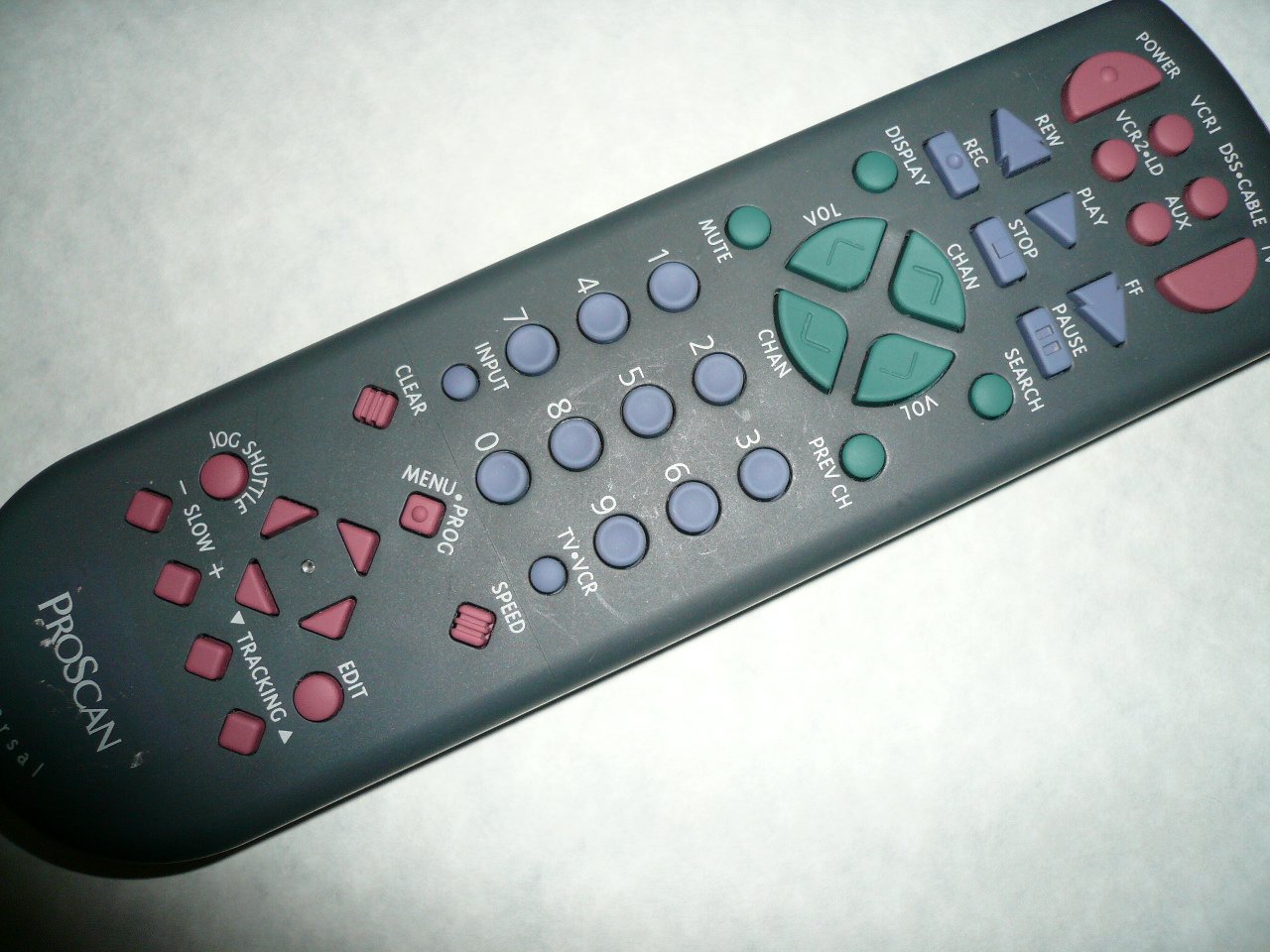
An image showing the Proscan CRK83X PSVR82 TV Remote Control, highlighting its ergonomic design and button layout. The remote is dark gray with purple and teal buttons, clearly labeled for various functions.
Setup
1. Battery Installation
- Locate the battery compartment cover on the back of the remote control.
- Slide the cover downwards or press the latch to open it.
- Insert two (2) AAA batteries (not included), ensuring the positive (+) and negative (-) terminals align correctly with the markings inside the compartment.
- Replace the battery compartment cover by sliding it back into place until it clicks securely.
2. Initial Use
The Proscan CRK83X PSVR82 remote control is typically pre-programmed for compatible Proscan TV and VCR models. No complex programming steps are usually required for initial use with supported devices. Simply point the remote at your device and press the desired function button.
This remote is compatible with a wide range of models, including but not limited to: P5VR74, PAVR57, PCVR72, PRVR71, PSDR72, PSDR73, PSNKVSR72, PSNPSVR57, PSNPSVR65, PSNPSVR70, PSNPSVR71, PSNPSVR72, PSNPSVR73, PSNPSVR74, PSNPSVRR73, PSNR65, PSNVR74, PSRV65, PSRV71, PSRV72, PSRV74, PSRVR65, PSRVR71, PSUR70, PSUR72, PSV174, PSV65, PSV71, PSV72, PSVDR73, PSVER72, PSVH57, PSVP71, PSVR22, PSVR27, PSVR57, PSVR61, PSVR62, PSVR65, PSVR72L, PSVR72VCR, PSVR75, PSVR79, PSVR83, PSVT73, PSVV73, PSZR65, PSZR71, PSZR73, PVSR73, R65, RCU800, RSVR73, SPVR65, SSVR62, VR653HF, VR730, VR730HF.
Operating Instructions
Familiarize yourself with the buttons and their functions for optimal control of your television and VCR.
| Button Name | Function |
|---|---|
| POWER | Turns the connected device (TV/VCR) on or off. |
| VCR1, DSS/CABLE, VCR2/LD, AUX | Selects the input source for the television or VCR. |
| MUTE | Mutes or unmutes the audio output. |
| VOL +/- | Adjusts the volume level up or down. |
| CHAN +/- | Changes the channel up or down. |
| PREV CH | Switches to the previously viewed channel. |
| DISPLAY | Displays on-screen information such as channel number or time. |
| REC | Initiates recording on the VCR. |
| REW | Rewinds the tape during VCR playback. |
| PLAY | Starts playback of a tape or disc. |
| FF | Fast forwards the tape during VCR playback. |
| STOP | Stops playback or recording. |
| PAUSE | Pauses playback or recording. |
| SEARCH | Activates search function, typically for VCR content. |
| Number Pad (0-9) | Directly enters channel numbers or menu selections. |
| INPUT | Cycles through available input sources. |
| CLEAR | Clears entered numbers or menu selections. |
| MENU / PROG | Accesses the on-screen menu or programming functions. |
| TV-VCR | Toggles control between TV and VCR modes. |
| JOG SHUTTLE | Provides frame-by-frame or variable speed control for VCR playback. |
| SLOW +/- | Adjusts slow-motion speed during VCR playback. |
| SPEED | Adjusts playback speed, typically for VCR. |
| TRACKING ▲/▼ | Adjusts the VCR tracking for optimal picture quality. |
| EDIT | Activates editing functions, typically for VCR. |
Maintenance
Cleaning the Remote
- Wipe the remote control with a soft, dry cloth.
- For stubborn dirt, slightly dampen the cloth with water or a mild, non-abrasive cleaner. Do not spray cleaner directly onto the remote.
- Avoid using harsh chemicals, solvents, or abrasive cleaning pads, as these can damage the remote's surface or internal components.
Battery Replacement
Replace batteries when the remote's response becomes sluggish or it stops functioning. Refer to the "Battery Installation" section under Setup for detailed instructions.
Always dispose of used batteries responsibly according to local regulations.
Troubleshooting
| Problem | Possible Cause / Solution |
|---|---|
| Remote is not working. |
|
| Remote works intermittently. |
|
| Certain buttons do not respond. |
|
Specifications
- Brand: PROSCAN
- Model: CRK83X PSVR82
- Manufacturer: Proscan
- Compatible Devices: Television (and various Proscan VCR models as listed in Setup section)
- Connectivity Technology: Infrared
- Controller Type: Button Control
- Special Feature: Ergonomic design
- ASIN: B00P82T2LS
- Date First Available: November 4, 2014
Warranty and Support
Specific warranty information for the Proscan CRK83X PSVR82 TV Remote Control is not provided in this manual. Please refer to the product packaging or contact your retailer for details regarding warranty coverage.
For further assistance or technical support, please contact the manufacturer or your point of purchase. No specific support contact details are available in this document.