
Introduction
The TDK Life on Record EB760 In-Ear Headphones are designed to deliver rich acoustic sound with enhanced bass. Featuring durable aluminum housing and noise isolation tips, these headphones are built for everyday use and provide a comfortable listening experience by minimizing external interference.
Key Features:
- Rich acoustic sound production for intended audio reproduction.
- Aluminum housing for strength and durability.
- Three sizes (S, M, L) of noise isolation ear tips for a comfortable and secure fit.
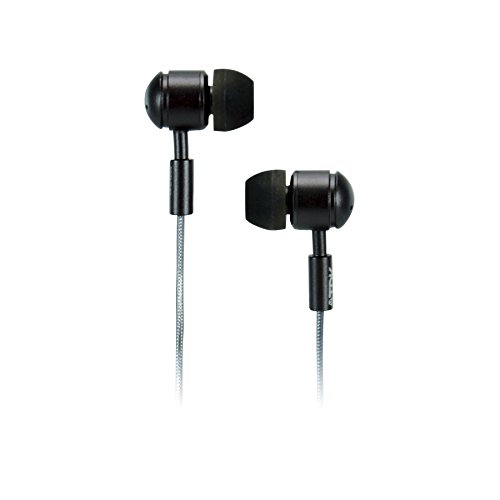
This image displays the TDK Life on Record EB760 In-Ear Headphones. The headphones feature a gunmetal finish on their aluminum housing, with black ear tips and a black cable. The design emphasizes their compact and durable construction.
Package Contents
Verify that all items are present in the package:
- TDK Life on Record EB760 In-Ear Headphones
- Noise Isolation Ear Tips (Small, Medium, Large)
- Storage Pouch
Setup
1. Selecting Ear Tips
Choose the ear tip size (Small, Medium, or Large) that provides the most comfortable and secure fit in your ear canal. A proper seal is crucial for optimal sound quality and noise isolation.
2. Inserting the Earphones
Gently insert each earphone into the corresponding ear. Adjust the position until a comfortable and snug fit is achieved. The cable should hang freely without tension.
3. Connecting to an Audio Device
Plug the 3.5mm audio jack of the headphones into the headphone port of your audio device (e.g., smartphone, tablet, MP3 player, computer). Ensure the connection is firm.
Operating Instructions
Audio Playback
Once connected to your audio device, begin playback of your desired audio content. The sound will be routed through the EB760 headphones.
Volume Control
Adjust the audio volume directly from your connected audio device. The EB760 headphones do not feature inline volume controls.
Maintenance
Cleaning the Ear Tips
Periodically remove the ear tips and clean them with a soft, damp cloth. Ensure they are completely dry before reattaching them to the earphones. Do not use harsh chemicals or abrasive cleaners.
Cleaning the Earphones and Cable
Wipe the earphone housing and cable with a dry, soft cloth to remove dust and debris. Avoid exposing the headphones to excessive moisture.
Storage
When not in use, store the EB760 headphones in the included storage pouch to protect them from dust, dirt, and tangling. Avoid wrapping the cable too tightly.
Troubleshooting
| Problem | Possible Cause | Solution |
|---|---|---|
| No sound or low volume | Headphone jack not fully inserted; device volume too low; audio source issue. | Ensure the 3.5mm jack is fully inserted. Increase volume on your audio device. Test with a different audio source or device. |
| Poor sound quality (muffled, distorted) | Ear tips not forming a proper seal; dirty ear tips; damaged cable. | Try different ear tip sizes for a better fit. Clean the ear tips. Inspect the cable for damage. |
| Discomfort or earphones falling out | Incorrect ear tip size. | Experiment with the different ear tip sizes (S, M, L) to find the most comfortable and secure fit. |
Specifications
| Feature | Detail |
|---|---|
| Brand | TDK |
| Model Number | EB760 |
| Ear Placement | In Ear |
| Form Factor | In Ear |
| Noise Control | Sound Isolation |
| Connectivity Technology | Wired |
| Enclosure Material | Aluminum |
| Color | Gunmetal |
| UPC | 020356620936 |
Warranty and Support
For information regarding product warranty, please refer to the warranty card included with your purchase or visit the official TDK website. For technical support or further assistance, please contact TDK customer service through their official support channels.

