
Crimestopper CA-5025
Crimestopper CA-5025 Parking Assist System User Manual
Front and Rear Parking Assist System with Windshield Mounted LCD Display
1. Introduction
This manual provides comprehensive instructions for the installation, operation, and maintenance of your Crimestopper CA-5025 Front and Rear Parking Assist System. This system is designed to enhance parking safety by providing audible and visual alerts to obstacles in front of and behind your vehicle.
Please read this manual thoroughly before installation and use to ensure proper function and to prevent damage to the system or your vehicle.
2. Product Features
- Front and Rear Parking Assist System for comprehensive coverage.
- Windshield Mounted LCD Display for clear visual distance indication.
- Equipped with 8 Ultra-Sonic Sensors for accurate obstacle detection.
- Sensors can be painted to match your vehicle's bumper color for a seamless look.
- Includes a Hole Saw Bit for precise sensor installation.
3. Package Contents
Verify that all components are present before beginning installation:
- CA-5025 Control Unit
- Windshield Mounted LCD Display
- 8 Ultra-Sonic Parking Sensors (4 front, 4 rear)
- Sensor Cables
- Power Cable
- Hole Saw Bit for sensor installation
- Mounting Hardware and Cable Ties
- User Manual (this document)
4. Setup and Installation
Installation of the Crimestopper CA-5025 system requires automotive electrical and mechanical knowledge. If you are not comfortable performing this installation, it is recommended to seek professional assistance.
4.1 Sensor Placement
The system includes 8 ultrasonic sensors. Four sensors are designated for the front bumper and four for the rear bumper. Ensure sensors are mounted at an appropriate height and evenly spaced for optimal detection.
Note: Sensors can be painted to match your vehicle's bumper color. Use thin coats of automotive paint to avoid affecting sensor performance.
4.2 Wiring Diagram Overview
Connect the sensors to the main control unit according to the provided wiring diagram (not included in this text, refer to physical manual). The control unit requires power and ground connections, typically from the vehicle's reverse light circuit for rear sensors and an ignition-switched power source for front sensors.
4.3 LCD Display Mounting
The LCD display is designed to be mounted on the windshield. Choose a location that provides clear visibility to the driver without obstructing the view of the road. Use the adhesive pad or suction cup provided for secure mounting.
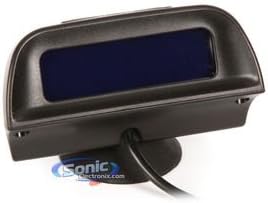
Image: Front view of the Crimestopper CA-5025 Windshield Mounted LCD Display unit. This display provides visual alerts for parking assistance.

Image: Side view of the Crimestopper CA-5025 Windshield Mounted LCD Display unit, showing the attached power/signal cable. This cable connects the display to the main control unit.
5. Operating Instructions
Once installed, the CA-5025 system operates automatically to assist with parking maneuvers.
5.1 Front Sensor Operation
When the vehicle is moving forward at low speeds (e.g., during parking), the front sensors will activate. The LCD display will show the distance to obstacles, and an audible alert will sound, increasing in frequency as the vehicle approaches an object.
5.2 Rear Sensor Operation
When the vehicle is shifted into reverse, the rear sensors will automatically activate. The LCD display will show the distance to obstacles behind the vehicle, and an audible alert will sound, increasing in frequency as the vehicle approaches an object.
5.3 Display Indications
The LCD display provides a visual representation of the distance to obstacles, typically using bars or numerical values, along with an indication of which side (left/center/right) the obstacle is detected on.
6. Maintenance
The Crimestopper CA-5025 system requires minimal maintenance to ensure optimal performance.
- Sensor Cleaning: Regularly clean the ultrasonic sensors on your bumpers. Dirt, mud, snow, or ice can obstruct the sensors and affect their performance. Use a soft cloth and mild soap and water. Do not use abrasive cleaners.
- Cable Inspection: Periodically check all wiring connections for signs of wear, corrosion, or damage. Ensure all cables are securely fastened and not exposed to excessive heat or sharp edges.
- Display Cleaning: Clean the LCD display with a soft, dry cloth. Avoid spraying cleaning solutions directly onto the display.
7. Troubleshooting
If you experience issues with your CA-5025 system, refer to the following common troubleshooting steps:
| Problem | Possible Cause | Solution |
|---|---|---|
| System not powering on. | No power supply; loose connection; blown fuse. | Check power cable connections. Verify vehicle's fuse for the circuit. Ensure proper grounding. |
| Sensors not detecting obstacles. | Sensors are dirty or obstructed; faulty sensor; incorrect wiring. | Clean sensors thoroughly. Check sensor cable connections to the control unit. Test individual sensors if possible. |
| False alarms or inconsistent readings. | Sensor obstruction (dirt, water); sensor angle incorrect; electromagnetic interference. | Clean sensors. Verify sensor mounting angle. Ensure no large metal objects or strong electromagnetic sources are near sensors. |
| LCD display not showing information. | Display cable loose; faulty display. | Check the connection between the LCD display and the control unit. |
If these steps do not resolve the issue, please contact Crimestopper customer support.
8. Specifications
| Attribute | Detail |
|---|---|
| Model Number | CA-5025 |
| Brand | Crimestopper |
| System Type | Front and Rear Parking Assist System |
| Display Type | Windshield Mounted LCD Display |
| Number of Sensors | 8 Ultra-Sonic Sensors |
| Sensor Paintability | Yes, sensors can be painted |
| Included Tools | Hole Saw Bit |
| Item Weight | 2.04 kg |
| Fit Type | Vehicle Specific Fit |
| UPC | 048097109671 |
9. Warranty and Support
For warranty information and technical support regarding your Crimestopper CA-5025 Parking Assist System, please refer to the warranty card included with your product or visit the official Crimestopper website. Keep your purchase receipt as proof of purchase for warranty claims.
Crimestopper Contact Information:
- Website: www.crimestopper.com (Example link, actual link may vary)
- Customer Service: Refer to website for contact numbers or email.