
Zinc NITRO2
Zinc Nitro Scooter User Manual
Model: NITRO2
1. Product Overview
The Zinc Nitro Scooter is designed for exciting and dynamic riding experiences. It features a durable aluminum construction and incorporates interactive elements to enhance play.
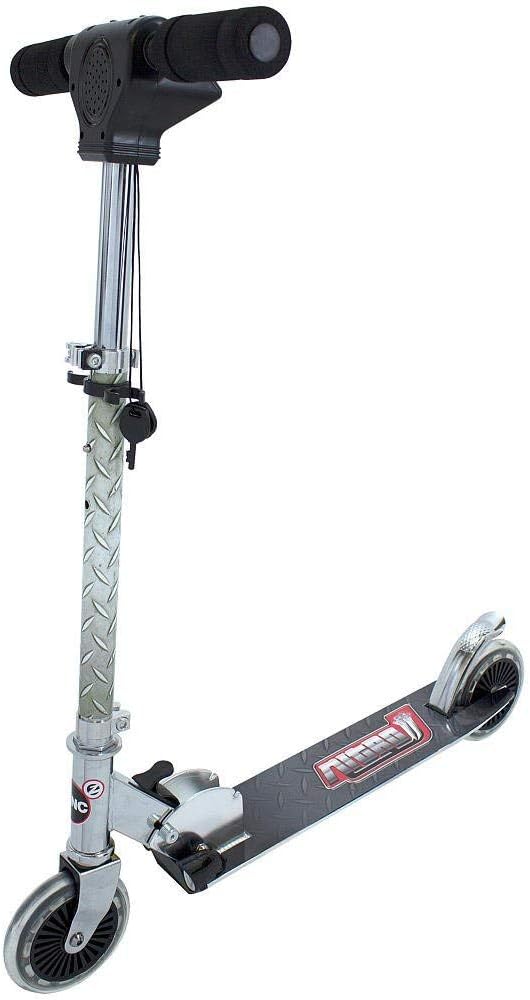
Figure 1: Main view of the Zinc Nitro Scooter, showcasing its sleek design and robust build.
Key Features:
- Front and Rear Lights: For enhanced visibility and exciting effects, especially in low-light conditions.
- Rear Screeching Brakes: Provides quick and effective stopping power with an engaging sound effect.
- Accelerating Engine Sounds: Realistic engine sounds activated by twisting the throttle, making riding more immersive.
- Durable Construction: Made from aluminum for lightweight strength.
- Foldable Design: Allows for easy storage and transport.
- Big Wheels: Equipped with awesome big wheels for a smooth ride.
2. Safety Information
Always prioritize safety when operating the Zinc Nitro Scooter. Failure to follow these guidelines may result in injury.
General Safety Guidelines:
- Age Recommendation: Suitable for ages 5 to 9 years.
- Weight Limit: Do not exceed the maximum weight limit of 45 pounds (approximately 20.4 kg).
- Protective Gear: Always wear a helmet, knee pads, elbow pads, and wrist guards when riding.
- Supervision: Adult supervision is recommended, especially for younger riders.
- Riding Surface: Ride on smooth, dry, paved surfaces away from traffic. Avoid uneven terrain, sand, gravel, or wet surfaces.
- Braking: Familiarize yourself with the braking system before riding at speed.
- Maintenance: Regularly inspect the scooter for loose parts, damage, or wear before each use.
- Battery Safety: The scooter requires 3 x AAA batteries for lights and sounds. Ensure correct battery installation and replace them when needed. Do not mix old and new batteries or different types of batteries.
3. Setup and Assembly
The Zinc Nitro Scooter comes largely pre-assembled. Follow these steps to prepare it for use.
Unfolding the Scooter:
- Locate the folding mechanism near the base of the handlebar stem.
- Carefully release the locking mechanism.
- Lift the handlebar stem until it clicks securely into the upright position. Ensure all locking mechanisms are fully engaged before riding.
Handlebar Adjustment:
The handlebar height is adjustable to suit different rider heights.
- Open the quick-release clamp on the handlebar stem.
- Adjust the handlebar to a comfortable height, typically around waist level for the rider.
- Securely close the quick-release clamp. Ensure the handlebar is firmly locked in place and does not wobble.
Battery Installation (for Lights and Sounds):
The scooter requires 3 x AAA batteries for its electronic features.
- Locate the battery compartment, typically on the handlebar unit.
- Using a small screwdriver, open the battery compartment cover.
- Insert 3 new AAA batteries, ensuring correct polarity (+/-).
- Replace the battery compartment cover and secure it with the screw.
4. Operating Instructions
Learn how to safely and effectively operate your Zinc Nitro Scooter.
Starting the Scooter:
- Place one foot firmly on the scooter deck.
- Use your other foot to push off the ground, gaining initial momentum.
- Once moving, place both feet on the deck, one behind the other.
Using Lights and Sounds:
- Front and Rear Lights: The scooter is equipped with lights at the front and rear for visibility. These lights activate when the scooter is in motion or when the electronic features are engaged.
- Engine Sounds: Twist the throttle grip on the handlebar to activate realistic engine acceleration sounds.
- Key Activated Features: Some electronic features, including lights and sounds, are activated by a key mechanism on the handlebar unit. Ensure the key is turned to the "ON" position.

Figure 2: Detail of the front lights, which illuminate for visibility and effect.
Braking:
- The Zinc Nitro Scooter features a rear screeching brake. To engage the brake, gently press your foot down on the rear fender brake located above the rear wheel.
- Apply steady pressure to slow down or stop. The brake will produce a screeching sound for added effect.

Figure 3: View of the rear fender brake, designed for quick stopping.
Demonstration Video:
Video 1: Official demonstration of the Zinc Nitro Scooter, highlighting its key features including lights, engine sounds, and braking system. This video provides a visual guide to operating the scooter.
5. Maintenance
Regular maintenance will ensure the longevity and safe operation of your Zinc Nitro Scooter.
- Cleaning: Wipe the scooter clean with a damp cloth after each use. Avoid using harsh chemicals or abrasive cleaners.
- Check Fasteners: Regularly check all nuts, bolts, and screws to ensure they are tight. It is crucial to tighten all components regularly, especially after initial use and before each ride.
- Wheel Inspection: Inspect the wheels for wear and tear. Replace worn wheels promptly.
- Bearing Lubrication: Periodically check and lubricate wheel bearings if necessary to ensure smooth rolling.
- Brake Functionality: Test the brake before each ride to ensure it is functioning correctly and provides adequate stopping power.
- Storage: Store the scooter in a dry, cool place away from direct sunlight and moisture.
6. Troubleshooting
This section addresses common issues you might encounter with your Zinc Nitro Scooter.
| Problem | Possible Cause | Solution |
|---|---|---|
| Lights or sounds not working. |
|
|
| Scooter feels wobbly or loose. |
|
|
| Brake is not effective. |
|
|
7. Specifications
| Attribute | Detail |
|---|---|
| Brand | Zinc |
| Model Name | zinc Nitro Scooter |
| Model Number | NITRO2 |
| Color | SILVER |
| Age Range (Description) | Kid (5 - 9 years) |
| Weight Limit | 45 Pounds |
| Product Dimensions (L x W x H) | 23"L x 17.3"W x 34"H |
| Number of Wheels | 2 |
| Handlebar Type | Adjustable |
| Wheel Size | 15 Centimeters |
| Wheel Type | Inline |
| Suspension Type | Front Suspension |
| Brake Style | Front Braking (Note: Product description mentions rear screeching brakes, this might be a discrepancy or a general term for scooter brakes) |
| Material | Aluminum |
| Batteries Required | 3 x AAA batteries |
| Date First Available | October 27, 2014 |
8. Warranty and Support
For detailed warranty information and customer support, please refer to the documentation included with your purchase or visit the official Zinc website. Keep your proof of purchase for any warranty claims.
If you require assistance with troubleshooting or replacement parts not covered in this manual, please contact Zinc customer service directly.
Ask a question about this manual
Ask about setup, troubleshooting, compatibility, parts, safety, or missing instructions. Manuals+ will review the question and use this page’s manual context to help answer it.