
Amphenol PT06A-10-6P(SR)
Amphenol Industrial PT06A-10-6P(SR) Connector User Manual
Model: PT06A-10-6P(SR) | Brand: Amphenol
1. Introduction
This user manual provides comprehensive instructions for the proper installation, operation, and maintenance of the Amphenol Industrial PT06A-10-6P(SR) metal circular connector. This connector is designed for robust and reliable electrical connections in industrial environments.
The PT06A-10-6P(SR) is a straight plug with a cable clamp, featuring a size 10 shell and six #20 solder pin contacts. Its durable construction ensures performance in demanding applications.
2. Product Overview
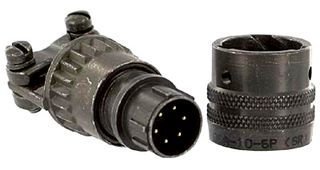
The image displays the Amphenol Industrial PT06A-10-6P(SR) circular connector. On the left is the straight plug component, featuring the six solder pin contacts and the integrated cable clamp with two securing screws. On the right is the mating receptacle or protective cap, designed to connect with the plug. Both components exhibit a robust, dark-colored metal construction, indicative of their industrial application.
Key Features:
- Type: Metal Circular Connector, Straight Plug
- Model: PT06A-10-6P(SR)
- Shell Size: 10
- Contact Configuration: 6 positions, #20 size
- Contact Type: Solder Pin
- Features: Integrated Cable Clamp
- Application: Industrial electrical connections
3. Setup and Installation
Proper installation is crucial for the reliable performance of the connector. Ensure all safety precautions are followed before beginning installation.
3.1. Safety Precautions
- Always disconnect power from the circuit before working with electrical connectors.
- Wear appropriate personal protective equipment (PPE), such as safety glasses and gloves.
- Ensure the work area is clean, dry, and well-lit.
- Refer to local electrical codes and standards for specific wiring requirements.
3.2. Wiring Instructions
- Prepare Cable: Strip the outer jacket of the cable to the appropriate length, exposing the individual insulated wires. Ensure the stripped length allows for proper wire termination without excess exposure.
- Prepare Wires: Strip approximately 3-4 mm of insulation from the end of each wire. Twist stranded wires tightly to prevent fraying.
- Solder Contacts: Insert each prepared wire into its corresponding solder cup on the connector pins. Apply heat with a soldering iron and introduce solder to create a strong, reliable electrical and mechanical connection. Ensure no solder bridges between contacts.
- Assemble Cable Clamp: Route the cable through the cable clamp components. Secure the cable clamp around the cable jacket using the provided screws, ensuring a firm grip to prevent strain on the solder connections. Do not overtighten.
- Final Assembly: Ensure all components are properly seated and secured. The connector should be ready for mating with its corresponding receptacle.
Note: For optimal performance, use appropriate soldering techniques and tools. Consult a qualified electrician if unsure about any step.
4. Operating the Connector
The Amphenol PT06A-10-6P(SR) connector is designed for simple and secure mating.
4.1. Mating Procedure
- Align: Align the keyway of the PT06A-10-6P(SR) plug with the corresponding keyway on the receptacle.
- Insert: Gently push the plug straight into the receptacle until the contacts engage.
- Secure: Rotate the coupling nut on the plug clockwise until it is fully tightened. This secures the connection and provides environmental sealing. Do not overtighten.
4.2. Unmating Procedure
- Disconnect Power: Always ensure power is disconnected from the circuit before unmating.
- Unscrew: Rotate the coupling nut on the plug counter-clockwise until it is loose.
- Separate: Pull the plug straight out from the receptacle. Avoid twisting or prying.
5. Maintenance
Regular maintenance ensures the longevity and optimal performance of your Amphenol connector.
5.1. Cleaning
- Keep connector contacts clean and free from dirt, dust, and moisture.
- Use a clean, dry, lint-free cloth to wipe the exterior of the connector.
- For contacts, use a specialized electrical contact cleaner if necessary, ensuring it is non-residue and safe for the materials.
- Ensure the connector is completely dry before re-mating or applying power.
5.2. Inspection
- Periodically inspect the connector for signs of wear, damage, or corrosion.
- Check the cable clamp for tightness and ensure the cable is securely held.
- Verify that the coupling nut rotates smoothly and provides a secure connection.
- If any damage is observed, replace the connector immediately to prevent electrical hazards or signal degradation.
6. Troubleshooting
This section provides guidance for common issues encountered with the connector.
| Problem | Possible Cause | Solution |
|---|---|---|
| Poor electrical connection / Intermittent signal |
|
|
| Connector difficult to mate/unmate |
|
|
| Cable pulling out of connector |
|
|
If the problem persists after attempting these solutions, contact Amphenol Industrial technical support or a qualified technician.
7. Specifications
| Parameter | Value |
|---|---|
| Model Number | PT06A-10-6P(SR) |
| Brand | Amphenol Industrial |
| Connector Type | Circular, Straight Plug |
| Shell Size | 10 |
| Number of Contacts | 6 |
| Contact Size | #20 |
| Contact Type | Solder Pin |
| Features | Integrated Cable Clamp |
| Material | Metal |
| ASIN | B00OVEVWA8 |
| UPC | 013227183739 |
| Item Weight | 0.01 ounces |
8. Warranty and Support
8.1. Warranty Information
Amphenol Industrial products are manufactured to high quality standards. For specific warranty terms and conditions, please refer to the official Amphenol Industrial website or contact their customer service. Warranty typically covers defects in materials and workmanship under normal use.
8.2. Technical Support
For technical assistance, product inquiries, or support regarding the PT06A-10-6P(SR) connector, please contact Amphenol Industrial directly. Their official website usually provides contact details for technical support and sales.
You may also find additional resources, datasheets, and application notes on the Amphenol Industrial website.
Related documentsPT06A-10-6P(SR)


Ask a question about this manual
Ask about setup, troubleshooting, compatibility, parts, safety, or missing instructions. Manuals+ will review the question and use this page’s manual context to help answer it.