1. Introduction
Thank you for choosing the AGPTEK Hands-Free Call Center Noise Cancelling Corded Monaural Headset. This manual provides essential information for setting up, operating, and maintaining your headset to ensure optimal performance and longevity. Designed for desk telephones, this headset offers clear communication and comfortable wear for extended periods.
Key features of your headset include:
- Clear Chat Design: Built-in flexible adjustable microphone for loud and clear voice pickup, reducing unwanted background noise.
- Durability & Wearability: Constructed with a flexible metal hose for positioning accuracy and a helical headphone cable to prevent damage.
- Comfortable to Wear: Features an adjustable headband and fluffy earpads with memory foam for extended comfort. Includes hearing protection technology.
- Easy to Use: Direct connect over-the-head headset, requiring no additional amplifiers or adapters.
- RJ9 Compatibility: Specifically designed for desk telephones with an RJ9 jack. Not compatible with computers.
2. Product Overview
The AGPTEK Monaural Headset consists of the headset unit and an inline control box with an RJ9 crystal head connector.
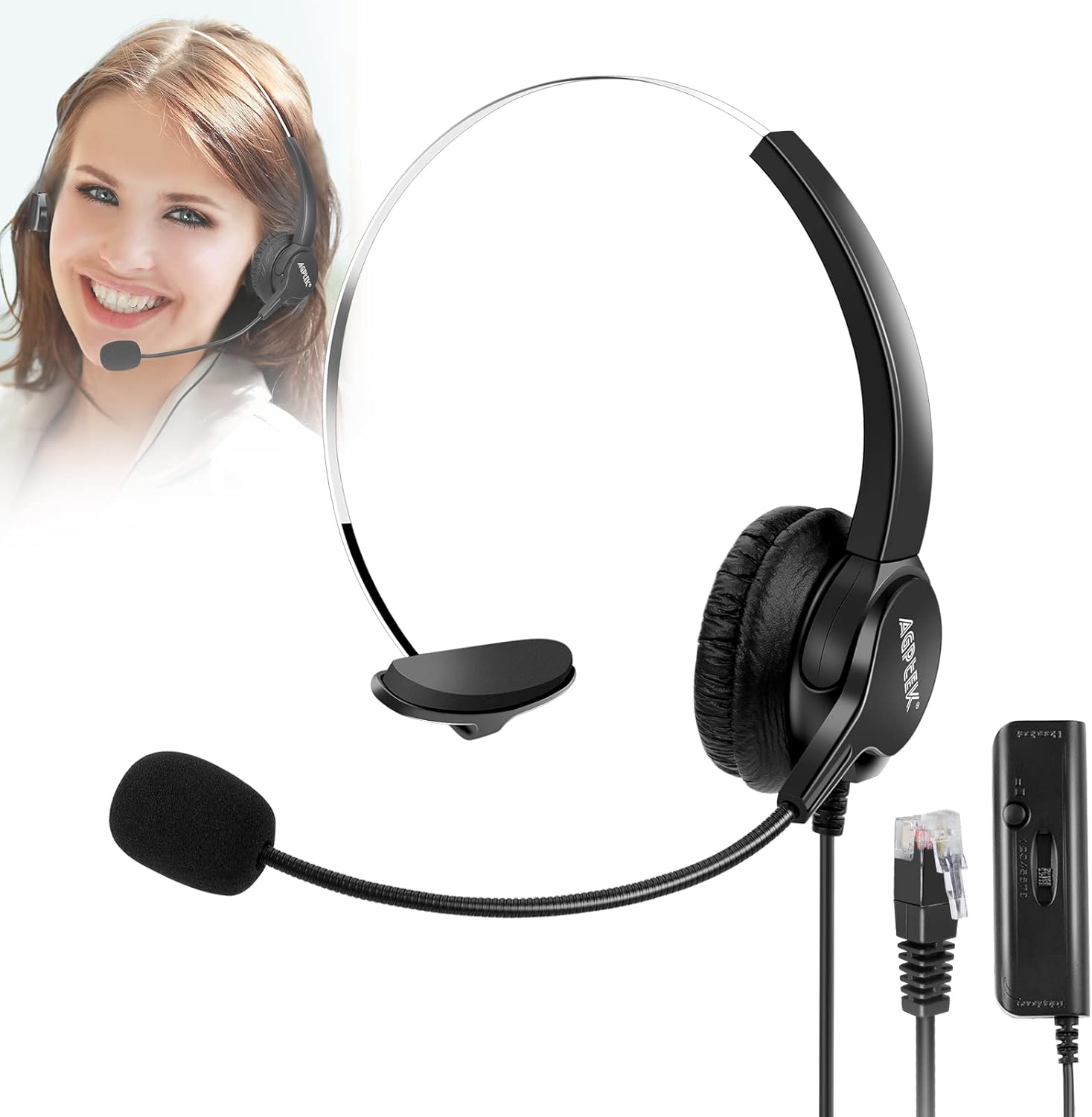
Figure 2.1: AGPTEK Monaural Headset components.
2.1 Headset Features
- Adjustable Headband: The headband can be adjusted to fit various head sizes, ensuring a secure and comfortable fit.
- Soft Ear Pad with Memory Foam: The earpad is designed with memory foam for enhanced comfort during long periods of use.
- 330° Rotatable Microphone: The microphone boom can be rotated 330 degrees, allowing you to position it optimally for voice pickup or move it out of the way when not in use.

Figure 2.2: Detailed features of the headset, including adjustable headband and rotatable microphone.
2.2 Inline Control Box
The inline control box provides convenient access to essential functions:
- Mute Button: Press to mute or unmute the microphone.
- Volume Slider: Adjust the listening volume.
- 8 Channels Switch: This switch allows you to select the correct channel for compatibility with various desk telephone systems.

Figure 2.3: The inline control box with its features.
3. Setup
This headset is designed for direct connection to desk telephones equipped with an RJ9 jack. It is not compatible with computers or mobile phones.
- Connect the Headset: Plug the RJ9 crystal head connector from the inline control box into the headset port (RJ9 jack) on your desk telephone. Ensure it clicks securely into place.
- Select the Correct Channel: The inline control box features an 8-channel switch. Different telephone models may require different channel settings for proper audio and microphone function. Slide the switch through the 8 available channels (1-8) until you find the one that provides clear incoming and outgoing audio.

Figure 3.1: Headset connection to a landline phone.
Video 3.1: Demonstrates the setup and key features of the AGPTEK headset, including microphone flexibility, adjustable headband, memory foam earpads, and the control box functions.
4. Operating Instructions
4.1 Wearing the Headset
Place the headset over your head with the earpad resting comfortably on one ear. Adjust the headband to ensure a snug yet comfortable fit. Position the microphone boom so that the microphone is approximately 1-2 inches from your mouth for optimal voice pickup.

Figure 4.1: Proper wearing and comfort of the headset in a professional setting.
4.2 Using the Microphone
The microphone features noise-cancelling technology to minimize background noise, ensuring clear conversations. The 330° rotatable design allows you to easily adjust the microphone's position or swing it upwards when not speaking.

Figure 4.2: The noise-cancelling microphone in action.
4.3 Inline Control Functions
- Mute: Press the mute button on the inline control box to temporarily disable the microphone. Press it again to unmute.
- Volume Adjustment: Use the volume slider on the inline control box to increase or decrease the listening volume.
Video 4.1: Demonstrates the headset's features, including the flexible microphone, adjustable headband, and the functionality of the inline control box with mute and channel selection.
5. Maintenance
Proper care will extend the life of your AGPTEK headset.
- Cleaning: Wipe the headset and control box with a soft, dry cloth. For the earpads, use a slightly damp cloth if necessary, and allow them to air dry completely before use. Avoid using harsh chemicals or abrasive cleaners.
- Storage: Store the headset in a clean, dry place away from extreme temperatures and direct sunlight.
- Cable Care: Avoid sharp bends or excessive pulling on the cable to prevent internal damage. The helical design of the cable helps prevent tangling.
6. Troubleshooting
| Problem | Possible Cause | Solution |
|---|---|---|
| No sound or distorted sound | Incorrect channel setting; loose connection; telephone compatibility issue. |
|
| Microphone not working | Microphone muted; incorrect channel setting; microphone not positioned correctly. |
|
| Echo or feedback during calls | Incorrect channel setting; volume too high. |
|
If you continue to experience issues after trying these solutions, please refer to the support information in Section 8.
7. Specifications
| Feature | Detail |
|---|---|
| Model Name | language _ tag |
| Connectivity Technology | Wired |
| Included Components | Headset |
| Age Range (Description) | Adult |
| Material | Plastic, Metal |
| Specific Uses For Product | Calling |
| Recommended Uses For Product | Calling |
| Compatible Devices | Telephones |
| Control Type | Voice Control |
| Cable Feature | Retractable |
| Item Weight | 7 Ounces |
| Frequency Range | 20 Hz - 20 KHz |
| Customer Package Type | Standard Packaging |
| Unit Count | 1.0 Count |
| Style | Classic |
| Control Method | Touch |
| Number of Items | 1 |
| Earpiece Shape | On Ear |
| Series Number | 21 |
| UPC | 700697077810 700697068122 757440654361 |
| Global Trade Identification Number | 00700697077810 |
| Manufacturer | AGPtEK |
| Package Dimensions | 7.56 x 5.55 x 1.46 inches |
| Item model number | HA0021H |
| Is Discontinued By Manufacturer | No |
| Material Type | Plastic, Metal |
| Size | Monaural Headset |
| Manufacturer Part Number | HA0021H-MB1 |
| ASIN | B00OUKCSEM |
| Date First Available | October 24, 2014 |
| Brand | AGPTEK |
| Color | Monaural Headset |
| Ear Placement | On Ear |
| Form Factor | On Ear |
| Noise Control | Active Noise Cancellation |
8. Warranty and Support
AGPTEK offers a 30-day return policy for this headset. If you are unsatisfied with the product, you may return it within 30 days of purchase.
For technical support, troubleshooting assistance beyond what is provided in this manual, or warranty inquiries, please contact the seller or AGPTEK customer service directly. Refer to your purchase documentation for specific contact details.


